
Hardware monitoring
Keep track of the physical health of your network devices by continuously monitoring their key hardware components, such as temperature, voltage, fan, and power supplies, using standard and vendor-specific SNMP MIBs.
Site24x7 discovers and polls these sensors from supported devices to provide real-time visibility into device health. This allows network teams to identify overheating, power instability, or cooling failures that could lead to performance degradation or unexpected outages.
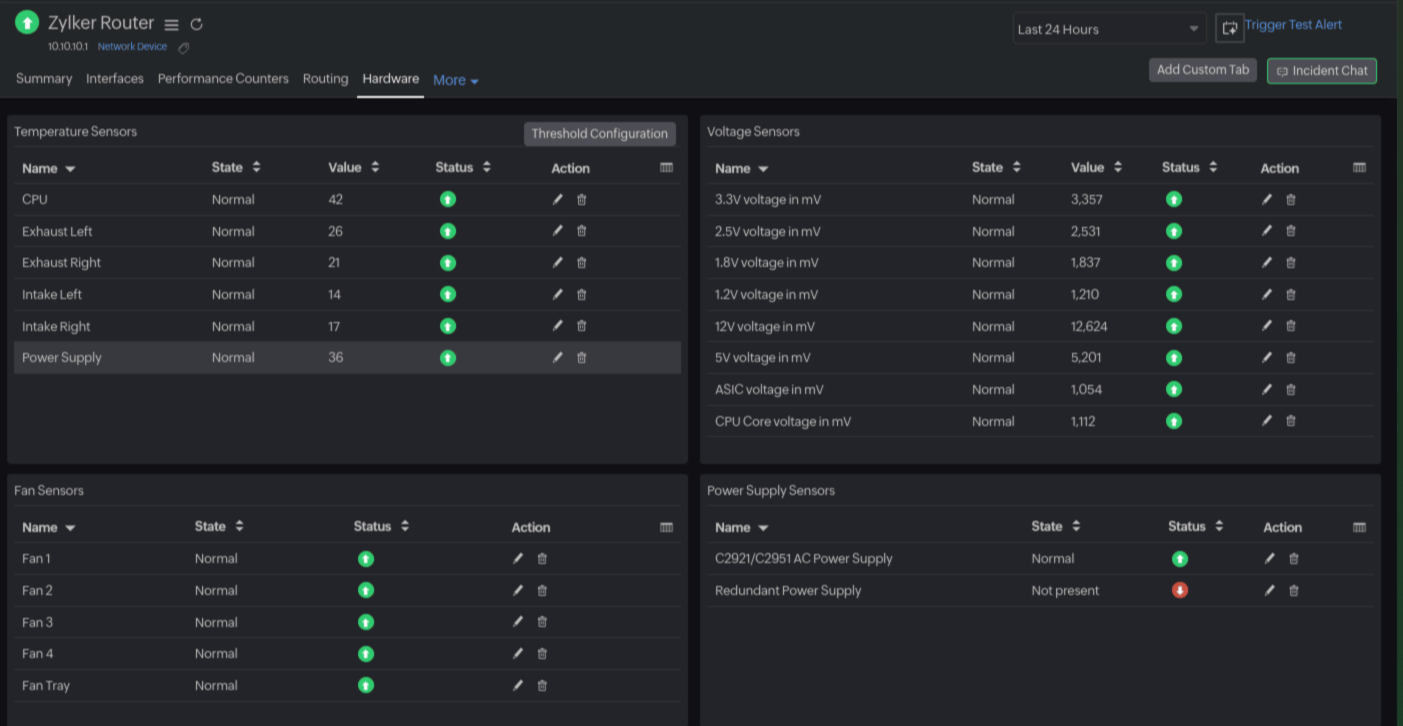
With temperature and voltage sensors, both the current temperature value and the health status of your devices are collected. With fan and power sensors, Site24x7 displays your devices' operational status, helping you detect failures early.
Use cases
Prevent hardware-related outages
Monitor temperature spikes, failing fans, and unstable power supplies before they impact device uptime. Early alerts help you act before a minor issue becomes a critical outage.
Ensure data center and branch device health
Get centralized visibility into the environmental status of routers, switches, firewalls, and appliances across data centers, branch offices, and remote sites.
Faster root cause analysis
When performance issues occur, correlate them with environmental data such as overheating or power faults to pinpoint the root cause faster and reduce mean time to repair.
Support capacity planning and optimization
Use historical temperature and voltage trends to evaluate cooling efficiency, power stability, and plan upgrades for racks, power systems, and device placement.
Meet operational and compliance requirements
Maintain continuous monitoring of hardware health to support internal SLAs and operational best practices for critical network infrastructure.
How it works
Site24x7 uses SNMP to query vendor-specific and standard MIBs exposed by your network devices to discover and monitor environmental sensors.
Once a device is added for monitoring:
- Sensor discovery: Site24x7 automatically detects supported temperature, voltage, fan, and power sensors based on the device type and available MIBs.
- Data collection:
- Temperature and voltage: Current value and health status are polled.
- Fan and power: Operational status is polled.
- Alerting: Threshold breaches or abnormal statuses trigger instant alerts through your configured notification channels.
This approach provides consistent environmental visibility across network devices without manual sensor configuration.
Prerequisites
Before enabling environmental monitoring, ensure the following:
- SNMP enabled on devices: Devices must be configured with SNMPv2c or SNMPv3 and allow polling from Site24x7’s On-Premise Poller.
- Network reachability: The device must be reachable from the Site24x7 On-Premise Poller on the SNMP port (default UDP 161).
- Required permissions: SNMP access should allow reading of sensor and entity OIDs.
- On-Premise Poller version: 6.7.5 or above.
Viewing hardware metrics
To view the hardware metrics:
- Log in to your Site24x7 account.
- Select Network > Network Devices. Then, click the required router.
- Click the Hardware tab to view metrics.
Related articles
-
On this page
- Use cases
- How it works
- Prerequisites
- Viewing hardware metrics