
Kubernetes management actions in Site24x7
Site24x7 provides a set of Kubernetes management actions, including applying configuration updates, scaling replicas, restarting workloads, managing node states, and deploying manifests using YAML deployment actions. These actions eliminate the need to switch to the kubectl command-line tool, making cluster operations simpler, safer, and more accessible.
This document explains the supported resource types, available actions, required permissions, and recommended use cases.
Use cases
Kubernetes management actions streamline operations, rollouts, and maintenance without direct kubectl access. Common use cases include corrective actions and updates.
1. Applying new configurations safely
Use APPLY or REPLACE to update container images, ConfigMaps, or environment variables across workloads without downtime.
2. Restarting workloads after fixing issues
Trigger a RESTART to gracefully restart Pods when they are stuck, unhealthy, or need configuration reloads.
3. Replacing a full resource specification
Use REPLACE when changes are too extensive for a patch, such as a full structural redesign of a Deployment spec. REPLACE completely overwrites the specification; review the YAML carefully before applying.
4. Preparing a Node for maintenance
Cordon the Node to prevent scheduling new Pods, then drain it to safely evict existing workloads. After maintenance, uncordon the Node to resume normal operation.
5. Rolling back a failed rollout
Use ROLLBACK to revert a Deployment, DaemonSet, or StatefulSet to a previously stable revision when a new rollout introduces issues. This operation requires revision history to be available.
Prerequisites
- Ensure the Site24x7 agent is deployed with full access permissions (i.e., read, write, update, and delete).
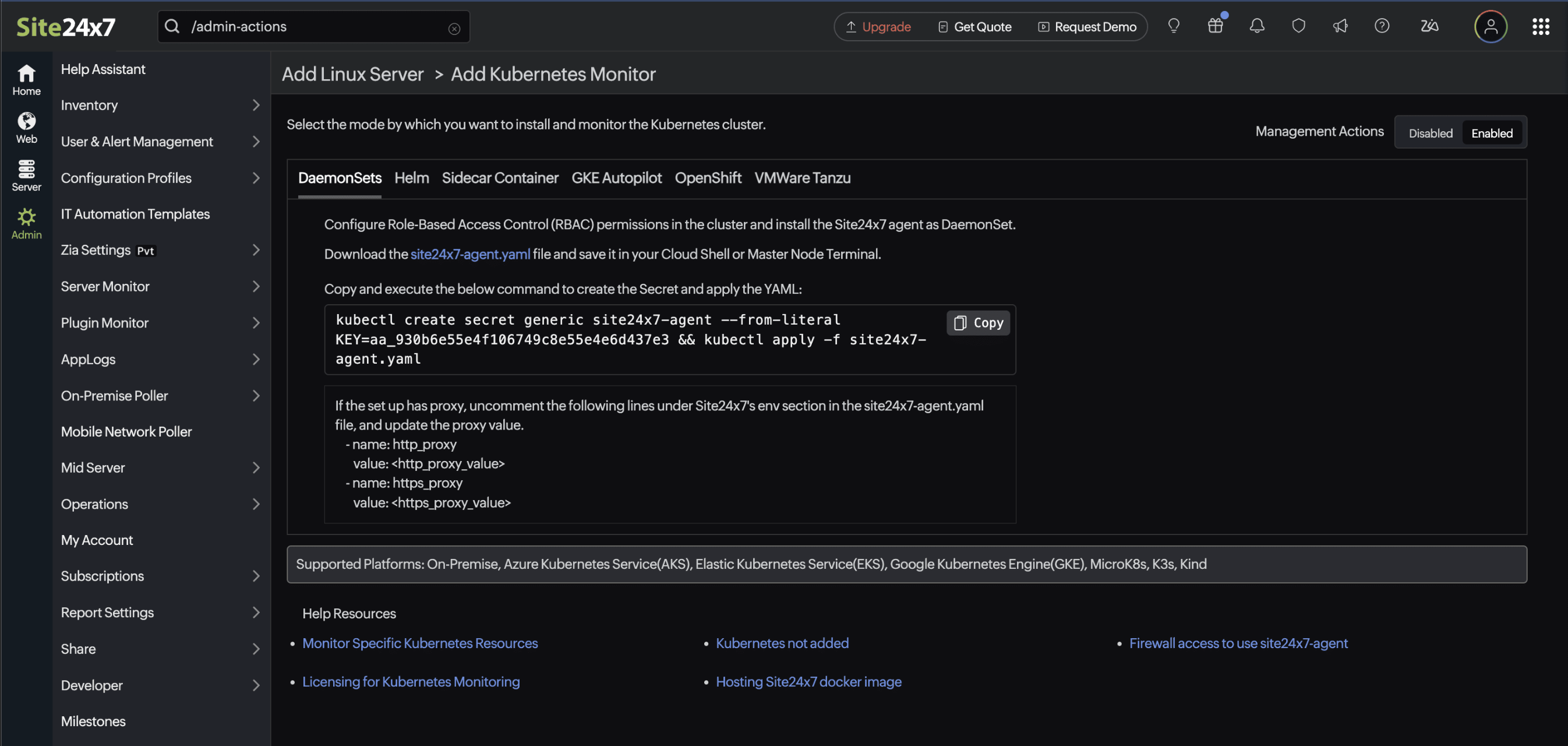
- In the Add Kubernetes Monitor page, toggle the management actions option in the top-right corner to enabled.
Add a Kubernetes monitor
To enable management actions, you must add a Kubernetes monitor with the Management Actions toggle Enabled. Here's how:
- If you are adding a Kubernetes monitor for the first time:
- In the top-right corner of the Add Kubernetes Monitor page, toggle the Management Actions option to Enabled.
- Then, execute the generated installation command to deploy the monitor.
- If you have already added a Kubernetes monitor:
- If you have already deployed the K8s agent with the version 22.0.00 and lower, a reinstallation is required because enabling Management Actions modifies the agent's execution command.
- To do this, follow step one, and re-execute the updated installation command to apply the changes.
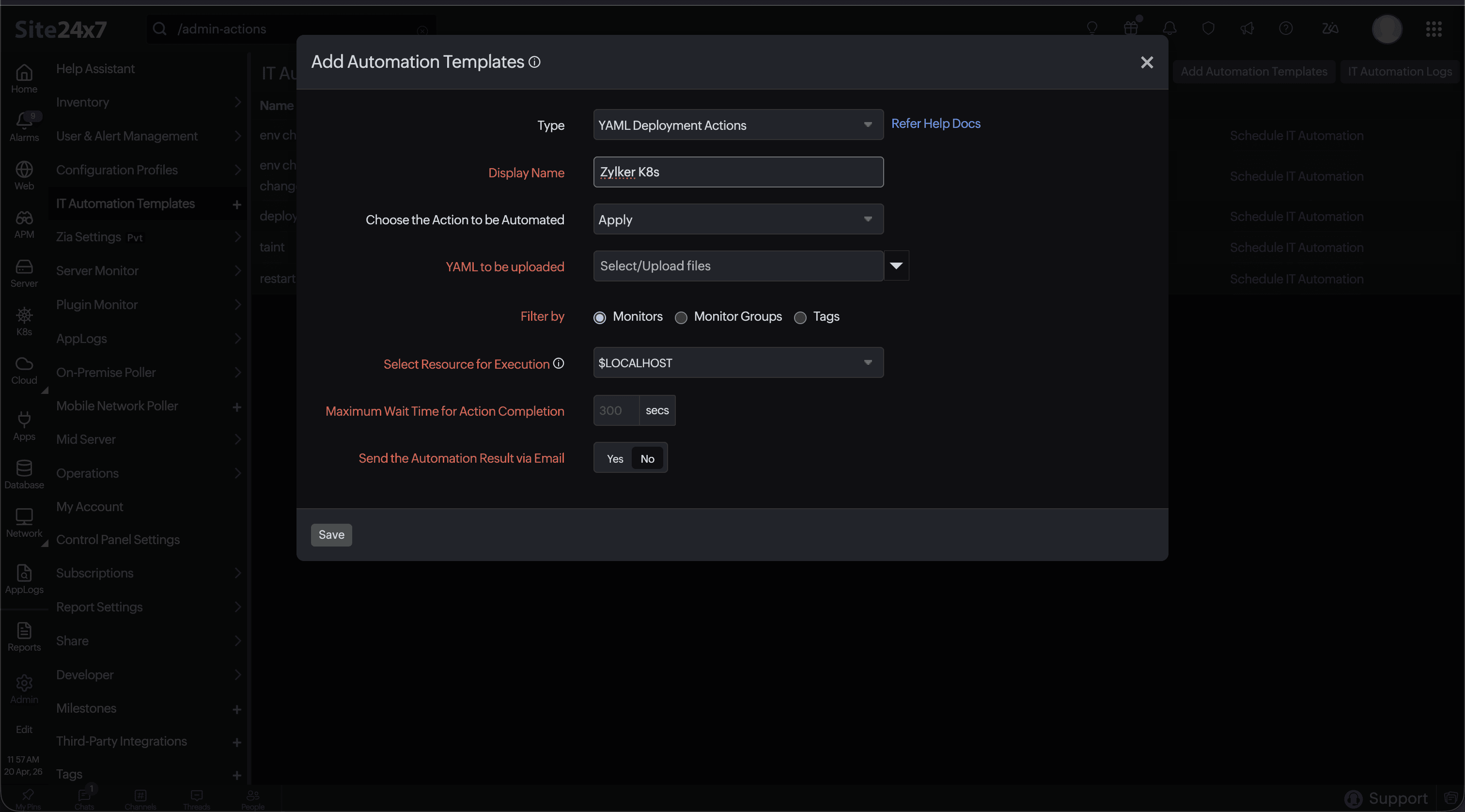
How to add a Kubernetes Automation Template
Add an Automation Template for Kubernetes to configure and schedule management actions.
Supported resource types and actions
The following sections list the actions available for each Kubernetes resource type.
YAML Deployment Actions
YAML Deployment Actions let you apply, create, or replace Kubernetes resources directly using YAML manifests. These actions are available across the following resource types:
- Services
- Deployments
- DaemonSets
- StatefulSets
- Pods
- Jobs
- Nodes
- ReplicaSets
- ControllerRevisions
- Namespaces
- ConfigMaps
- HorizontalPodAutoscalers
- PersistentVolumes
- PersistentVolumeClaims
- Ingresses
- ResourceQuota
If you select YAML Deployment Actions in the Type field, the following actions are available.
| Action | Description |
|---|---|
| APPLY | Apply an updated YAML configuration to an existing resource. Only changed fields are updated. |
| CREATE | Create a new resource from a YAML manifest. |
| REPLACE | Replace the entire resource specification with a new YAML definition. Use with caution as the existing spec is fully overwritten. |
Deployments
| Actions | Description |
|---|---|
| DELETE | Delete the Deployment. |
| RESTART | Perform a rolling restart of all Pods in the Deployment. |
| PAUSE | Pause an ongoing rollout. |
| RESUME | Resume a paused rollout. |
| ROLLBACK | Roll back to a previous Deployment revision. |
| SCALE UP/DOWN | Update the replica count. |
DaemonSets
| Actions | Description |
|---|---|
| DELETE | Delete the DaemonSet. |
| RESTART | Restart DaemonSet Pods. |
| ROLLBACK | Roll back to the previous revision. |
StatefulSets
| Actions | Description |
|---|---|
| DELETE | Delete the StatefulSet. |
| RESTART | Restart StatefulSet Pods. |
| ROLLBACK | Roll back to a previous version. |
| SCALE UP/DOWN | Adjust replica count. |
Jobs
| Actions | Description |
|---|---|
| DELETE | Delete the Job. |
| SUSPEND | Pause Job execution. |
| RESUME | Resume a suspended Job. |
Pods
| Actions | Description |
|---|---|
| DELETE | Delete the Pod. |
Nodes
| Actions | Description |
|---|---|
| CORDON | Mark a Node as unschedulable. |
| UNCORDON | Mark a Node as schedulable again. |
| DRAIN | Evict workloads safely before maintenance. |
| DELETE | Delete the Node object. |
| TAINT | Apply taints to a Node. |
Services
| Actions | Description |
|---|---|
| DELETE | Delete the Service. |
Ingress
| Actions | Description |
|---|---|
| DELETE | Delete the Ingress. |
Notes and limitations
- Actions execute asynchronously; timing depends on workload and scheduler conditions.
- REPLACE will override the entire spec, so use it carefully.
- ROLLBACK works only when revision history is available.
- DRAIN may fail due to PodDisruptionBudget rules, DaemonSet Pods, or eviction restrictions. Actions are applied only in the resource's actual namespace.
- Certain system workloads may block specific actions for safety.