
Kubernetes KubeVirt virtual machine monitoring
Site24x7 integrates with KubeVirt to deliver granular insights into virtual machines operating within your Kubernetes clusters. By monitoring KubeVirt VMs alongside container workloads, you can analyze CPU, memory, storage, and network metrics of each virtual machine instance (VMI) in a single unified view.
Site24x7 automatically discovers KubeVirt virtual machine resources in your cluster and collects metrics covering VM configuration, runtime status, compute performance, network I/O, and storage utilization.
Use cases
Here are some operational scenarios:
Performance detection: Track Storage Read Latency and Storage Write Latency per drive to proactively identify storage bottlenecks before they impact throughput and application performance.
Bottleneck isolation: Compare aggregate and per-drive IOPS to quickly pinpoint the source and scope of storage performance issues across VMI workloads.
Real-time status tracking: Monitor active instances and isolate infrastructure bottlenecks as they occur with VMI and the execution stage of your VM in real time.
Benefits of KubeVirt Virtual Machine monitoring
With KubeVirt observability, gain the following benefits:
- Use a single Kubernetes monitoring dashboard to unify visibility into KubeVirt VMs and container workloads, so you can manage mixed infrastructure with less context switching.
- Correlate CPU, memory, storage, and network metrics at the VirtualMachineInstance level to diagnose VM performance issues faster.
- Track migration state, completion, and failure across all VMIs in real time, enabling better control of live migration operations.
- Monitor memory availability and vCPU utilization across your VM fleet to improve capacity planning.
Prerequisites
- Install Site24x7 Kubernetes agent version 22.2.00 or later.
- For existing customers, upgrade your Kubernetes agent to the latest version 22.2.00 or above.
The Site24x7 Kubernetes agent must be installed and running on the cluster before KubeVirt monitoring data is collected.
View your KubeVirt VM monitor
Once the agent is installed and running, Site24x7 automatically fetches Virtual Machine (VM) metrics. No additional configuration is required.
To view your KubeVirt virtual machine monitor:
- Log in to your Site24x7 account.
- Navigate to K8s. Then, select the cluster name.
- Click Virtual Machine.
This opens the list of VM monitors in the cluster. Select any VM to view detailed performance data, status conditions, and resource utilization metrics.
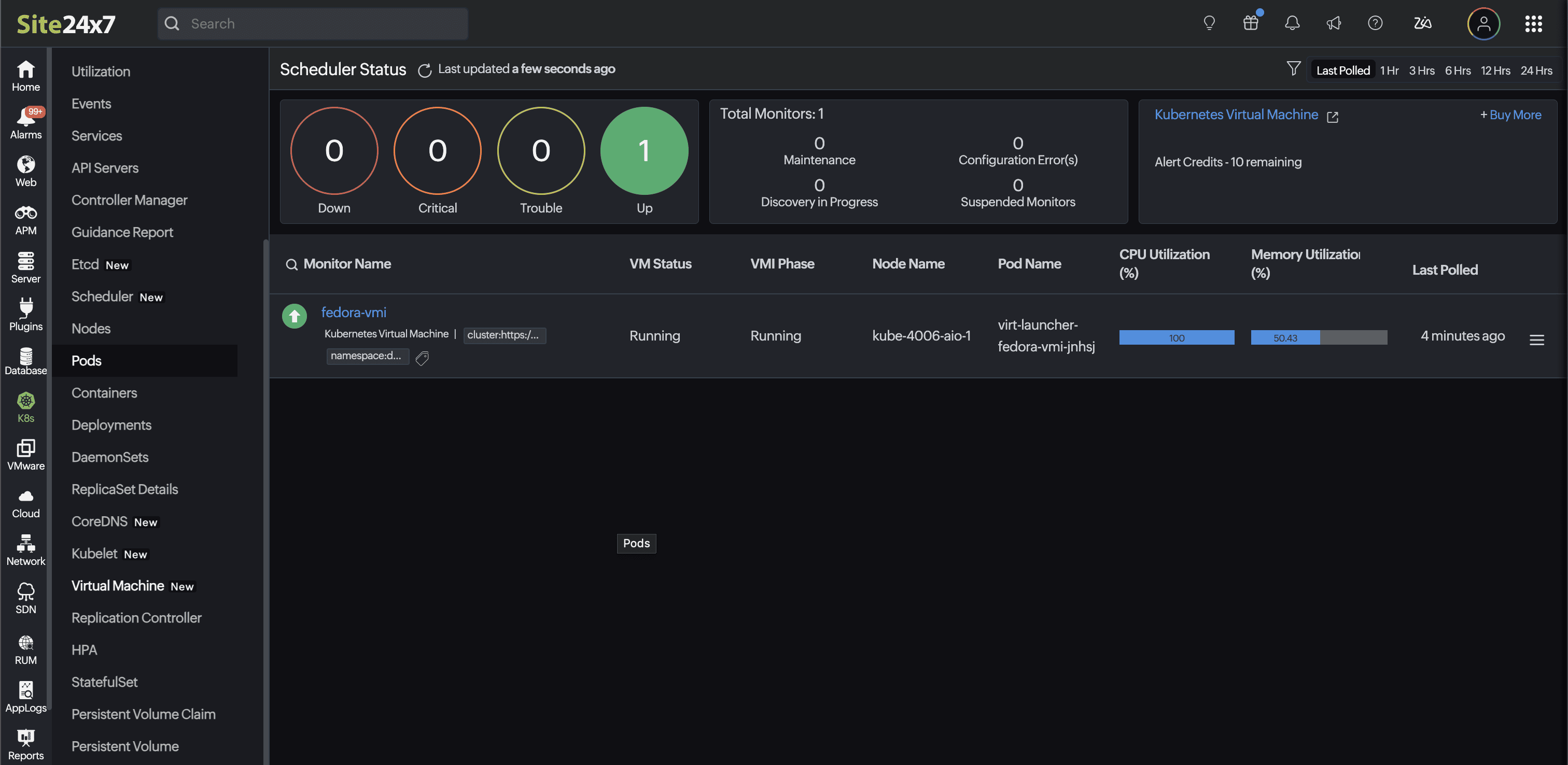
Polling frequency
By default, every five minutes the performance metrics of your KubeVirt VMs are collected and updated in the Site24x7 web client.
Supported metrics
The following table metrics consist of all the Kubernetes VMIs.
| Metric name | Description | Unit |
|---|---|---|
| Labels | The labels assigned to the virtual machine resource during the last poll period. | JSON String |
| Annotations | The annotations assigned to the virtual machine resource during the last poll period. | JSON String |
| Run Policy | The run policy configured for the VM (Always, Manual, Halted, or RerunOnFailure) during the last poll period. | String |
| Instance Type | The instance type referenced by the VM during the last poll period. | String |
| Preference | The preference profile referenced by the VM during the last poll period. | String |
| DataVolume Templates | The number of DataVolume templates declared in the VM during the last poll period. | Count |
| Termination Grace Period | The termination grace period configured in the VM template during the last poll period. | Seconds |
| Architecture | The CPU architecture specified in the VM template during the last poll period. | String |
| Requested vCPUs | The total number of vCPUs requested by the VM (calculated as cores × sockets × threads) during the last poll period. | Count |
| Requested Memory | The amount of guest memory requested by the VM during the last poll period. | String |
| Network Interfaces | The network interfaces configured for the VM (keyed by interface name) during the last poll period. | Child |
| Disks | The disks configured for the VM—including bus type, disk type, and source, keyed by disk name—during the last poll period. | Child |
| VM Status | The printable status of the virtual machine custom resource (Running, Stopped, Provisioning, and so on) captured at the last poll period. | String |
| Ready | Indicates whether the VM or VMI is reported as Ready during the last poll period. | Boolean |
| VM Conditions | The status conditions reported on the virtual machine resource during the last poll period. | Child |
| VMI Phase | The phase of the VMI (Pending, Scheduling, Scheduled, Running, Succeeded, or Failed) captured at the last poll period. | String |
| Node | The name of the node on which the VMI is currently running during the last poll period. | String |
| IP Address | The primary IP address assigned to the VMI during the last poll period. | String |
| VMI Conditions | The status conditions reported on the virtual machine instance during the last poll period. | Child |
| Paused | Indicates whether the VMI is in a Paused state during the last poll period. | Boolean |
| Live Migratable | Indicates whether the VMI is eligible for live migration during the last poll period. | Boolean |
| Live Migration State | The live migration state details—including target node, source node, completion status, and failure status—captured at the last poll period. | — |
| CPU Usage | The total CPU time consumed by the VMI per second during the last poll period. | Seconds/sec |
| CPU System Usage | The system (kernel) CPU time consumed by the VMI per second during the last poll period. | Seconds/sec |
| CPU User Usage | The user-space CPU time consumed by the VMI per second during the last poll period. | Seconds/sec |
| Memory Resident | The resident memory used by the VMI during the last poll period. | Bytes |
| Memory Available | The total memory available inside the VMI guest during the last poll period. | Bytes |
| Memory Used | The memory currently in use inside the VMI guest during the last poll period. | Bytes |
| Swap In Traffic | The rate of memory swap-in traffic during the last poll period. | Bytes/sec |
| Swap Out Traffic | The rate of memory swap-out traffic during the last poll period. | Bytes/sec |
| Network Received Bytes | The number of bytes received on a VMI network interface per second during the last poll period. | Bytes/sec |
| Network Transmitted Bytes | The number of bytes transmitted on a VMI network interface per second during the last poll period. | Bytes/sec |
| Network Received Packets | The number of packets received on a VMI network interface per second during the last poll period. | Packets/sec |
| Network Transmitted Packets | The number of packets transmitted on a VMI network interface per second during the last poll period. | Packets/sec |
| Network Receive Errors | The number of received errors on a VMI network interface per second during the last poll period. | Errors/sec |
| Network Transmit Errors | The number of transmit errors on a VMI network interface per second during the last poll period. | Errors/sec |
| Network Receive Drops | The number of inbound packets dropped on a VMI network interface per second during the last poll period. | Packets/sec |
| Network Transmit Drops | The number of outbound packets dropped on a VMI network interface per second during the last poll period. | Packets/sec |
| Storage Read Bytes | The number of bytes read from a VMI drive per second during the last poll period. | Bytes/sec |
| Storage Write Bytes | The number of bytes written to a VMI drive per second during the last poll period. | Bytes/sec |
| Storage Read IOPS | The number of read I/O operations per second on a VMI drive during the last poll period. | IOPS |
| Storage Write IOPS | The number of write I/O operations per second on a VMI drive during the last poll period. | IOPS |
| Storage Read Latency | The average read latency on a VMI drive during the last poll period. | Seconds |
| Storage Write Latency | The average write latency on a VMI drive during the last poll period. | Seconds |
| Live Migration Completed | Indicates whether the live migration completed successfully during the last poll period. | Boolean |
| Live Migration Failed | Indicates whether the live migration failed during the last poll period. | Boolean |
| Live Migration Start time | The start time of the live migration during the last poll period. | String |
| Live Migration End time | The end time of the live migration during the last poll period. | String |
| Total Network Received Bytes | The total bytes received per second across all VMI network interfaces during the last poll period. | Bytes/sec |
| CPU Usage Percentage | The CPU usage of the VMI is expressed as a percentage of the total requested vCPUs (CPU Usage / Requested vCPUs × 100) during the last poll period. | Percentage |
| Memory Unused | The unused memory inside the VMI guest during the last poll period. | Bytes |
| Memory Usage Percentage | The memory usage of the VMI expressed as a percentage of available memory (Memory Used / Memory Available × 100) during the last poll period. | Percentage |
| Total Network Received Bytes | The total bytes received per second across all VMI network interfaces during the last poll period. | Bytes/sec |
| Total Network Transmitted Bytes | The total bytes transmitted per second across all VMI network interfaces during the last poll period. | Bytes/sec |
| Total Network Received Packets | The total packets received per second across all VMI network interfaces during the last poll period. | Packets/sec |
| Total Network Transmitted Packets | The total packets transmitted per second across all VMI network interfaces during the last poll period. | Packets/sec |
| Total Network Receive Errors | The total receive errors per second across all VMI network interfaces during the last poll period. | Errors/sec |
| Total Network Transmit Errors | The total transmit errors per second across all VMI network interfaces during the last poll period. | Errors/sec |
| Total Network Receive Drops | The total inbound packets dropped per second across all VMI network interfaces during the last poll period. | Packets/sec |
| Total Network Transmit Drops | The total outbound packets dropped per second across all VMI network interfaces during the last poll period. | Packets/sec |
| Total Disk Read Bytes | The total bytes read per second across all VMI drives during the last poll period. | Bytes/sec |
| Total Disk Write Bytes | The total bytes written per second across all VMI drives during the last poll period. | Bytes/sec |
| Total Disk Read IOPS | The total read I/O operations per second across all VMI drives during the last poll period. | IOPS |
| Total Disk Write IOPS | The total write I/O operations per second across all VMI drives during the last poll period. | IOPS |
| Total Disk Read Latency | The total read latency across all VMI drives during the last poll period. | Seconds |
| Total Disk Write Latency | The total write latency across all VMI drives during the last poll period. | Seconds |
Configuration rules
Use Configuration Rules to automate bulk setup across Kubernetes Virtual Machine instances. Automatically assign Threshold Profiles, Notification Profiles, Tags, and Monitor Groups when new monitors are discovered.
Licensing
KubeVirt VMs do not consume any license.
Monitor data
The monitor data for KubeVirt VM monitor is given below.
Dependency Tree
The Dependency Tree tab offers a visual map of your KubeVirt infrastructure, showing how VMs and VMIs connect to Pods, Nodes, and Storage.
Outages
The Outages tab displays outage details, including start time, end time, duration, and associated comments, helping you track and review downtime events.
Notes
The Notes tab lets you document descriptions, operational context, runbook procedures, recent changes, and reference links to keep your team informed. Content can be formatted using Markdown syntax.
Log Reports
The Log Reports tab provides a consolidated view of the KubeVirt VM monitor's log status and allows you to download reports in CSV format for analysis and auditing.
Alert Logs
The Alert Logs tab displays a chronological history of alerts generated by the KubeVirt VM monitor, helping you review incidents, analyze alert severity, and validate threshold configurations.