
OCI Guidance Report
Site24x7’s OCI Guidance Report provides best practice recommendations to help optimize your Oracle Cloud Infrastructure (OCI) setup. These recommendations are designed to fine-tune your OCI configuration, ensuring optimal performance, enhanced reliability, and cost efficiency.
By following the suggested best practices, you can improve the performance of your cloud resources, avoid potential issues, and maintain a secure and well-architected OCI environment. Site24x7's Guidance Report has grouped the recommendations under the Availability category at three severity levels: High, Moderate, and Low.
Benefits of using the OCI Guidance Report
With the OCI Guidance Report feature, you can leverage the following benefits:
- Stay ahead of potential issues by proactively identifying areas of improvement in your OCI setup.
- Receive clear recommendations that are easy to implement, ensuring quick and effective adjustments.
- Maximize the value of your OCI services by eliminating inefficiencies and optimizing resource allocation.
- Ensure your cloud environment adheres to the best practices, reducing the risk of vulnerabilities.
Use case
Let's say you are running critical applications on an OCI Block Volume, but do not have a backup policy attached to it. Without a backup policy, the data stored in the Block Volume is vulnerable to availability domain failures, which could result in potential data loss and disruption of critical services.
Site24x7 identifies this issue and provides the recommendation to attach a backup policy to the Block Volume. By following this recommendation, you can regularly back up your data, ensure its availability, and protect its applications against unexpected failures in the availability domain.
Viewing the Guidance Report and compliance checks
To view the compliance data along with the guidance report:
- Login to Site24x7.
- Navigate to Cloud > OCI.
- Select the applicable OCI service.
- Select the Guidance Report dashboard.
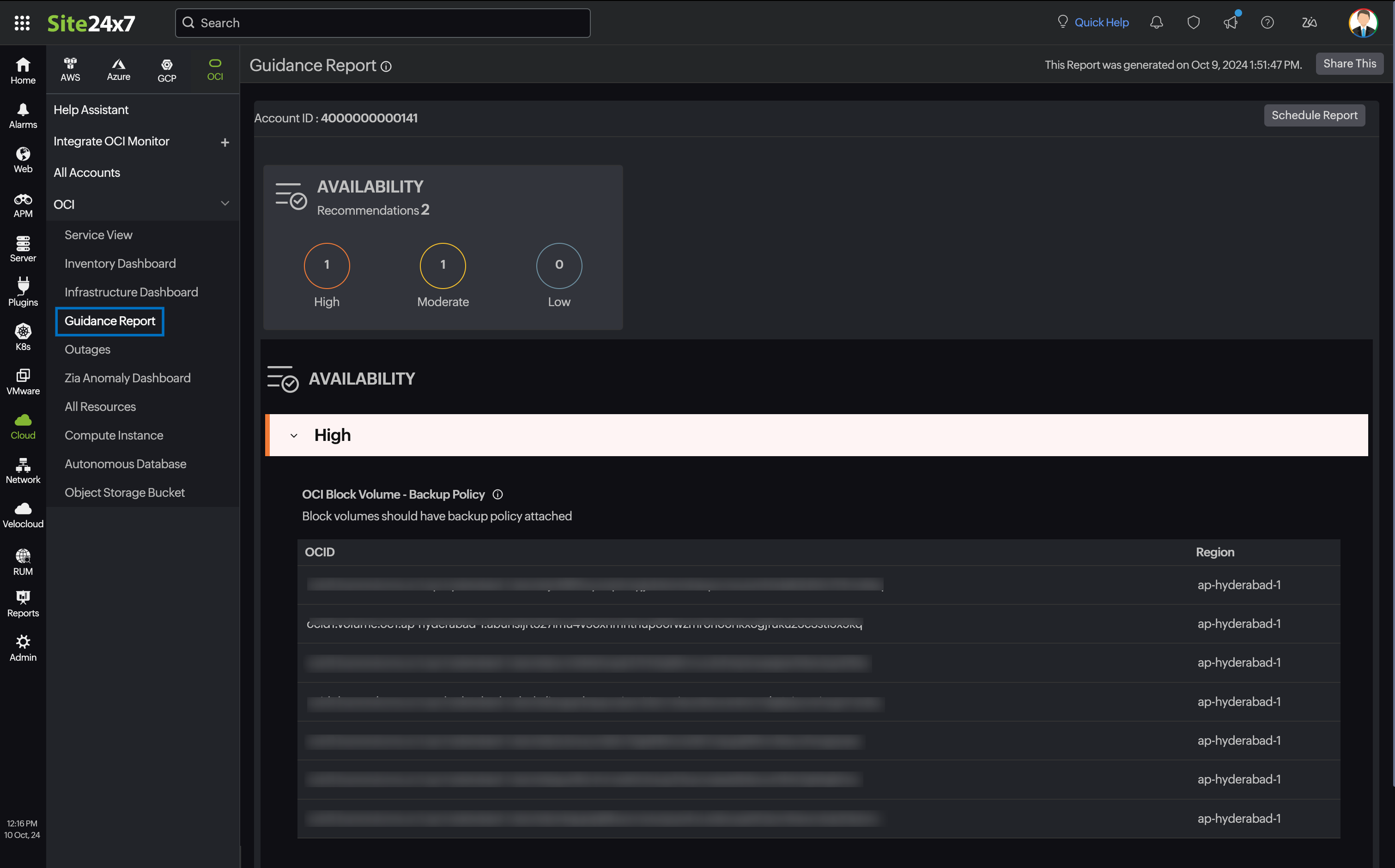
- Review the recommendations provided for each resource.
- Follow the action steps to implement changes and optimize your OCI environment.
Best practice checks for OCI services
The recommendation checks available for various OCI services include:
Compute Instance
OCI Compute - Single Fault Domain (Priority: Low)
Baseline:
Checks whether all instances in an availability domain are present in a single fault domain.
Description:
By placing Compute Instances in different fault domains inside an availability zone, you can ensure that a failure of any one fault domain does not result in an outage for your application.
Recommendation:
Consider changing the fault domain of the Compute Instance.
Required permission:
- GetInstance - INSTANCE_READ
OCI Compute - Single Fault Domain (Priority: Low)
Baseline:
Checks whether all instances in an availability domain are present in a single fault domain.
Description:
By placing Compute Instances in different fault domains inside an availability zone, you can ensure that a failure of any one fault domain does not result in an outage for your application.
Recommendation:
Consider changing the fault domain of the Compute Instance.
Required permission:
- GetInstance - INSTANCE_READ
OCI Compute - Instance Without Tags (Priority: Info)
Baseline:
Checks whether Compute Instances have tags applied.
Description:
Tagging resources enables cost tracking, governance, and organized cloud management. Without proper tags, resources become difficult to manage, attribute costs, and audit.
Recommendation:
Consider adding appropriate tags to the Compute Instance for cost tracking and governance.
Required permission:
- GetInstance - INSTANCE_READ
OCI Compute - Stopped Instance (Priority: Medium)
Baseline:
Checks whether there are Compute Instances in a stopped state.
Description:
Stopped Compute Instances may still incur storage costs, and even some shapes incur charges even if the instance is in a stopped state, representing unused resources. Identifying and removing unused stopped instances can reduce costs.
Recommendation:
Consider terminating stopped Compute Instances that are no longer needed.
Required permission:
- GetInstance - INSTANCE_READ
OCI Compute - Maintenance Event (Priority: High)
Baseline:
Checks whether Compute Instances have pending maintenance events.
Description:
Oracle periodically schedules maintenance events for the compute infrastructure. Unacknowledged maintenance events may cause unexpected instance reboots.
Recommendation:
Review and acknowledge pending maintenance events to plan for scheduled downtime.
Required permission:
- GetInstance - INSTANCE_READ
OCI Compute - Instance Monitoring Plugin Disabled (Priority: Medium)
Baseline:
Checks whether the Compute Instance monitoring plugin is enabled.
Description:
The monitoring plugin collects performance metrics from instances. Without it, you cannot view metrics in OCI Monitoring or configure alarms for instance health.
Recommendation:
Enable the Compute Instance monitoring plugin to collect performance metrics.
Required permission:
- GetInstance - INSTANCE_READ
OCI Compute - Custom Logs Monitoring Disabled (Priority: Medium)
Baseline:
Checks whether custom log monitoring is configured for Compute Instances.
Description:
Custom log monitoring enables ingestion of application and OS logs into OCI Logging, allowing centralized log analysis and alerting.
Recommendation:
Configure custom log monitoring to capture application and operating system logs.
Required permission:
- GetInstance - INSTANCE_READ
OCI Compute - Under Utilized Instances (Priority: High)
Baseline:
Checks whether Compute Instances are under-utilized based on CPU and memory metrics.
Description:
Under-utilized instances waste compute spend. Right-sizing or terminating them can result in significant cost savings.
Recommendation:
Consider right-sizing or terminating under-utilized Compute Instances to reduce costs.
Required permissions:
- GetInstance - INSTANCE_READ
- GetMetricData - METRIC_DATA_READ
OCI Compute - High Utilization (Priority: High)
Baseline:
Checks whether Compute Instances are running at high CPU or memory utilization.
Description:
Instances running at consistently high utilization may experience degraded performance. Scaling up or out ensures application reliability.
Recommendation:
Consider scaling up the instance shape or adding additional instances to distribute the load.
Required permissions:
- GetInstance - INSTANCE_READ
- GetMetricData - METRIC_DATA_READ
OCI Compute - In-Transit Encryption Disabled (Priority: High)
Baseline:
Checks whether in-transit encryption is enabled for Compute Instances.
Description:
In-transit encryption protects data moving between the instance and Block Volumes from interception. It is a security best practice to enable this for all instances.
Recommendation:
Enable in-transit encryption for Compute Instances to protect data in transit.
Required permission:
- GetInstance - INSTANCE_READ
OCI Compute - Legacy IMDS Enabled (Priority: High)
Baseline:
Checks whether the legacy Instance Metadata Service (IMDSv1) is enabled.
Description:
IMDSv1 is vulnerable to server-side request forgery (SSRF) attacks. Disabling it and using IMDSv2 with token-based authentication reduces this risk.
Recommendation:
Disable legacy IMDSv1 and migrate to the secure token-based IMDSv2.
Required permission:
- GetInstance - INSTANCE_READ
OCI Compute - Secure Boot Disabled (Priority: High)
Baseline:
Checks whether Secure Boot is enabled on Compute Instances.
Description:
Secure Boot ensures that a device boots using only software that is trusted by the OEM. It protects against boot-level malware and rootkits.
Recommendation:
Enable Secure Boot on Compute Instances to prevent unauthorized boot software.
Required permission:
- GetInstance - INSTANCE_READ
OCI Compute - Confidential Computing Disabled (Priority: Medium)
Baseline:
Checks whether Confidential Computing is enabled on Compute Instances.
Description:
Confidential Computing encrypts data in use, protecting it from the hypervisor and cloud provider. It provides the highest level of data isolation for sensitive workloads.
Recommendation:
Enable Confidential Computing for instances processing sensitive data.
Required permission:
- GetInstance - INSTANCE_READ
OCI Compute - Cloud Guard Disabled (Priority: High)
Baseline:
Checks whether OCI Cloud Guard is enabled for the Compute Instance's compartment.
Description:
Cloud Guard continuously monitors OCI resources for security misconfigurations and threats, providing automated remediation capabilities.
Recommendation:
Enable OCI Cloud Guard to detect and respond to security threats.
Required permissions:
- GetInstance - INSTANCE_READ
- GetCloudGuardConfiguration - CLOUD_GUARD_CONFIG_READ
OCI Compute - OS Management Disabled (Priority: Medium)
Baseline:
Checks whether OS Management is enabled for Compute Instances.
Description:
OS Management allows automated patching and package management for Compute Instances, reducing the risk of unpatched vulnerabilities.
Recommendation:
Enable OS Management to automate patching and software updates.
Required permission:
- GetInstance - INSTANCE_READ
OCI Compute - Vulnerability Scanning Disabled (Priority: High)
Baseline:
Checks whether vulnerability scanning is enabled for Compute Instances.
Description:
Regular vulnerability scanning identifies known CVEs and misconfigurations in the operating system and installed packages, enabling proactive remediation.
Recommendation:
Enable vulnerability scanning to identify and remediate security vulnerabilities.
Required permission:
- GetInstance - INSTANCE_READ
OCI Compute - Measured Boot Disabled (Priority: Medium)
Baseline:
Checks whether Measured Boot is enabled on Compute Instances.
Description:
Measured Boot records the boot sequence hash chain and stores it in a Trusted Platform Module (TPM). This allows detection of any tampering with the boot process.
Recommendation:
Enable Measured Boot alongside Secure Boot for full boot integrity verification.
Required permission:
- GetInstance - INSTANCE_READ
Block Volume
OCI Block Volume - Backup Policy (Priority: High)
Baseline:
Checks whether the block volume has a backup policy attached.
Description:
It is recommended to take backup of critical applications to protect against failure of the availability domain and ensure data availability.
Recommendation:
Consider attaching a backup policy to the block volume.
Required permission:
- GetVolumeBackupPolicyAssetAssignment - BACKUP_POLICY_ASSIGNMENT_INSPECT and VOLUME_INSPECT
OCI Block Volume - Backup Policy Disabled (Priority: High)
Baseline:
Checks whether the Block Volume has a backup policy attached.
Description:
It is recommended to take a backup of critical applications to protect against the failure of the availability domain and ensure data availability.
Recommendation:
Consider attaching a backup policy to the Block Volume.
Required permission:
- GetVolumeBackupPolicyAssetAssignment - BACKUP_POLICY_ASSIGNMENT_INSPECT and VOLUME_INSPECT
OCI Boot Volume - Backup Policy Disabled (Priority: High)
Baseline:
Checks whether the Boot Volume has a backup policy attached.
Description:
Boot Volumes contain the operating system and are critical for instance recovery. A backup policy ensures the OS disk is protected against accidental loss or corruption.
Recommendation:
Consider attaching a backup policy to the Boot Volume.
Required permission:
- GetVolumeBackupPolicyAssetAssignment - BACKUP_POLICY_ASSIGNMENT_INSPECT and BOOT_VOLUME_INSPECT
OCI Block Volume - Not Attached (Priority: Medium)
Baseline:
Checks whether Block Volumes are attached to a Compute Instance.
Description:
Unattached Block Volumes incur storage costs without providing value. Identifying orphaned volumes helps reduce unnecessary spend.
Recommendation:
Consider deleting or archiving unattached Block Volumes that are no longer needed.
Required permission:
- ListVolumes - VOLUME_INSPECT
OCI Boot Volume - Not Attached (Priority: Medium)
Baseline:
Checks whether Boot Volumes are attached to a Compute Instance.
Description:
Detached Boot Volumes still incur storage costs. Unattached Boot Volumes from terminated instances should be reviewed and removed if no longer needed.
Recommendation:
Consider deleting unattached Boot Volumes that are no longer required.
Required permission:
- ListBootVolumes - BOOT_VOLUME_INSPECT
OCI Block Volume - Auto-Tune Disabled (Priority: Medium)
Baseline:
Checks whether auto-tune performance is enabled for Block Volumes.
Description:
Auto-tune automatically adjusts the performance tier of a volume when it is detached, reducing costs when the volume is not actively being used.
Recommendation:
Enable auto-tune to reduce Block Volume costs during periods of non-use.
Required permission:
- GetVolume - VOLUME_INSPECT
OCI Boot Volume - Auto-Tune Disabled (Priority: Medium)
Baseline:
Checks whether auto-tune performance is enabled for Boot Volumes.
Description:
Auto-tune on Boot Volumes reduces costs during stopped or detached states by automatically lowering the performance tier.
Recommendation:
Enable auto-tune on Boot Volumes to optimize cost during low-usage periods.
Required permission:
- GetBootVolume - BOOT_VOLUME_INSPECT
OCI Block Volume - Cross-Region Replication Disabled (Priority: High)
Baseline:
Checks whether Block Volumes have cross-region replication enabled.
Description:
Cross-region replication protects data from regional disasters and supports business continuity and disaster recovery objectives.
Recommendation:
Enable cross-region replication for critical Block Volumes.
Required permission:
- GetVolume - VOLUME_INSPECT
OCI Block Volume - CMK Encryption Disabled (Priority: High)
Baseline:
Checks whether Block Volumes are encrypted with a customer-managed key (CMK).
Description:
While OCI encrypts Block Volumes by default, using customer-managed keys provides greater control over key lifecycle and meets compliance requirements for data sovereignty.
Recommendation:
Enable customer-managed key encryption for Block Volumes.
Required permission:
- GetVolume - VOLUME_INSPECT
OCI Boot Volume - CMK Encryption Disabled (Priority: High)
Baseline:
Checks whether Boot Volumes are encrypted with a customer-managed key (CMK).
Description:
Boot Volumes store the operating system. Encrypting them with CMK ensures that the OS data at rest is protected with keys you control.
Recommendation:
Enable customer-managed key encryption for Boot Volumes.
Required permission:
- GetBootVolume - BOOT_VOLUME_INSPECT
Autonomous Database
OCI Autonomous Database - Backup Retention Period (Priority: Medium)
Baseline:
Checks whether an autonomous database has a backup retention period of at least seven days.
Description:
It is recommended to have a minimum backup retention period of seven days in order to achieve compliance requirements.
Recommendation:
Consider setting the backup retention period of an autonomous database to at least seven days.
Required permission:
- GetAutonomousDatabase - AUTONOMOUS_DATABASE_INSPECT
OCI Autonomous Database - Backup Retention Period (Priority: Medium)
Baseline :
Checks whether an Autonomous Database has a backup retention period of at least seven days.
Description:
It is recommended to have a minimum backup retention period of seven days in order to achieve compliance requirements.
Recommendation:
Consider setting the backup retention period of an Autonomous Database to at least seven days.
Required permission:
- GetAutonomousDatabase - AUTONOMOUS_DATABASE_INSPECT
OCI Autonomous Database - Compute Auto-Scaling Disabled (Priority: Medium)
Baseline:
Checks whether compute auto-scaling is enabled for the Autonomous Database.
Description:
Compute auto-scaling allows the database to use up to three times the base OCPUs during peak workloads, ensuring performance and only charging for actual usage.
Recommendation:
Enable compute auto-scaling to handle peak workload demands efficiently.
Required permission:
- GetAutonomousDatabase - AUTONOMOUS_DATABASE_INSPECT
OCI Autonomous Database - Storage Auto-Scaling Disabled (Priority: Medium)
Baseline:
Checks whether storage auto-scaling is enabled for the Autonomous Database.
Description:
Storage auto-scaling allows the database to expand storage automatically as data grows, preventing outages caused by insufficient storage.
Recommendation:
Enable storage auto-scaling to prevent storage capacity issues.
Required permission:
- GetAutonomousDatabase - AUTONOMOUS_DATABASE_INSPECT
OCI Autonomous Database - Operations Insights Disabled (Priority: Low)
Baseline:
Checks whether Operations Insights is enabled for the Autonomous Database.
Description:
Operations Insights provides AI-powered resource utilization analysis and capacity planning recommendations for Autonomous Databases.
Recommendation:
Enable Operations Insights to gain visibility into database resource usage trends.
Required permission:
- GetAutonomousDatabase - AUTONOMOUS_DATABASE_INSPECT
OCI Autonomous Database - Tagging Check (Priority: Info)
Baseline:
Checks whether the Autonomous Database has cost-tracking tags applied.
Description:
Tags enable cost attribution, budget tracking, and governance across OCI resources.
Recommendation:
Apply appropriate cost-tracking and governance tags to the Autonomous Database.
Required permission:
- GetAutonomousDatabase - AUTONOMOUS_DATABASE_INSPECT
OCI Autonomous Database - Cross-Region Replication Not Configured (Priority: High)
Baseline:
Checks whether cross-region replication is configured for the Autonomous Database.
Description:
Cross-region replication ensures database availability in the event of a regional failure, meeting recovery time and point objectives for critical workloads.
Recommendation:
Configure cross-region replication for Autonomous Databases hosting critical workloads.
Required permission:
- GetAutonomousDatabase - AUTONOMOUS_DATABASE_INSPECT
OCI Autonomous Database - Database Management Disabled (Priority: Medium)
Baseline:
Checks whether Database Management is enabled for the Autonomous Database.
Description:
Database Management provides performance monitoring, tuning recommendations, and fleet management for Autonomous Databases.
Recommendation:
Enable Database Management to access performance diagnostics and tuning insights.
Required permission:
- GetAutonomousDatabase - AUTONOMOUS_DATABASE_INSPECT
OCI Autonomous Database - Data Safe Disabled (Priority: High)
Baseline:
Checks whether OCI Data Safe is enabled for the Autonomous Database.
Description:
Data Safe provides security assessment, user assessment, data discovery, data masking, and activity auditing to protect sensitive data in the database.
Recommendation:
Enable Data Safe to continuously monitor and protect sensitive data.
Required permission:
- GetAutonomousDatabase - AUTONOMOUS_DATABASE_INSPECT
OCI Autonomous Database - Costly Tools Enabled (Priority: Medium)
Baseline:
Checks whether costly add-on tools are unnecessarily enabled for the Autonomous Database.
Description:
Certain ADB tools carry additional licensing costs. Enabling them without active use results in unnecessary charges.
Recommendation:
Review and disable costly tools that are not actively being used.
Required permission:
- GetAutonomousDatabase - AUTONOMOUS_DATABASE_INSPECT
OCI Autonomous Database - CMK Encryption Disabled (Priority: High)
Baseline:
Checks whether the Autonomous Database is encrypted with a customer-managed key.
Description:
Customer-managed keys provide control over the encryption lifecycle and satisfy data sovereignty and compliance requirements.
Recommendation:
Enable customer-managed key encryption for the Autonomous Database.
Required permission:
- GetAutonomousDatabase - AUTONOMOUS_DATABASE_INSPECT
OCI Autonomous Database - Public Access Enabled (Priority: High)
Baseline:
Checks whether the Autonomous Database allows public access.
Description:
Exposing the database to the public internet increases the attack surface significantly. Databases should only be accessible from trusted private networks.
Recommendation:
Restrict public access to the Autonomous Database and use private endpoints instead.
Required permission:
- GetAutonomousDatabase - AUTONOMOUS_DATABASE_INSPECT
OCI Autonomous Database - No Private Endpoint (Priority: High)
Baseline:
Checks whether the Autonomous Database has a private endpoint configured.
Description:
Private endpoints ensure database traffic stays within the OCI network fabric and is not exposed to the public internet.
Recommendation:
Configure a private endpoint for the Autonomous Database.
Required permission:
- GetAutonomousDatabase - AUTONOMOUS_DATABASE_INSPECT
OCI Autonomous Database - mTLS Not Required (Priority: High)
Baseline:
Checks whether mutual TLS (mTLS) authentication is required for database connections.
Description:
mTLS requires both client and server to authenticate with certificates, providing strong mutual authentication and protection against impersonation attacks.
Recommendation:
Enable mTLS requirement for all connections to the Autonomous Database.
Required permission:
- GetAutonomousDatabase - AUTONOMOUS_DATABASE_INSPECT
OCI Autonomous Database - No Customer Contacts (Priority: Low)
Baseline:
Checks whether customer contact information is configured for the Autonomous Database.
Description:
Customer contacts receive important notifications about maintenance events, security advisories, and operational updates for the database.
Recommendation:
Configure customer contact information to receive database notifications.
Required permission:
- GetAutonomousDatabase - AUTONOMOUS_DATABASE_INSPECT
Object Storage Bucket
OCI Storage Bucket - Replication Disabled (Priority: Medium)
Baseline:
Checks whether the storage buckets have a replication policy created.
Description:
Replication policy provides protection from regional outages, aids in disaster recovery efforts, and addresses data redundancy compliance requirements. Maintaining multiple copies of data in regional locations closer to user access can also reduce latency.
Recommendation:
Consider creating a replication policy for storage bucket.
Required permission:
- GetBucket - BUCKET_READ
OCI Storage Bucket - Replication Disabled (Priority: Medium)
Baseline:
Checks whether the Storage Buckets have a replication policy created.
Description:
Replication policy provides protection from regional outages, aids in disaster recovery efforts, and addresses data redundancy compliance requirements. Maintaining multiple copies of data in regional locations closer to user access can also reduce latency.
Recommendation:
Consider creating a replication policy for the Storage Bucket.
Required permission:
- GetBucket - BUCKET_READ
OCI Storage Bucket - Versioning Disabled (Priority: Medium)
Baseline:
Checks whether object versioning is enabled on Storage Buckets.
Description:
Object versioning retains previous versions of objects, protecting against accidental overwrites or deletions and enabling point-in-time recovery.
Recommendation:
Enable versioning on Storage Buckets containing critical data.
Required permission:
- GetBucket - BUCKET_READ
OCI Storage Bucket - Public Access Not Blocked (Priority: High)
Baseline:
Checks whether public access to object Storage Buckets is blocked.
Description:
Publicly accessible buckets expose stored data to unauthorized access. Unless intentionally serving public content, buckets should block all public access.
Recommendation:
Block public access to all Storage Buckets unless explicitly required for public content hosting.
Required permission:
- GetBucket - BUCKET_READ
OCI Storage Bucket - Lifecycle Policy Not Configured (Priority: Medium)
Baseline:
Checks whether a lifecycle policy is configured for Storage Buckets.
Description:
Lifecycle policies automatically transition objects to lower-cost storage tiers or delete expired objects, reducing storage costs over time.
Recommendation:
Configure lifecycle policies to manage object retention and storage tier transitions.
Required permission:
- GetBucket - BUCKET_READ
OCI Storage Bucket - Tagging Check (Priority: Info)
Baseline:
Checks whether Storage Buckets have required tags applied.
Description:
Tags enable cost attribution and governance across storage resources.
Recommendation:
Apply appropriate cost-tracking and governance tags to all Storage Buckets.
Required permission:
- GetBucket - BUCKET_READ
OCI Storage Bucket - Auto-Tiering Disabled (Priority: Medium)
Baseline:
Checks whether auto-tiering is enabled for Storage Buckets.
Description:
Auto-tiering automatically moves infrequently accessed objects to lower-cost Archive storage, reducing costs without manual intervention.
Recommendation:
Enable auto-tiering on buckets with mixed access patterns to reduce storage costs.
Required permission:
- GetBucket - BUCKET_READ
OCI Storage Bucket - Archive Storage Tier (Priority: low)
Baseline:
Checks whether buckets are using the Archive storage tier appropriately.
Description:
The archive tier is designed for data that is rarely accessed. Using it for frequently accessed data results in high retrieval latency and costs.
Recommendation:
Review buckets in the archive tier to ensure the access pattern warrants this tier.
Required permission:
- GetBucket - BUCKET_READ
OCI Storage Bucket - Retention Rules Not Configured (Priority: Medium)
Baseline:
Checks whether retention rules are configured for Storage Buckets.
Description:
Retention rules prevent objects from being deleted or overwritten before a specified period, supporting compliance and data integrity requirements.
Recommendation:
Configure retention rules on buckets that store compliance or audit data.
Required permission:
- GetBucket - BUCKET_READ
OCI Storage Bucket - Logging Disabled (Priority: Medium)
Baseline:
Checks whether access logging is enabled for Storage Buckets.
Description:
Access logging records all read and write operations on the bucket, providing an audit trail for security investigations and compliance audits.
Recommendation:
Enable access logging for all Storage Buckets.
Required permission:
- GetBucket - BUCKET_READ
OCI Storage Bucket - CMK Encryption Disabled (Priority: High)
Baseline:
Checks whether Storage Buckets are encrypted with a customer-managed key.
Description:
Customer-managed keys provide control over data encryption and meet compliance requirements for sensitive data stored in object storage.
Recommendation:
Enable customer-managed key encryption for Storage Buckets.
Required permission:
- GetBucket - BUCKET_READ
VCN
OCI Subnet - Availability Domain Specific Subnets (Priority: High)
Baseline:
Checks whether subnets are specific to the availability domain.
Description:
Opting for a regional subnet will mitigate availability domain failures since resources can be in any of the region's availability domain.
Recommendation:
It is recommended by Oracle to create a regional subnet as opposed to an availability domain-specific subnet. Consider replacing the availability domain-specific subnets with regional subnets.
Required permission:
- ListSubnets - SUBNET_READ
OCI VCN - Private Subnet Has IGW Route (Priority: High)
Baseline:
Checks whether private Subnets have route rules pointing to an Internet Gateway.
Description:
Private Subnets should not have direct routes to an Internet Gateway. Such misconfigurations can accidentally expose private resources to the internet.
Recommendation:
Remove Internet Gateway route rules from private Subnet route tables.
Required permissions:
- GetVcn - VCN_READ
- GetRouteTable - ROUTE_TABLE_INSPECT
OCI VCN - Default VCN In Use (Priority: Medium)
Baseline:
Checks whether the default VCN created by the tenancy is in use.
Description:
The default VCN often has permissive default settings and is not aligned with security best practices. Using custom VCNs with explicitly designed network topologies is recommended.
Recommendation:
Migrate workloads from the default VCN to a purpose-built, properly secured VCN.
Required permission:
- GetVcn - VCN_READ
OCI VCN - Flow Logs Disabled (Priority: High)
Baseline:
Checks whether VCN flow logs are enabled.
Description:
VCN flow logs capture metadata for all network traffic, providing visibility for threat detection, compliance auditing, and network troubleshooting.
Recommendation:
Enable VCN flow logs across all VCNs.
Required permission:
- GetVcn - VCN_READ
OCI VCN - No Tagging (Priority: Low)
Baseline:
Checks whether VCNs have required tags applied.
Description:
Tags enable cost attribution, governance, and lifecycle management for VCN resources.
Recommendation:
Apply cost-tracking and governance tags to all VCNs.
Required permission:
- GetVcn - VCN_READ
OCI Subnet - Availability Domain Specific Subnets (Priority: High)
Baseline:
Checks whether Subnets are specific to the availability domain.
Description:
Opting for a regional Subnet will mitigate availability domain failures since resources can be in any of the region's availability domains.
Recommendation:
It is recommended by Oracle to create a regional Subnet as opposed to an availability domain-specific Subnet. Consider replacing the availability domain-specific Subnets with regional Subnets.
Required permission:
- ListSubnets - SUBNET_READ
OCI Subnet - Flow Logging Disabled (Priority: High)
Baseline:
Checks whether flow logs are enabled for Subnets.
Description:
Flow logs capture network traffic metadata for all traffic flowing through the Subnet, enabling threat detection, traffic analysis, and forensic investigation.
Recommendation:
Enable flow logging for all Subnets, especially those hosting sensitive workloads.
Required permissions:
- ListSubnets - SUBNET_READ
- GetFlowLogConfig - VNIC_READ
OCI NSG - Unrestricted Inbound Traffic (Priority: High)
Baseline:
Checks whether Network Security Groups allow unrestricted inbound traffic (0.0.0.0/0).
Description:
Unrestricted inbound rules expose instances to all internet traffic, enabling brute force, scanning, and exploitation of any open ports.
Recommendation:
Restrict inbound NSG rules to known IP ranges and required ports only.
Required permission:
- GetNetworkSecurityGroup - NETWORK_SECURITY_GROUP_INSPECT
OCI NSG - Unrestricted Outbound Traffic (Priority: Medium)
Baseline:
Checks whether Network Security Groups allow unrestricted outbound traffic.
Description:
Unrestricted outbound rules can allow malware or compromised instances to exfiltrate data or communicate with command-and-control servers.
Recommendation:
Restrict outbound NSG rules to known destinations and required protocols.
Required permission:
- GetNetworkSecurityGroup - NETWORK_SECURITY_GROUP_INSPECT
OCI NSG - Unrestricted RDP Access (Priority: High)
Baseline:
Checks whether NSGs allow unrestricted inbound access on RDP port 3389.
Description:
Exposing RDP to the internet is a leading vector for ransomware and brute force attacks. RDP should only be accessible from trusted IP ranges via VPN.
Recommendation:
Restrict RDP access (port 3389) to specific trusted IP ranges or remove it entirely in favour of Bastion access.
Required permission:
- GetNetworkSecurityGroup - NETWORK_SECURITY_GROUP_INSPECT
OCI NSG - Unrestricted SSH Access (Priority: High)
Baseline:
Checks whether NSGs allow unrestricted inbound access on SSH port 22.
Description:
Open SSH access to the internet exposes instances to brute force and credential stuffing attacks. SSH should be restricted to known management IPs or bastion hosts.
Recommendation:
Restrict SSH access (port 22) to specific trusted IP ranges or use the OCI Bastion service.
Required permission:
- GetNetworkSecurityGroup - NETWORK_SECURITY_GROUP_INSPECT
OCI Security List - Unrestricted Inbound Traffic (Priority: High)
Baseline:
Checks whether Security Lists allow unrestricted inbound traffic from all sources.
Description:
An unrestricted inbound rule permits all traffic from any source, significantly expanding the attack surface of resources in the Subnet.
Recommendation:
Restrict inbound Security List rules to required ports and trusted source IP ranges.
Required permission:
- GetSecurityList - SECURITY_LIST_INSPECT
OCI Security List - Unrestricted Stateless Inbound Traffic (Priority: Medium)
Baseline:
Checks whether Security Lists contain unrestricted stateless inbound rules.
Description:
Stateless rules do not track connection state, so return traffic must be explicitly allowed. Unrestricted stateless inbound rules can be exploited for traffic amplification.
Recommendation:
Review and restrict stateless inbound rules to minimize exposure.
Required permission:
- GetSecurityList - SECURITY_LIST_INSPECT
OCI Security List - Unrestricted Outbound Traffic (Priority: Medium)
Baseline:
Checks whether Security Lists allow unrestricted outbound traffic.
Description:
Unrestricted outbound rules can allow data exfiltration from compromised instances. Restricting outbound traffic to required destinations reduces this risk.
Recommendation:
Restrict outbound Security List rules to known destinations and protocols.
Required permission:
- GetSecurityList - SECURITY_LIST_INSPECT
OCI Security List - Unrestricted Stateless Outbound Traffic (Priority: Medium)
Baseline:
Checks whether Security Lists contain unrestricted stateless outbound rules.
Description:
Unrestricted stateless outbound rules combined with loose inbound rules can allow unauthorized data exfiltration without any state tracking.
Recommendation:
Review and restrict stateless outbound Security List rules.
Required permission:
- GetSecurityList - SECURITY_LIST_INSPECT
OCI Security List - Unrestricted RDP Access (Priority: High)
Baseline:
Checks whether Security Lists allow unrestricted RDP access (port 3389).
Description:
Open RDP access in Security Lists exposes all instances in the Subnet to internet-based attacks targeting Windows remote desktop.
Recommendation:
Restrict RDP access to specific trusted IP ranges in all Security Lists.
Required permission:
- GetSecurityList - SECURITY_LIST_INSPECT
OCI Security List - Unrestricted SSH Access (Priority: High)
Baseline:
Checks whether Security Lists allow unrestricted SSH access (port 22).
Description:
Open SSH access in Security Lists exposes all instances in the Subnet to brute force and credential theft attacks from the internet.
Recommendation:
Restrict SSH access to specific trusted IP ranges or bastion host IPs in all Security Lists.
Required permission:
- GetSecurityList - SECURITY_LIST_INSPECT
OCI Security List - Default Security List Allows Unrestricted Traffic (Priority: High)
Baseline:
Checks whether the default VCN Security List has been left in its default unrestricted state.
Description:
The default Security List is often left unchanged after VCN creation. It may contain overly permissive rules that apply to all Subnets that do not have custom Security Lists.
Recommendation:
Review and tighten the default Security List rules immediately after VCN creation.
Required permission:
- GetSecurityList - SECURITY_LIST_INSPECT
Base Database Service
OCI BaseDB - Automatic Backup Disabled (Priority: High)
Baseline:
Checks whether automatic backup is enabled for the Base Database.
Description:
Automatic backups protect against data loss from accidental deletion, corruption, or hardware failures. Without backups, recovery options are severely limited.
Recommendation:
Enable automatic backup for all Base Database instances.
Required permission:
- GetDbSystem - DB_SYSTEM_INSPECT
OCI BaseDB - Backup Retention Period Low (Priority: Medium)
Baseline:
Checks whether the Base Database backup retention period meets minimum standards.
Description:
A short retention period limits your ability to recover from incidents discovered after a delay. A minimum of 30 days is recommended based on workload criticality.
Recommendation:
Increase the backup retention period to meet recovery requirements.
Required permission:
- GetDbSystem - DB_SYSTEM_INSPECT
OCI BaseDB System - Maintenance Window Not Configured (Priority: Medium)
Baseline:
Checks whether a maintenance window is configured for the Base Database system.
Description:
Configuring a maintenance window allows you to control when Oracle applies patches and updates, minimizing impact on business operations.
Recommendation:
Configure a maintenance window that aligns with low-traffic periods for your workload.
Required permission:
- GetDbSystem - DB_SYSTEM_INSPECT
OCI BaseDB System - Tagging Check (Priority: Info)
Baseline:
Checks whether Base Database systems have required tags applied.
Description:
Proper tagging enables cost allocation, governance enforcement, and resource lifecycle management.
Recommendation:
Apply cost-tracking and governance tags to all Base Database systems.
Required permission:
- GetDbSystem - DB_SYSTEM_INSPECT
OCI BaseDB System - Diagnostic Collection Disabled (Priority: Medium)
Baseline:
Checks whether diagnostic data collection is enabled for the Base Database system.
Description:
Diagnostic collection enables Oracle Support to access performance and error data needed to resolve issues faster, reducing mean time to resolution.
Recommendation:
Enable diagnostic collection to improve support response times.
Required permission:
- GetDbSystem - DB_SYSTEM_INSPECT
OCI BaseDB System - Health Monitoring Disabled (Priority: Medium)
Baseline:
Checks whether health monitoring is enabled for the Base Database system.
Description:
Health monitoring tracks the operational status of database infrastructure components and triggers alerts for degraded or failed components.
Recommendation:
Enable health monitoring to detect and respond to infrastructure issues proactively.
Required permission:
- GetDbSystem - DB_SYSTEM_INSPECT
OCI BaseDB System - Incident Logs Disabled (Priority: Medium)
Baseline:
Checks whether incident log collection is enabled for the Base Database system.
Description:
Incident logs capture error events and diagnostic data that are critical for root cause analysis during database incidents.
Recommendation:
Enable incident log collection to support faster incident response and root cause analysis.
Required permission:
- GetDbSystem - DB_SYSTEM_INSPECT
OCI Pluggable Database - Database Management Disabled (Priority: Medium)
Baseline:
Checks whether Database Management is enabled for pluggable databases.
Description:
Database Management provides performance monitoring, SQL tuning, and fleet management for pluggable databases.
Recommendation:
Enable Database Management for pluggable databases to access performance insights.
Required permission:
- GetPluggableDatabase - PLUGGABLE_DATABASE_INSPECT
OCI Pluggable Database - Connection String Not Configured (Priority: High)
Baseline:
Checks whether a connection string is configured for the pluggable database.
Description:
A missing connection string prevents applications from connecting to the PDB and indicates a misconfigured database setup.
Recommendation:
Configure appropriate connection strings for all pluggable databases.
Required permission:
- GetPluggableDatabase - PLUGGABLE_DATABASE_INSPECT
OCI Pluggable Database - Tagging Check (Priority: Info)
Baseline:
Checks whether pluggable databases have required tags applied.
Description:
Tags enable cost allocation and lifecycle governance across database resources.
Recommendation:
Apply cost-tracking and governance tags to all pluggable databases.
Required permission:
- GetPluggableDatabase - PLUGGABLE_DATABASE_INSPECT
Functions
OCI Function - No Provisioned Concurrency (Priority: Medium)
Baseline:
Checks whether provisioned concurrency is configured for OCI Functions.
Description:
Without provisioned concurrency, Functions experience cold starts that add latency to the first invocation. For latency-sensitive workloads, provisioned concurrency keeps Functions warm.
Recommendation:
Configure provisioned concurrency for latency-sensitive OCI Functions.
Required permission:
- GetFunction - FUNCTION_INSPECT
OCI Function - No Trace Configured (Priority: Low)
Baseline:
Checks whether distributed tracing is configured for OCI Functions.
Description:
Distributed tracing provides end-to-end visibility into Function execution, latency, and errors, facilitating debugging and performance optimization.
Recommendation:
Enable distributed tracing for OCI Functions to improve observability.
Required permission:
- GetFunction - FUNCTION_INSPECT
OCI Application - Tracing Disabled (Priority: Medium)
Baseline:
Checks whether distributed tracing is enabled for OCI Applications.
Description:
Distributed tracing provides end-to-end visibility into request flows across Application components, enabling latency analysis and root cause investigation.
Recommendation:
Enable distributed tracing for all OCI Applications.
Required permission:
- GetApplication - APPLICATION_INSPECT
OCI Application - Logging Disabled (Priority: Medium)
Baseline:
Checks whether logging is enabled for OCI Applications.
Description:
Application logs are essential for debugging, performance analysis, security auditing, and compliance. Without logging, diagnosing issues becomes significantly harder.
Recommendation:
Enable logging for all OCI Applications.
Required permission:
- GetApplication - APPLICATION_INSPECT
Vault
OCI Vault - No Keys (Priority: Medium)
Baseline:
Checks whether a Vault has any keys stored in it for the Vault type Virtual private and external.
Description:
An empty Vault may indicate that keys were deleted or never created, which could mean encryption is not being used for services that reference this Vault.
Recommendation:
Review empty Vaults and ensure all resources requiring encryption have associated keys.
Required permission:
- ListKeys - KEY_INSPECT
OCI Vault Key - Rotation Disabled (Priority: High)
Baseline:
Checks whether automatic Key rotation is enabled for Vault Keys.
Description:
Regular Key rotation limits the exposure window if a Key is compromised. Automated rotation ensures Keys are rotated without manual intervention.
Recommendation:
Enable automatic Key rotation for all Vault Keys.
Required permission:
- GetKey - KEY_INSPECT
OCI Vault Key - Not Rotated (Priority: High)
Baseline:
Checks whether Vault Keys have been rotated within the recommended period- 90 days.
Description:
Even with rotation enabled, verifying that rotation has actually occurred is critical. A Key that has not been rotated for an extended period increases compromise risk.
Recommendation:
Rotate Vault Keys immediately if they have not been rotated within the required period.
Required permission:
- GetKey - KEY_INSPECT
OCI Vault Key - No Cost Tags (Priority: Info)
Baseline:
Checks whether Vault Keys have cost-tracking tags applied.
Description:
Tags on Vault Keys enable cost attribution and lifecycle governance.
Recommendation:
Apply cost-tracking tags to all Vault Keys.
Required permission:
- GetKey - KEY_INSPECT
OCI Vault Key - HSM Protection Not Used (Priority: Medium)
Baseline:
Checks whether Vault Keys are protected by a Hardware Security Module (HSM).
Description:
HSM-protected Keys are stored in tamper-proof hardware, providing the highest level of Key security for sensitive workloads and compliance requirements.
Recommendation:
Use HSM protection for Vault Keys that protect sensitive data or are required by compliance frameworks.
Required permission:
- GetKey - KEY_INSPECT
OCI Vault Key - Unused Key (Priority: Medium)
Baseline:
Checks whether Vault Keys are actively being used for encryption.
Description:
Unused Keys represent unnecessary cost and an expanded Key management overhead. Identifying and deleting unused Keys simplifies the Key estate.
Recommendation:
Review and delete Vault Keys that are not actively protecting any resources.
Required permission:
- GetKey - KEY_INSPECT
OCI Secrets - Rotation Not Enabled (Priority: High)
Baseline:
Checks whether automatic rotation is enabled for Vault Secrets.
Description:
Secrets such as passwords, API keys, and certificates should be rotated regularly. Automatic rotation reduces risk from credential exposure without manual effort.
Recommendation:
Enable automatic rotation for all Vault Secrets.
Required permission:
- GetSecret - SECRET_INSPECT
OCI Secrets - Max Days Since Rotation Exceeded (Priority: High)
Baseline:
Checks whether Vault Secrets have been rotated within the allowed maximum age -90 days.
Description:
Long-lived Secrets increase the risk of compromise. Enforcing a maximum Secret age reduces the window of exposure.
Recommendation:
Rotate Secrets that have exceeded the maximum allowed rotation age.
Required permission:
- GetSecret - SECRET_INSPECT
OCI Secrets - Unsuccessful Rotation (Priority: High)
Baseline:
Checks whether any Vault Secret rotation attempts have failed.
Description:
Failed rotations leave Secrets with stale credentials and may indicate misconfigured rotation logic. Failed rotations must be investigated and resolved.
Recommendation:
Investigate and resolve all failed Secret rotation attempts.
Required permission:
- GetSecret - SECRET_INSPECT
OCI Secrets - Unused Secret (Priority: Low)
Baseline:
Checks whether Vault Secrets are actively being referenced by applications.
Description:
Unused Secrets represent unnecessary Secrets sprawl and an increased attack surface. Removing unused Secrets reduces risk.
Recommendation:
Review and delete Vault Secrets that are not actively being used.
Required permission:
- GetSecret - SECRET_INSPECT
Load Balancer
OCI Load Balancer - Access Logging Disabled (Priority: Medium)
Baseline:
Checks whether access logging is enabled on Load Balancers.
Description:
Access logs record all requests processed by the Load Balancer, providing an audit trail for security investigations and performance analysis.
Recommendation:
Enable access logging on all Load Balancers.
Required permission:
- GetLoadBalancer - LOAD_BALANCER_INSPECT
OCI Load Balancer - Error Logging Disabled (Priority: Medium)
Baseline:
Checks whether error logging is enabled on Load Balancers.
Description:
Error logs capture failed connections and Backend health check failures, which are critical for diagnosing availability issues and security events.
Recommendation:
Enable error logging on all Load Balancers.
Required permission:
- GetLoadBalancer - LOAD_BALANCER_INSPECT
OCI Load Balancer - Tagging Check (Priority: Info)
Baseline:
Checks whether Load Balancers have required tags applied.
Description:
Tags enable cost attribution and governance for Load Balancer resources.
Recommendation:
Apply cost-tracking and governance tags to all Load Balancers.
Required permission:
- GetLoadBalancer - LOAD_BALANCER_INSPECT
OCI Load Balancer - Deletion Protection Disabled (Priority: High)
Baseline:
Checks whether deletion protection is enabled for Load Balancers.
Description:
Without deletion protection, Load Balancers can be accidentally deleted, causing immediate service outages. This safeguard prevents unintentional removal.
Recommendation:
Enable deletion protection on all production Load Balancers.
Required permission:
- GetLoadBalancer - LOAD_BALANCER_INSPECT
OCI Load Balancer - Empty Backend Set (Priority: High)
Baseline:
Checks whether Load Balancer Backend sets have at least one healthy Backend.
Description:
An empty Backend set causes the Load Balancer to return errors for all traffic routed to it, resulting in complete service unavailability.
Recommendation:
Ensure all Backend sets have at least one registered and healthy Backend.
Required permission:
- GetLoadBalancer - LOAD_BALANCER_INSPECT
OCI Load Balancer - Public Exposure (Priority: High)
Baseline:
Checks whether Load Balancers are unnecessarily publicly accessible.
Description:
Load balancers serving internal services should not be exposed to the internet. Public exposure unnecessarily increases the attack surface.
Recommendation:
Make Load Balancers private unless they are explicitly required to serve internet traffic.
Required permission:
- GetLoadBalancer - LOAD_BALANCER_INSPECT
Network Load Balancer
OCI NLB - Public Exposure (Priority: High)
Baseline:
Checks whether Network Load Balancers are unnecessarily exposed to the public internet.
Description:
Publicly accessible NLBs that front internal services unnecessarily expand the attack surface. NLBs should only be public when serving internet-facing workloads.
Recommendation:
Make Network Load Balancers private unless they are explicitly required to be internet-facing.
Required permission:
- GetNetworkLoadBalancer - NETWORK_LOAD_BALANCER_INSPECT
OCI NLB - Preserve Source Not Enabled (Priority: Medium)
Baseline:
Checks whether source IP preservation is enabled on Network Load Balancers.
Description:
Preserving the source IP allows Backend services to see the original client IP address, which is critical for security logging, rate limiting, and geo-based access control.
Recommendation:
Enable source IP preservation on Network Load Balancers where client IP visibility is required.
Required permission:
- GetNetworkLoadBalancer - NETWORK_LOAD_BALANCER_INSPECT
OCI NLB - Tagging Check (Priority: Info)
Baseline:
Checks whether Network Load Balancers have required tags applied.
Description:
Tags enable cost attribution and governance for Network Load Balancer resources.
Recommendation:
Apply cost-tracking and governance tags to all Network Load Balancers.
Required permission:
- GetNetworkLoadBalancer - NETWORK_LOAD_BALANCER_INSPECT
OCI NLB - Symmetric Hash Not Enabled (Priority: Medium)
Baseline:
Checks whether symmetric hashing is enabled for Network Load Balancers.
Description:
Symmetric hashing ensures that packets belonging to the same flow are consistently routed to the same Backend in both directions, which is critical for stateful protocols.
Recommendation:
Enable symmetric hashing for NLBs handling stateful network protocols.
Required permission:
- GetNetworkLoadBalancer - NETWORK_LOAD_BALANCER_INSPECT
OCI NLB Backend Set - Empty or Single Backend (Priority: Medium)
Baseline:
Checks whether the NLB Backend sets have more than one healthy Backend.
Description:
A Backend set with zero or one Backend provides no redundancy. Any failure of the single Backend results in a complete loss of service availability.
Recommendation:
Add at least two Backends to each NLB Backend set to ensure high availability.
Required permission:
- GetNetworkLoadBalancer - NETWORK_LOAD_BALANCER_INSPECT
OCI NLB Backend Set - Fail Open Disabled (Priority: Medium)
Baseline:
Checks whether fail open is configured for NLB Backend sets.
Description:
When all Backends in a set are unhealthy, fail-open routes traffic to all Backends rather than dropping it, maintaining service continuity during health check failures.
Recommendation:
Enable fail open for Backend sets where service continuity is prioritized over strict health enforcement.
Required permission:
- GetNetworkLoadBalancer - NETWORK_LOAD_BALANCER_INSPECT
OCI NLB Backend Set - Instant Failover Disabled (Priority: Medium)
Baseline:
Checks whether instant failover is enabled for NLB Backend sets.
Description:
Instant failover immediately reroutes traffic when a Backend becomes unhealthy, without waiting for the health check interval. This reduces the impact duration of Backend failures.
Recommendation:
Enable instant failover to minimize the impact of Backend failures on end users.
Required permission:
- GetNetworkLoadBalancer - NETWORK_LOAD_BALANCER_INSPECT
Internet Gateway
OCI Internet Gateway - Route Table Missing (Priority: Medium)
Baseline:
Checks whether an Internet Gateway has an associated route table.
Description:
An Internet Gateway without route table entries is non-functional and represents a misconfigured network. Traffic will not flow to or from the internet without proper routing.
Recommendation:
Associate a route table with appropriate route rules to the Internet Gateway.
Required permission:
- GetInternetGateway - INTERNET_GATEWAY_INSPECT
OCI Internet Gateway - Unused (Priority: Info)
Baseline:
Checks whether Internet Gateways are actively being used by route tables.
Description:
Unused Internet Gateways represent unnecessary network resources and should be removed to simplify the network topology.
Recommendation:
Remove unused Internet Gateways from VCNs.
Required permission:
- GetInternetGateway - INTERNET_GATEWAY_INSPECT
OCI Internet Gateway - Tagging Check (Priority: Info)
Baseline:
Checks whether Internet Gateways have required tags applied.
Description:
Tags enable governance and cost attribution for networking resources.
Recommendation:
Apply governance tags to all Internet Gateways.
Required permission:
- GetInternetGateway - INTERNET_GATEWAY_INSPECT
NAT Gateway
OCI NAT Gateway - Blocking Check (Priority: Medium)
Baseline:
Checks whether the NAT gateway has traffic blocking enabled.
Description:
Enabling blocking on a NAT gateway halts all outbound internet traffic through it. Verify that blocking is intentional and not accidentally disrupting workloads.
Recommendation:
Review the NAT gateway blocking status and ensure it reflects the intended network policy.
Required permission:
- GetNatGateway - NAT_GATEWAY_INSPECT
OCI NAT Gateway - Route Table Missing (Priority: Medium)
Baseline:
Checks whether NAT gateways are referenced in route tables.
Description:
A NAT gateway not referenced in any route table is unused and non-functional. Private instances will not be able to access the internet.
Recommendation:
Add route rules referencing the NAT gateway or remove it if not needed.
Required permission:
- GetNatGateway - NAT_GATEWAY_INSPECT
OCI NAT Gateway - Tagging Check (Priority: Info)
Baseline:
Checks whether NAT gateways have required tags applied.
Description:
Tags enable governance and cost attribution for NAT gateway resources.
Recommendation:
Apply governance tags to all NAT gateways.
Required permission:
- GetNatGateway - NAT_GATEWAY_INSPECT
Service Gateway
OCI Service Gateway - Route Table Missing (Priority: Medium)
Baseline:
Checks whether Service Gateways are referenced in route tables.
Description:
A Service Gateway not referenced in route tables cannot be used by private Subnets to access OCI services. Traffic will fall back to internet paths or fail.
Recommendation:
Add route rules referencing the Service Gateway to enable private access to OCI services.
Required permission:
- GetServiceGateway - SERVICE_GATEWAY_INSPECT
OCI Service Gateway - Blocking Check (Priority: Medium)
Baseline:
Checks whether the Service Gateway has traffic blocking enabled.
Description:
A blocked Service Gateway prevents all traffic to OCI services through it. Verify this is intentional and not impacting workloads that depend on OCI service connectivity.
Recommendation:
Review Service Gateway blocking status and ensure alignment with network policy.
Required permission:
- GetServiceGateway - SERVICE_GATEWAY_INSPECT
OCI Service Gateway - Tagging Check (Priority: Low)
Baseline:
Checks whether Service Gateways have required tags applied.
Description:
Tags enable governance and cost attribution for Service Gateway resources.
Recommendation:
Apply governance tags to all Service Gateways.
Required permission:
- GetServiceGateway - SERVICE_GATEWAY_INSPECT
Dynamic Routing Gateway
OCI DRG - Unused (Priority: Info)
Baseline:
Checks whether Dynamic Routing Gateways are actively attached to VCNs or FastConnect circuits.
Description:
Unused DRGs represent unnecessary resources. They should be removed if there is no plan to use them, reducing management overhead.
Recommendation:
Remove DRGs that are not attached to any VCN or circuit.
Required permission:
- GetDrg - DRG_INSPECT
OCI DRG - Stale Attachment (Priority: Medium)
Baseline:
Checks whether DRG attachments are in a degraded or stale state.
Description:
Stale DRG attachments indicate connectivity issues between the DRG and attached VCNs or circuits. This can result in routing failures for on-premises connectivity.
Recommendation:
Investigate and resolve stale DRG attachments to restore full connectivity.
Required permission:
- GetDrgAttachment - DRG_ATTACHMENT_INSPECT
Site-to-Site VPN
OCI VPN - Single Tunnel (Priority: High)
Baseline:
Checks whether VPN connections have at least two tunnels configured.
Description:
A single-tunnel VPN is a single point of failure for on-premises connectivity. Dual tunnels provide redundancy and seamless failover in case of tunnel failure.
Recommendation:
Configure at least two VPN tunnels for each VPN connection to ensure high availability.
Required permission:
- GetIPSecConnection - IPSEC_CONNECTION_INSPECT
OCI VPN - No Encryption (Priority: Medium)
Baseline:
Checks whether VPN tunnels have strong encryption configured.
Description:
VPN tunnels without proper encryption expose network traffic to interception. All VPN connections should enforce strong encryption algorithms.
Recommendation:
Configure strong encryption (AES-256) for all VPN tunnel profiles.
Required permission:
- GetIPSecConnection - IPSEC_CONNECTION_INSPECT
OCI VPN - Tagging Check (Priority: Info)
Baseline:
Checks whether VPN connections have required tags applied.
Description:
Tags enable cost attribution and governance for VPN connection resources.
Recommendation:
Apply cost-tracking and governance tags to all VPN connections.
Required permission:
- GetIPSecConnection - IPSEC_CONNECTION_INSPECT
Related topics