
Performance metrics of a DHCP server monitor
DHCP server monitoring provides real-time data on your DHCP server's scope utilization, leased IP addresses, and available address capacity, helping you prevent IP exhaustion and maintain uninterrupted network performance.
To view the performance metrics for a DHCP server monitor:
- Log in to your Site24x7 account.
- Go to Network > DHCP Server. Then, click the required monitor to view the Summary tab.
Site24x7 collects and displays a comprehensive set of performance metrics for your DHCP servers, helping you monitor IP address pool utilization, track scope-level resource availability, and detect potential exhaustion before it disrupts your network. This page lists all the metrics tracked across the Summary and Scopes tabs of a DHCP server monitor.
Summary metrics
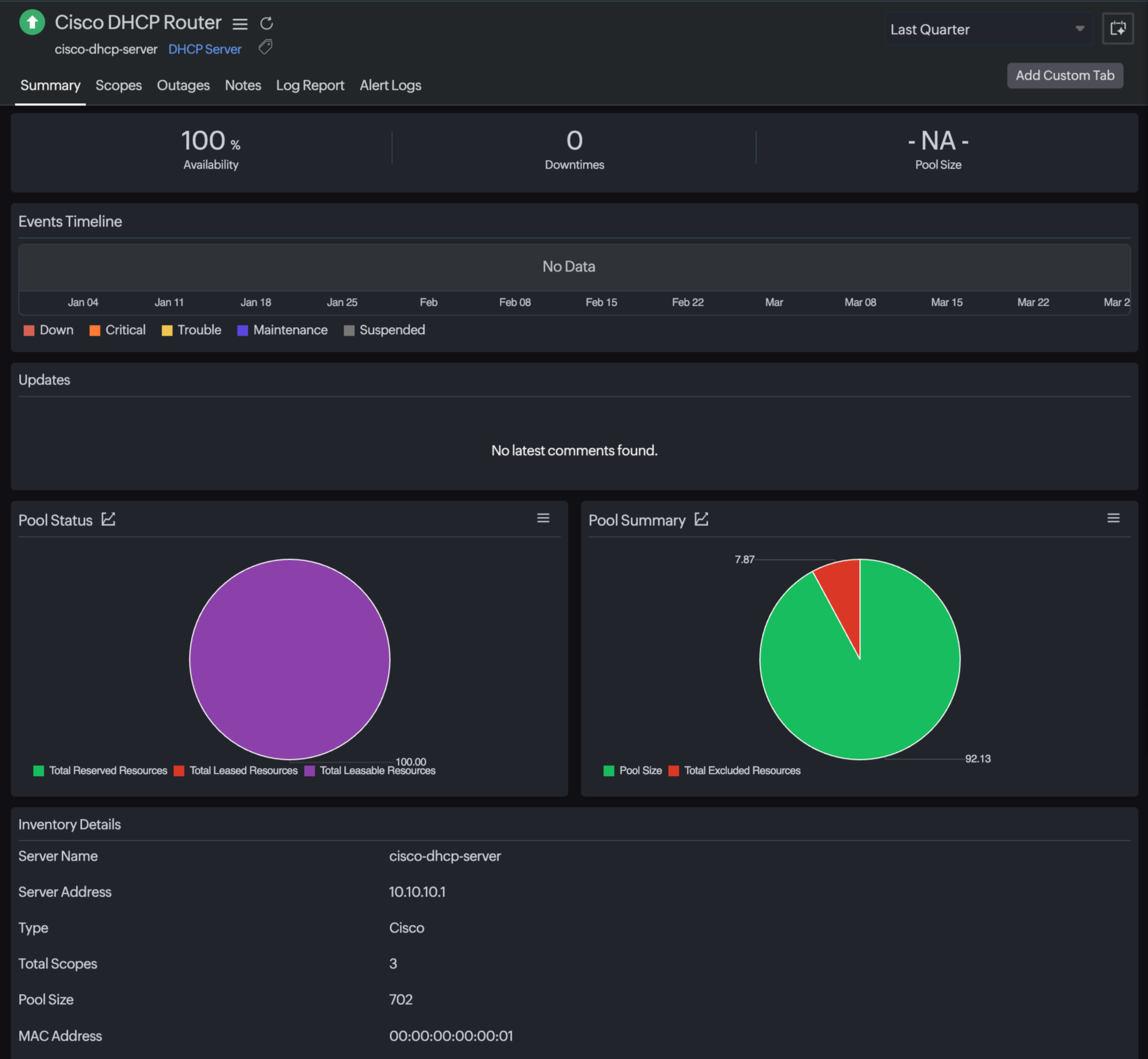
The Summary tab provides an at-a-glance view of server-level availability and overall pool health. The following metrics appear at the top of the Summary view.
| Metric name | Description | Unit |
|---|---|---|
| Availability | The percentage of time the DHCP server was reachable and operational during the selected time period. | % |
| Downtimes | The total number of downtime events recorded for the DHCP server during the selected time period. | Count |
| Pool Size | The total number of IP addresses in the DHCP pool across all scopes. Displays NA if no pool data is available. | Count |
Pool metrics
The Pool Status and Pool Summary charts on the Summary tab visualize how IP addresses are distributed and consumed across the entire server.
Pool Status
| Metric name | Description | Unit |
|---|---|---|
| Total Available Resources | The total number of IP addresses available for lease across all scopes. This is the effective assignable pool after subtracting excluded and reserved addresses. | Count / % |
| Total Leased Resources | The total number of IP addresses currently leased to clients across all scopes. | Count / % |
| Total Reserved Resources | The total number of IP addresses reserved for specific devices (for example, printers or servers with fixed IPs) across all scopes. | Count / % |
Pool Summary
| Metric name | Description | Unit |
|---|---|---|
| Pool Size | The total number of IP addresses defined across all scopes on the server, including excluded addresses. | Count / % |
| Total Excluded Resources | The total number of IP addresses explicitly excluded from distribution by the DHCP server administrator. | Count / % |
The percentage values shown in the Pool Status and Pool Summary charts are calculated relative to the total pool size of the server.
Inventory details
The Inventory Details section at the bottom of the Summary tab provides static configuration information about the DHCP server. These values are discovered at the time of monitor creation and updated on each poll cycle.
| Field | Description |
|---|---|
| Server Name | The hostname of the DHCP server as configured in Site24x7. |
| Server Address | The IP address used to communicate with the DHCP server (for example, 10.10.10.1). |
| Type | The vendor or platform type of the DHCP server (for example, Cisco, Windows, etc.). |
| Total Scopes | The total number of DHCP scopes configured on the server. |
| Pool Size | The aggregate count of IP addresses across all scopes on the server. |
| MAC Address | The MAC address of the network interface on the DHCP server. |
Scope metrics
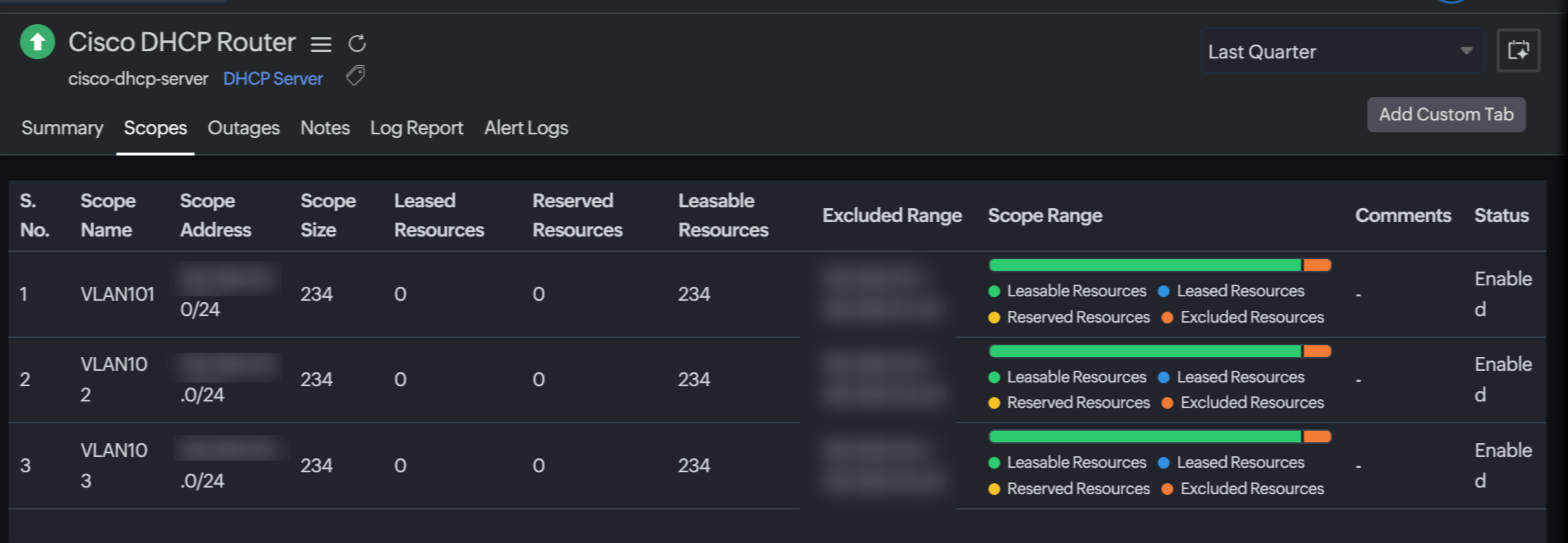
The Scopes tab lists all configured DHCP scopes on the server. Each row in the table represents a single scope and displays the following metrics.
| Metric name | Description | Unit |
|---|---|---|
| Scope Name | The name assigned to the DHCP scope (for example, VLAN101, VLAN102). | NA |
| Scope Address | The network address and subnet mask that defines the IP address range of the scope (for example, 192.168.1.0/24). | NA |
| Scope Size | The total number of IP addresses in the scope, determined by the subnet mask. | Count |
| Leased Resources | The number of IP addresses in this scope that are currently leased to client devices. | Count |
| Reserved Resources | The number of IP addresses in this scope that are statically reserved for specific client devices based on MAC address. | Count |
| Available Resources | The number of IP addresses in this scope that are available to be leased to client devices. | Count |
| Excluded Range | The IP address range within the scope that has been excluded from dynamic assignment by the administrator. | — |
| Scope Range | A visual bar chart indicating the proportion of leasable, leased, reserved, and excluded resources within the scope. Color coding: green implies available, blue implies leased, yellow implies reserved, and orange implies excluded. | — |
| Status | The current operational state of the scope on the DHCP server. Possible values are Enabled or Disabled. | — |