
Go application monitoring in Kubernetes
Site24x7 APM Insight for Kubernetes enables automatic monitoring of Go applications running in Kubernetes clusters using Extended Berkeley Packet Filter (eBPF) technology. This approach allows you to monitor performance without modifying application code or injecting language-specific agents.
This guide explains the architecture, components, and monitoring workflow for Go applications in Kubernetes.
Common terms
- DaemonSet: Ensures that one agent pod automatically runs on every node in the cluster, providing consistent visibility into all application pods.
- /host/proc mounts: The host’s /proc filesystem is made accessible inside the agent container so it can read host-level process information.
- Cgroup mappings: Identify which container or pod a process belongs to.
- Inode: A unique filesystem identifier that represents a file’s metadata and location.
- eBPF uprobe: A user-space probe used to trace function calls in application binaries without modifying code.
- Instrumentor: A lightweight process that loads eBPF programs and collects runtime telemetry.
- Position-independent executables (PIE): An executable that can run at any memory address, enabling security features like Address Space Layout Randomization (ASLR).
- OverlayFS: A layered filesystem that combines read-only image layers with a writable layer to form a single unified view.
- Helm charts: Pre-packaged templates that simplify the installment and management of Kubernetes applications.
Architecture diagram for Go app monitoring in Kubernetes
The architecture diagram below provides an overview of how monitoring works in a Kubernetes setup.
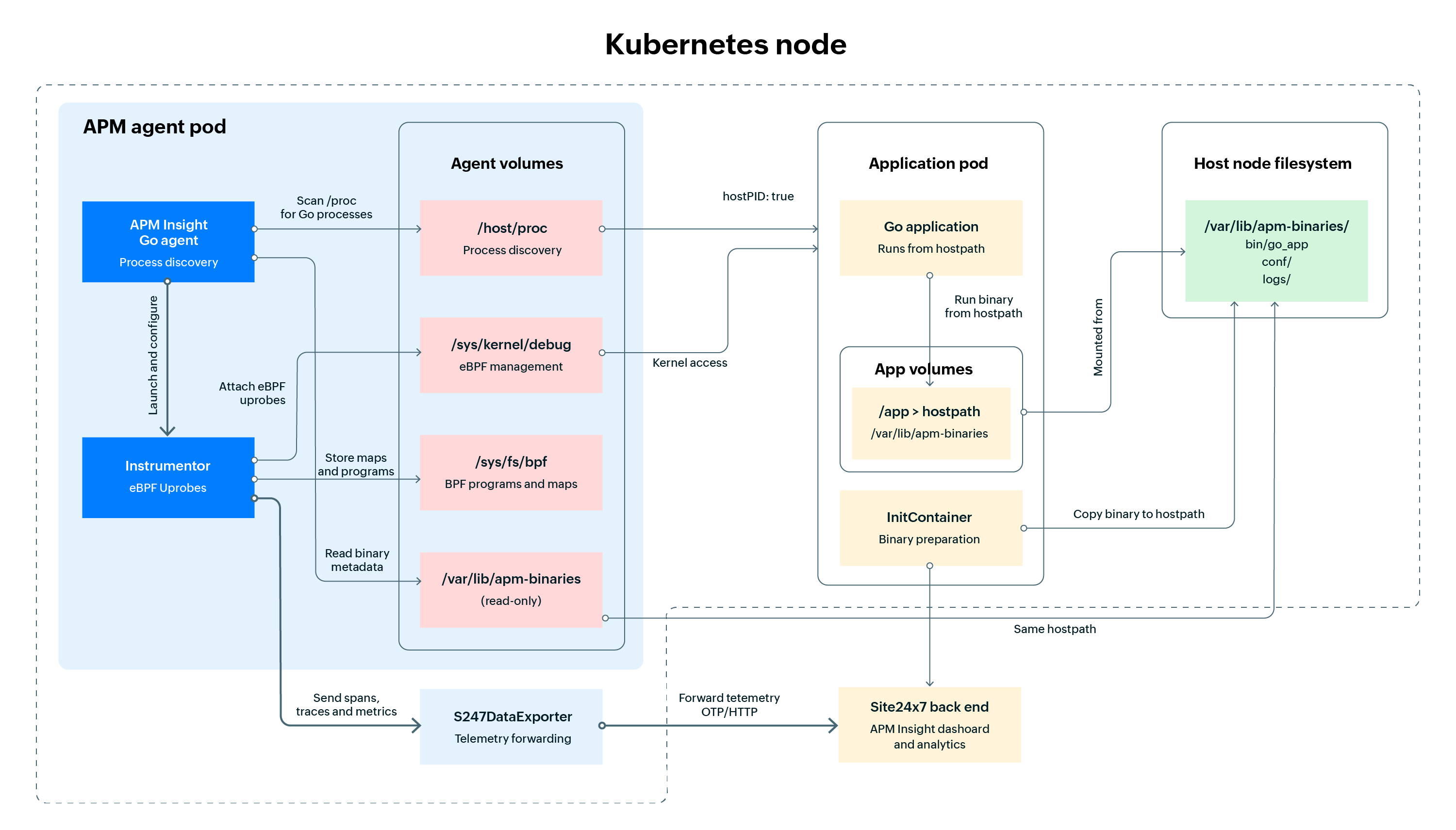
Your Go applications run inside the Application Pods. A dedicated APM Insight agent pod handles all monitoring tasks on each node, deployed as a DaemonSet. Let’s explore the components shown in the diagram in detail.
APM Insight Go agent
The APM Insight Go agent acts as the controller and orchestrator of the entire system. It discovers running Go processes across all pods on the node using host process identifier (PID) and /host/proc mounts. It extracts metadata including command-line arguments, environment variables, container IDs, pod associations, and cgroup mappings.
The agent applies user-defined rules to determine which applications to instrument. It resolves binary paths from a shared hostPath to ensure stable inode or device numbers for eBPF uprobe attachment. Finally, it manages the life cycle of instrumentor processes as pods appear, restart, or terminate.
APM Insight instrumentor
The instrumentor loads eBPF programs into the kernel and attaches uprobes to selected Go functions. It captures function calls, return values, latency, errors, and execution paths without modifying the application or requiring the injection of libraries. The instrumentor also performs symbol resolution, runtime offset mapping, and function address calculations for position-independent executables (PIE). Finally, it streams lightweight telemetry events to the user-space collector via a ring buffer.
S247DataExporter
The S247DataExporter converts eBPF events into standard OpenTelemetry spans and metrics. It enriches the data with Kubernetes metadata, including pod name, namespace, node, container ID, IP address, and labels. The exporter then sends the telemetry to the Site24x7 back end using OpenTelemetry Protocol (OTLP), employing batching, retry logic, and back pressure management to ensure reliable delivery.
Shared volumes and host access
A shared hostPath volume (e.g., /var/lib/apm-binaries) stores application binaries on the node’s real filesystem. This setup ensures stable inode and device numbers, bypassing the inconsistencies introduced by OverlayFS in most container runtimes. Agent pods also access host resources, such as /proc, /sys/kernel/debug, and /sys/fs/bpf, to discover processes and manage eBPF programs. Application pods run binaries directly from the shared hostPath, ensuring that the kernel sees the exact binary that the agent instruments.
To summarize the overall monitoring workflow, the DaemonSet ensures that one agent pod runs on each node and automatically adjusts as nodes are added to or removed from the cluster. The Go agent discovers running processes and launches an instrumentor for every eligible Go application. The instrumentor attaches eBPF probes to capture performance data with minimal impact on performance. Finally, the S247DataExporter forwards telemetry, including traces, metrics, and errors, to the Site24x7 back end for visualization and analysis.
Key benefits of this architecture
This architecture is fully event-driven and adaptive, automatically discovering new pods, re-attaching probes during rolling updates or restarts, and requiring no changes to CI/CD pipelines, application images, helm charts, or startup scripts.
Supported Kubernetes platforms
Site24x7 APM Insight for Kubernetes is supported on the following managed Kubernetes platforms:
| Kubernetes platform | Node OS and kernel requirement | Additional considerations |
|---|---|---|
| EKS (Amazon Elastic Kubernetes Service) | Amazon Linux 2 (kernel 5.10+) | - |
| GKE (Google Kubernetes Engine) | Ubuntu or Container-Optimized OS (kernel 5.10+) | Requires host PID (access to host process namespace) and privileged mode for eBPF probe attachment |
| AKS (Azure Kubernetes Service) | Ubuntu (kernel 5.10+) | Supports Azure CNI or Kubenet networking |
Before deployment, verify that your provider’s security policies allow privileged pods and hostPath mounts, which are required for proper eBPF instrumentation and process discovery.
Best practices for Go app monitoring in Kubernetes
To ensure smooth and reliable monitoring of your Go applications in Kubernetes, follow these best practices:
- Use a dedicated namespace: Deploy the monitoring agent in a separate monitoring namespace to keep it isolated from your application workloads.
- Set appropriate resource limits: Assign CPU and memory limits based on your cluster size to prevent resource contention and ensure stable agent performance.
- Label your nodes: Apply node labels and selectors so that the agent runs only on the nodes you intend to monitor.
- Pin image versions: Use fixed image tags instead of the latest in production environments to avoid unexpected updates or behavior changes.
- Monitor agent health: Set up alerts to notify you of DaemonSet pod failures, restarts, or any fluctuations in agent health.
- Update the agent regularly: Keep the agent version up to date to benefit from the latest fixes, enhancements, and security improvements.
- Validate changes in staging: Test new agent versions or configuration changes in a staging environment before deploying them to production.
- Use consistent binary names: Ensure that your Go application binaries follow predictable and consistent naming conventions across environments to avoid discovery issues.
- Verify hostPath permissions: Confirm that the /var/lib/apm-binaries directory has the correct permissions (755) so the agent can access binaries without errors.
- Ensure network access: If you're using Kubernetes network policies, make sure the agent has outbound access to the Site24x7 endpoints so it can send metrics and trace data successfully.
Frequently asked questions
1. Why do I need hostPath? Can't the agent access binaries directly from the containers?
Containerized applications often run on OverlayFS, where binaries are stored across multiple filesystem layers. This results in inconsistent inode and device numbers, which prevents eBPF uprobes from reliably attaching to functions.
Using a hostPath volume provides:
- A consistent, stable view of the binary.
- Matching inode or device numbers for both the application and the agent.
- A workaround that avoids OverlayFS limitations entirely.
2. Will the agent monitor all the Go processes running on my machine?
No. The agent discovers all processes on the machine, but it only instruments the ones explicitly listed in the GO_APPS (Go application) environment variable. Instrumentation is fully controlled by your configuration.
3. Does the agent modify or alter my Go application binary?
No. The agent instruments the application in memory at runtime using eBPF uprobes that attach to the runtime process at the kernel level. The application binary on disk remains unchanged.
4. What happens if my application restarts?
The agent includes an orchestrator that runs every 30 seconds. When a restart (PID change) is detected, it automatically:
- Stops the existing instrumentor.
- Identifies the new process PID.
- Launches a new instrumentor.
- Reattaches eBPF probes to the new process.
5. Can I monitor applications running in different Kubernetes namespaces?
Yes. The DaemonSet runs with hostPID. When configured to true, it grants visibility into all processes on the node, regardless of their namespace. Ensure that all required process names are included in your GO_APPS configuration.
6. What is the overhead of using eBPF-based instrumentation?
eBPF instrumentation is designed to be lightweight and efficient, monitoring with minimal impact on system performance.
Typical overhead:
- CPU: < 5%
- Memory: Minimal (small eBPF maps in kernel space)
- Latency: Microseconds per traced function
Actual overhead varies with application load and the number of instrumented functions.
7. Is this solution supported on EKS, GKE, and AKS?
Yes, Site24x7 APM Insight for Kubernetes is supported on all three managed Kubernetes platforms with some platform-specific requirements.
Related articles