
Go application monitoring in Docker using eBPF
Site24x7 APM Insight enables automatic monitoring of Go applications running inside Docker containers using extended Berkley Packet Filter (eBPF) technology. This approach allows you to monitor application performance without modifying your source code.
This guide walks you through the complete setup, configuration, and troubleshooting steps required to monitor your Go applications running in Docker.
The monitoring workflow in Docker
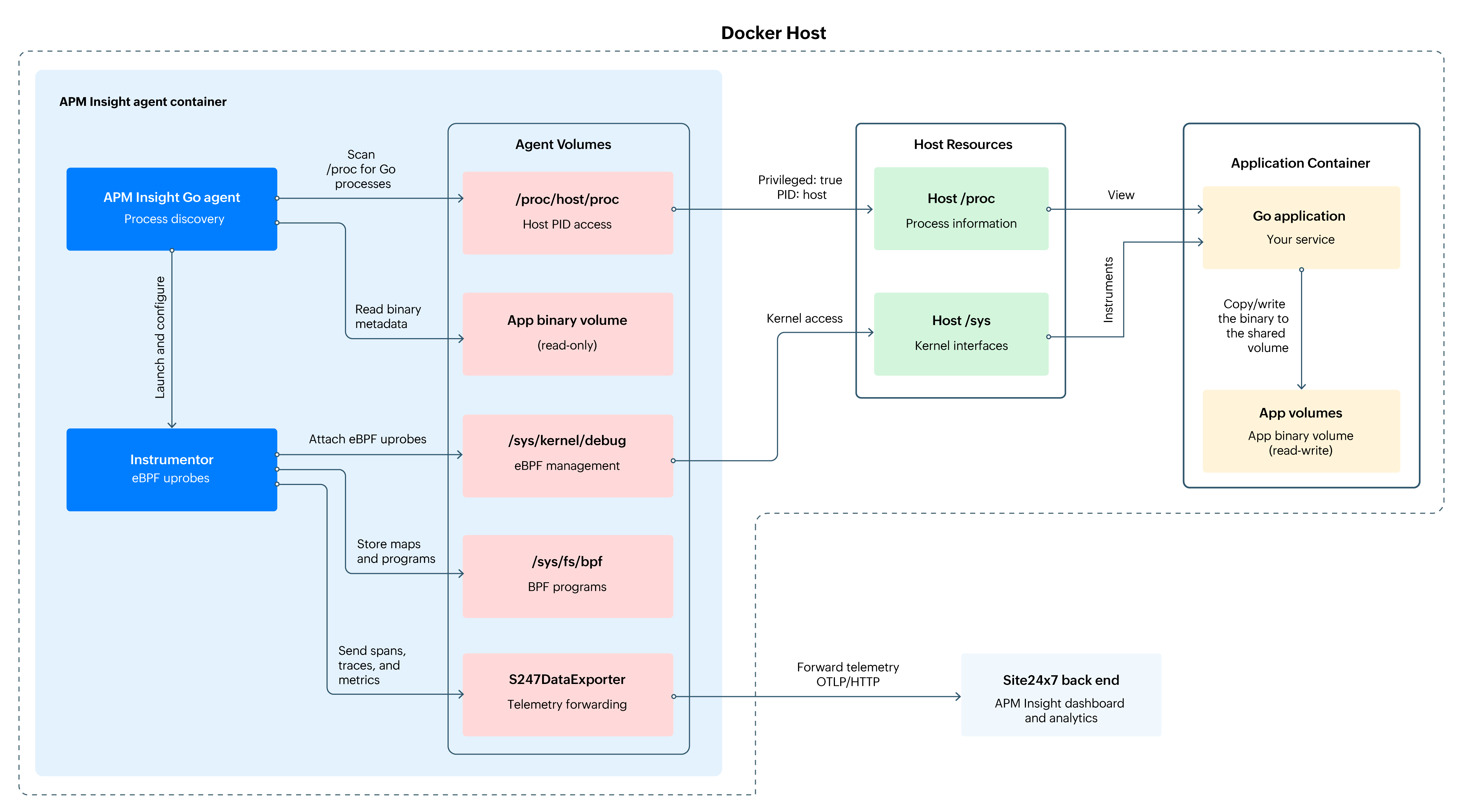
The diagram below provides an overview of how monitoring works within a Docker setup using a sidecar container pattern with shared volumes and a host process identifier (PID) namespace.
Your Go application runs inside the Application Container (labelled Go application in the diagram) while a separate helper container (the APM Insight agent container) handles all the monitoring work. Inside this APM Insight agent container, the APM Insight Go agent finds your Go processes. The Instrumentor (a small component that adds monitoring hooks to your app to collect performance data without changing your code) attaches lightweight eBPF probes to observe how your application behaves, and the S247DataExporter sends the collected data to the Site24x7 back end.
Both containers share an App binary volume (a shared folder that holds your app’s executable files), which simply lets the agent read your application's binary without modifying it. The agent also uses access to the host’s /proc and /sys folders (shown as Host Resources) to understand what’s running on the machine. All of this runs in the background and provides performance insights without requiring any changes to your application.
Prerequisites
Before you start, make sure the following requirements are in place:
- Docker Engine 20.10 or later
- Docker Compose v2 or later
- Linux kernel 5.8 or higher (required for eBPF support)
- A valid Site24x7 APM license key
- A Go application container running Go 1.18 or later (recommended)
Set up monitoring for your Go application in Docker
Use the steps below to quickly configure automatic monitoring for your Go application running in Docker.
Step 1: Prepare your application container
The Site24x7 APM container needs access to your Go binary to perform monitoring. Ensure your application binary is accessible through the shared volume.
Modify your existing docker-compose.yml to expose the Go application binary through a shared volume.
services:  your-app:
    image: your-go-application:latest
    container_name: your-app-container
    # Your application configuration
    ports:
      - "8080:8080"  # Your application ports

    # Create shared volume for binary access
    volumes:
      - app_binary:/app:ro  # Mount application directory as read-only # Define shared volume (will be used by APM container)
volumes:
  app_binary:
 driver: local
Step 2: Add Site24x7 APM Insight container
Next, add the Site24x7 APM Insight service to your docker-compose.yml.
services:
  # Your existing application service
  your-app:
    image: your-go-application:latest
    container_name: your-app-container
    ports:
      - "8080:8080"
    volumes:
      - app_binary:/app:ro
  # Site24x7 APM Insight service
  site24x7-apm:
    image: site24x7/apminsight-go-agent:latest
    container_name: site24x7-apm-agent

    # Required: Privileged mode for eBPF operations
    privileged: true

    # Required: Host PID namespace for process discovery
    pid: host

    # Required environment variables
    environment:
      # REQUIRED: Your Site24x7 license key
      - S247_LICENSE_KEY=

      # REQUIRED: Go applications to monitor
      # Format: "AppName=ProcessName:Port1,Port2;AnotherApp=ProcessName:Port;"
      # Replace with your application details
      - GO_APPS=MyGoApp=your-app-binary:8080

    # Volume mounts
    volumes:
      # Required: Host /proc access for eBPF (read-only)
      - /proc:/host/proc:ro

      # Required: Shared volume with your application (read-only)
      - app_binary:/app_runtime:ro

    # Restart policy
    restart: unless-stopped

# Shared resources
volumes:
  app_binary:
 driver: local
Step 3: Configure environment variables
Create a ENV file in the same directory as your docker-compose.yml.
# Site24x7 License Key (REQUIRED)
S247_LICENSE_KEY=your_actual_license_key_here
# Go Applications to Monitor (REQUIRED)
# Format: "AppName=ProcessName:Port1,Port2,Port3;AnotherApp=ProcessName:Port;"
#
# Examples:
#   Single app with one port:
#     GO_APPS=WebAPI=mywebapi:8080
#
#   Single app with multiple ports:
#     GO_APPS=WebAPI=mywebapi:8080,8443,9090
#
#   Multiple apps:
#     GO_APPS=WebAPI=mywebapi:8080;AdminAPI=adminapi:9000;WorkerService=worker:8081
#
GO_APPS=MyGoApp=your-process-name:8080
The GO_APPS format is used to map your Go applications for automatic discovery and monitoring. This format includes the following fields:
- ProcessName: The exact name of your Go binary/process as it appears in the container.
- Port(s): The port(s) that your application listens on (used for application identification).
- AppName: A friendly name for your application (will appear in the Site24x7 dashboard).
Security considerations
The following guidelines describe the security-related aspects of the monitoring setup:
- Privileged mode: This mode is required for eBPF operations. The container requires elevated permissions to attach and manage eBPF probes safely.
- Host PID namespace: This enables process discovery across containers. The APM agent can view all host processes but only monitors the ones you specify in the configuration.
- Read-only volumes: Application binary volumes are mounted with the read-only (:ro) option to prevent any modifications and ensure secure access.
Advanced configurations
Use these advanced configurations when you need to monitor multiple Go applications or deploy the APM agent in more complex Docker environments, such as Swarm or Stack mode.
Monitoring multiple Go applications
If your environment contains multiple Go containers, you can configure the APM agent to monitor all of them.
services:
# Application 1
  user-service:
    image: your-registry/user-service:latest
    container_name: user-service
    ports:
      - "8081:8081"
    volumes:
      - user_app:/app:ro
  # Application 2
  order-service:
    image: your-registry/order-service:latest
    container_name: order-service
    ports:
      - "8082:8082"
    volumes:
      - order_app:/app:ro
  # Site24x7 APM (monitors both)
  site24x7-apm:
    image: site24x7/apminsight-go-agent:latest
    container_name: site24x7-apm-agent
    privileged: true
    pid: host

    environment:
      - S247_LICENSE_KEY=${S247_LICENSE_KEY}
      # Monitor both applications
      - GO_APPS=UserService=user-service:8081;OrderService=order-service:8082
    volumes:
      - /proc:/host/proc:ro
      # Mount both application volumes
      - user_app:/app_runtime/user:ro
      - order_app:/app_runtime/order:ro
volumes:
  user_app:
    driver: local
  order_app:
 driver: local
Deployment in Docker Swarm/Stack
When deploying in Swarm mode (cluster of machines, so the APM agent must run on each one to monitor the entire cluster), set the APM agent to run on all nodes so every node is monitored.
version: '3.8'
services:
  your-app:
    image: your-go-application:latest
    deploy:
      replicas: 3
      placement:
        constraints:
          - node.role == worker
    volumes:
      - app_binary:/app:ro
  site24x7-apm:
    image: site24x7/apminsight-go-agent:latest

    # Required capabilities
    privileged: true

    deploy:
      mode: global  # Run on every node to monitor all applications
      placement:
        constraints:
          - node.platform.os == linux

    environment:
      - S247_LICENSE_KEY=${S247_LICENSE_KEY}
      - GO_APPS=${GO_APPS}

    volumes:
      - /proc:/host/proc:ro
      - app_binary:/app_runtime:ro
volumes:
  app_binary:
 driver: local
Related article
-
On this page
- The monitoring workflow in Docker
- Prerequisites
- Set up monitoring for your Go application in Docker
- Step 1: Prepare your application container
- Step 2: Add Site24x7 APM Insight container
- Step 3: Configure environment variables
- Security considerations
- Advanced configurations
- Monitoring multiple Go applications
- Deployment in Docker Swarm/Stack