
eBPF-APM
eBPF-APM in Site24x7 is a modern observability approach that offers a simple way to monitor your application performance using eBPF at the Linux kernel level. Extended Berkeley Packet Filter (eBPF) is a technology built into the Linux kernel that allows you to observe what’s happening inside the system in real time. It can track events such as process activity, network calls, and system operations without changing application code or modifying the kernel itself.
In the context of eBPF-APM, eBPF collects performance data directly from the operating system, allowing for the measurement of metrics such as latency, throughput, and errors with minimal overhead. There’s no need for code changes or complex instrumentation because eBPF-APM automatically collects kernel-level metrics, giving you real-time visibility into how your applications are performing with no overhead.
In simple terms, eBPF is the technology that helps eBPF-APM monitor applications efficiently without traditional APM agents.
Supported applications: Java, Node.js, and Python.
Supported databases: MySQL, Redis, and Memcached.
Use case
In large e-commerce applications, multiple microservices such as search, cart, payments, and inventory run together on Linux servers. Managing monitoring across many services and technologies may require additional configuration and coordination.
In these situations, eBPF-APM simplifies monitoring by automatically observing all running services without requiring separate configurations or code changes. By using eBPF in the Linux kernel, eBPF-APM collects performance data for all services from a single point. It also maps service dependencies and helps teams quickly identify which service is causing latency or performance issues, making troubleshooting faster and easier.
eBPF-APM vs. traditional APM
The table below compares eBPF-APM and traditional APM to help you understand their key differences and determine the most suitable approach for your needs.
| Comparison criteria | eBPF-APM | Traditional APM |
|---|---|---|
| Installation | Enabled at the host level using a single agent. | Requires installing language-specific agents for each application. |
| Code changes | No code changes required. | Requires configuration changes or runtime arguments. |
| Application restart | Not required. | Often required during agent installation or configuration changes. |
| Visibility level and metrics | Collects kernel-level metrics using eBPF, providing system- and process-level visibility. | Collects deep application-level metrics through code instrumentation, providing detailed transaction and method-level visibility. |
| Recommended for | Mixed environments, for containers, quick visibility. | Detailed request tracking, and identifying issues within the application code. |
How to enable eBPF-APM in Site24x7
Here are the prerequisites and steps to enable eBPF-APM in the Site24x7 console.
Prerequisites
- The Linux kernel version must be 4.16 or later.
- The Site24x7 Full-Stack Agent and Auto Profiler must be installed with root user privileges.
Steps to enable eBPF-APM
- Enable eBPF-based APM by navigating to Admin > Server Monitor > APM Insight Process Monitoring Rules.
- Create a new rule or edit an existing one.
- Select the eBPF option in the Monitoring Agent field.
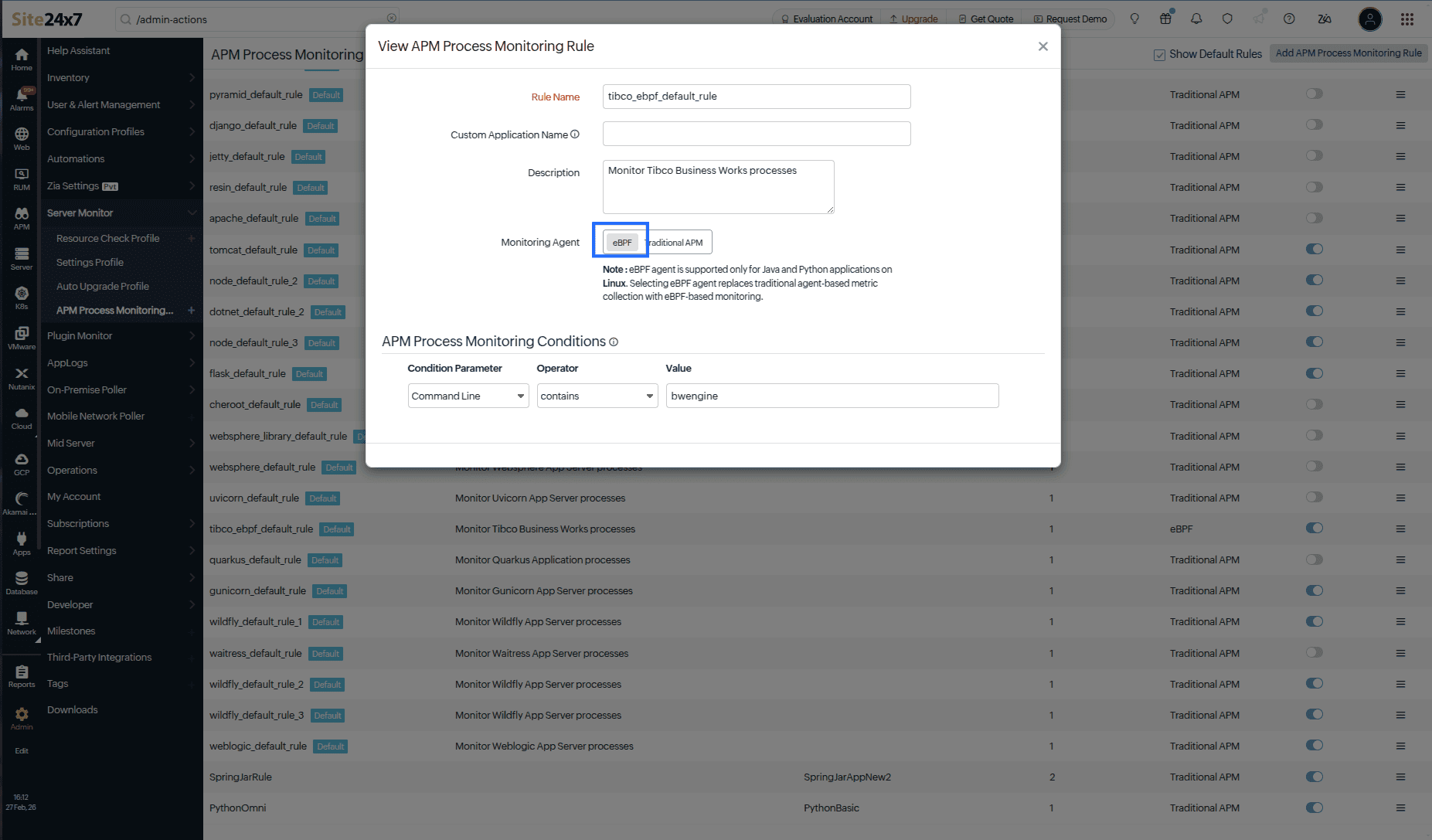
- Once done, click Save to apply the changes.
- Restart your application.
Now, Site24x7 automatically monitors applications that match this rule without requiring any code changes.
Benefits of eBPF-APM
eBPF-APM offers several practical advantages for application monitoring. Here are its key benefits:
- Automatic discovery: Automatically monitors all applications, including unknown workloads, without prior configuration.
- No code changes: Does not require code changes, ensuring secure and non-invasive monitoring.
- Quick setup: Enable monitoring quickly; it requires no code changes or redeploying services.
- Efficient monitoring: Collects performance metrics with no noticeable impact on application performance.
Frequently asked questions
-
Can eBPF-APM monitor Kubernetes workloads?
Yes. eBPF-APM can observe containerized applications at the host level and help map service dependencies in Kubernetes environments. -
What kind of metrics does eAPM collect?
eBPF-APM collects application-level metrics without requiring any code instrumentation. -
What happens if the Linux kernel does not support eBPF?
eBPF-APM will not function if the kernel version or configuration does not support eBPF. Ensure the system meets the minimum kernel requirements. -
How do I uninstall eBPF-APM?
eBPF-APM is part of the Full-Stack agent and cannot be uninstalled separately. To stop eBPF-APM, disable the APM Insight Process Monitoring Rule or uninstall the Full-Stack agent from the host. -
What happens if I switch from eBPF-APM to traditional APM monitoring?
When you switch from eBPF-APM to traditional APM monitoring, Site24x7 will stop using eBPF and instead use platform-specific APM agents to monitor your applications.