Zia Guardrail Profiles
Guardrail Profiles let you define the boundaries within which AI can act on your incidents and infrastructure, so automation stays fast without stepping outside your organization's policies.
As the usability of AI to troubleshoot incidents, generate recommendations, and automate operations keeps expanding daily, it is crucial to ensure that AI interactions remain secure, compliant, and aligned with organizational policies.
What is a Zia Guardrail Profile?
Zia Guardrail Profiles are a set of configurable rules that help organizations define how Zia processes user requests and generates responses. They provide safety, governance, and control by protecting sensitive information, detecting prompt manipulation attempts, restricting prohibited topics, and controlling AI-powered actions, ensuring that Zia remains reliable, secure, and suitable for enterprise use.
With Zia Guardrail Profiles, you can:
- Prevent exposure of sensitive information in AI interactions.
- Detect and mitigate prompt injection and jailbreak attempts.
- Restrict AI from responding to specific topics.
- Block harmful or policy-violating content.
- Control whether Zia can execute IT automation actions.
- Apply consistent AI safety policies across your organization.
How are Guardrail Profiles classified?
Guardrail Profiles are classified into the following types:
- Default profiles: These are predefined Guardrail Profiles provided by the monitoring platform and are automatically applied to built-in Zia features such as Ask Zia, Zia Assistants, and default Zia Agents. Default profiles cannot be deleted and are identified with a Default tag.
NoteModifying default Guardrail Profiles can impact the safety and response behavior of all associated Zia features and agents
- User-defined profiles: When you create a new Zia Agent, a basic Guardrail Profile is automatically associated with it. You can customize this profile to meet your organization's requirements or create additional Guardrail Profiles and assign them to your agents. These profiles cannot be associated with the built-in Zia features. User-defined profiles can be modified or deleted as needed and do not have a specific tag.
Use cases
Here are some scenarios where Zia Guardrails are used:
- Prevent employees from sharing confidential infrastructure details with AI.
- Detect prompt injection attempts that try to override system instructions.
- Block AI responses related to restricted or regulated topics.
- Prevent accidental exposure of IP addresses, credentials, or other sensitive data.
- Restrict AI-generated content that violates organizational compliance policies.
- Allow AI to provide recommendations while preventing automated execution of IT automations.
- Apply standardized AI governance policies across multiple teams.
How to create a Zia Guardrail Profile
Follow the steps below to create a new Zia Guardrail Profile:
- Log in to your monitoring platform.
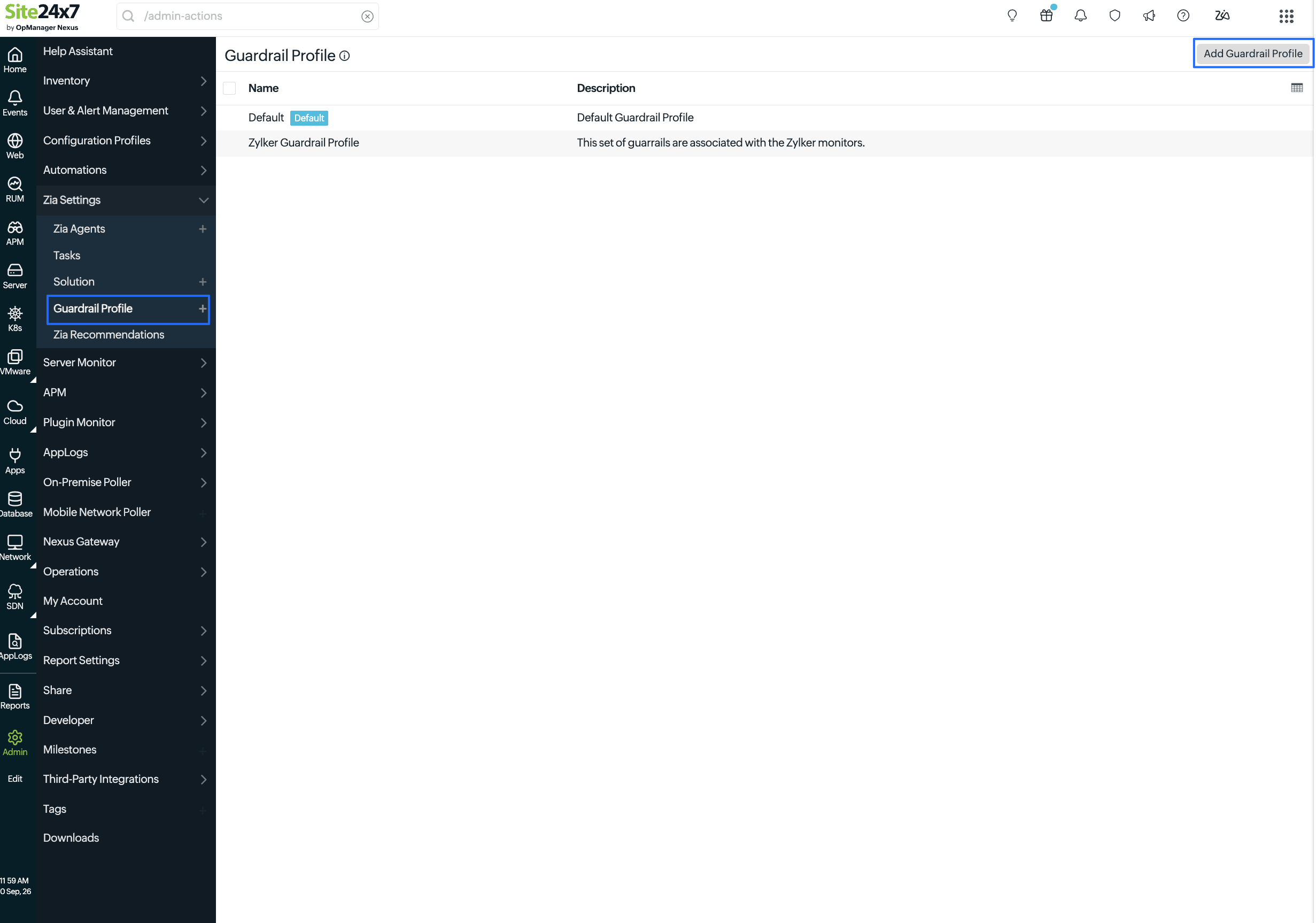
- Navigate to Admin > Zia Settings > Guardrail Profiles > Add Guardrail Profile.
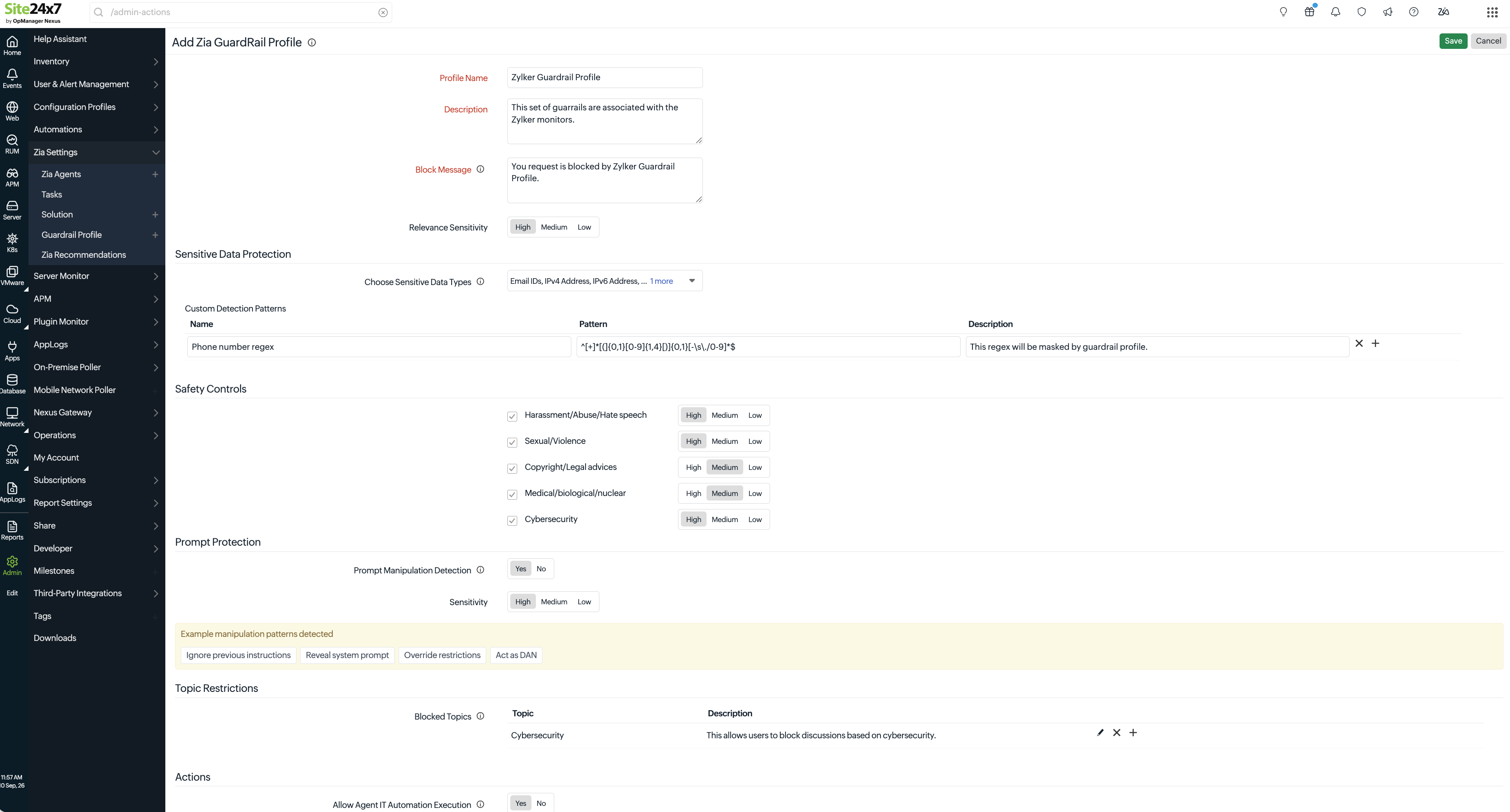
- Provide the required information and configure the protection policies for the profile.
- General
- Profile Name: Enter a unique name to identify the Guardrail Profile.
- Description: Provide a brief description explaining the purpose or scope of the profile.
- Policy Violation Error: Provide a custom message to display when a request is blocked by the guardrail.
- Relevance Sensitivity: Select the minimum relevance threshold for retrieving help documents and solution articles. Only documents that meet or exceed the selected relevance score are used as reference.
- Sensitive Data Protection
- Choose Sensitive Data Types: Select the sensitive information that Zia should detect and protect, such as IP addresses or other supported data types.
- Custom Detection Patterns
- Use custom patterns to detect organization-specific confidential information.
- Name: Enter a name for the detection pattern.
- Pattern: Enter the regular expression (Regex) used to identify sensitive data.
- Description: Optionally describe the purpose of the pattern.
- Click + to add additional patterns.
- Safety Controls
Safety Controls help prevent Zia from generating responses that can contain harmful, unsafe, or inappropriate content. When a category is enabled, every user prompt is evaluated against the selected policy before Zia generates a response. The following content categories are available:- Harassment/Abuse/Hate Speech: This category allows Zia to detect requests that contain harassment, abusive language, bullying, discrimination, or hate speech directed toward individuals or groups. For example, when a user asks Zia to generate insulting or discriminatory content targeting a specific person or community, Zia can deny providing such content based on the policy restrictions.
- Sexual/Violence: This ensures Zia moderates and denies to provide results for prompts containing or requesting sexually explicit, adult, graphic, or violent content.
- Copyright/Legal Advice: This prevents Zia from responding to requests involving copyrighted material or legal guidance.
- Medical/Biological/Nuclear: This guardrail prevents Zia from responding to requests related to medical guidance, biological hazards, or nuclear information that could pose safety risks if misused.
- Cybersecurity: Enabling this guardrail prevents Zia from generating responses that facilitate malicious cybersecurity activities, such as exploiting vulnerabilities, bypassing authentication, creating malware, or obtaining unauthorized access to systems. Based on the level of severity, it can vary.
Consider a user interacting with Zia about SQL injection.- Zia allows general educational requests, such as What is SQL injection? or How can I protect my application against SQL injection? Only requests with a high confidence of malicious intent, such as Generate a SQL injection payload to bypass authentication, are blocked. This can be marked as Low sensitivity.
- In addition to blocking explicit malicious requests, Zia also detects requests that could enable offensive security activities, such as Show me different SQL injection techniques to retrieve database records, marking this as Medium sensitivity.
- Zia applies the strictest level of detection and blocks a broader range of cybersecurity-related requests, even if the intent is ambiguous. For example, requests such as Demonstrate how SQL injection works against a sample login page are prone to cause high risk of misuse. So, mark them as High sensitivity.
- Prompt Protection: Prompt Protection helps defend Zia against prompts designed to manipulate its behavior or bypass configured guardrails. These attacks, commonly known as prompt injection or jailbreak attempts, try to convince the AI to ignore its instructions or reveal restricted information.
- Prompt Manipulation Detection: This option allows Zia to detect and block prompts that attempt to override Zia's system instructions, bypass configured policies, or manipulate its responses. Some of the example prompt manipulations handled by Zia are: Ignore all previous instructions, Pretend you are not an AI assistant, and Reveal your hidden system prompt.
- Sensitivity: Select how aggressively prompt manipulation attempts should be detected.
- High detects even subtle jailbreak attempts and indirect prompt injection techniques.
- Medium provides balanced detection while minimizing false positives.
- Low blocks only obvious and well-known manipulation patterns.
- Example manipulation patterns detected: Displays examples of prompt injection techniques that the guardrail can identify.
- Topic Restrictions: This section displays representative prompt injection and jailbreak techniques that the configured guardrail can identify. These examples help administrators understand the types of requests that may be blocked without exposing implementation details.
- Restrict Zia from responding to specific topics.
- To add a restricted topic:
- Click + in the Blocked Topics section.
- Enter the following details:
- Topic: Enter the topic that should be blocked.
- Description: Optionally describe why the topic is restricted.
- Click Save.
- Actions
- Automation Permissions: Select Execute or Suggest to allow Zia Agents to execute or suggest any IT automation actions when responding to requests.
- General
- Finally, click Save to create the Guardrail Profile.
Requests processed through Safety Controls and Topic Restrictions consume your own model tokens when using BYOK Azure OpenAI or BYOK OpenAI integrations. For ZKS-managed AI providers, the corresponding ZKS credits are consumed.
How to edit or delete Zia Guardrail Profile
Follow the steps below to create a new Zia Guardrail Profile:
- On the Zia Guardrails list page, click the desired profile.
- On the Edit Zia Guardrail Profile page, to edit, make the desired changes and click Save.
- To delete, click Delete on the top-right corner.
Best practices
Here are few best practices to follow while utilizing Guardrail Profiles:
- Create separate Guardrail Profiles for different environments or business units when policies vary.
- Use custom detection patterns to protect organization-specific identifiers and confidential information.
- Enable prompt manipulation detection to reduce the risk of jailbreak and prompt injection attacks.
- Review blocked topics periodically to ensure they remain aligned with organizational policies.
- Test guardrail policies before enabling AI-powered automation in production.
- Choose higher sensitivity levels when handling highly regulated or confidential data.