
Discovered Devices
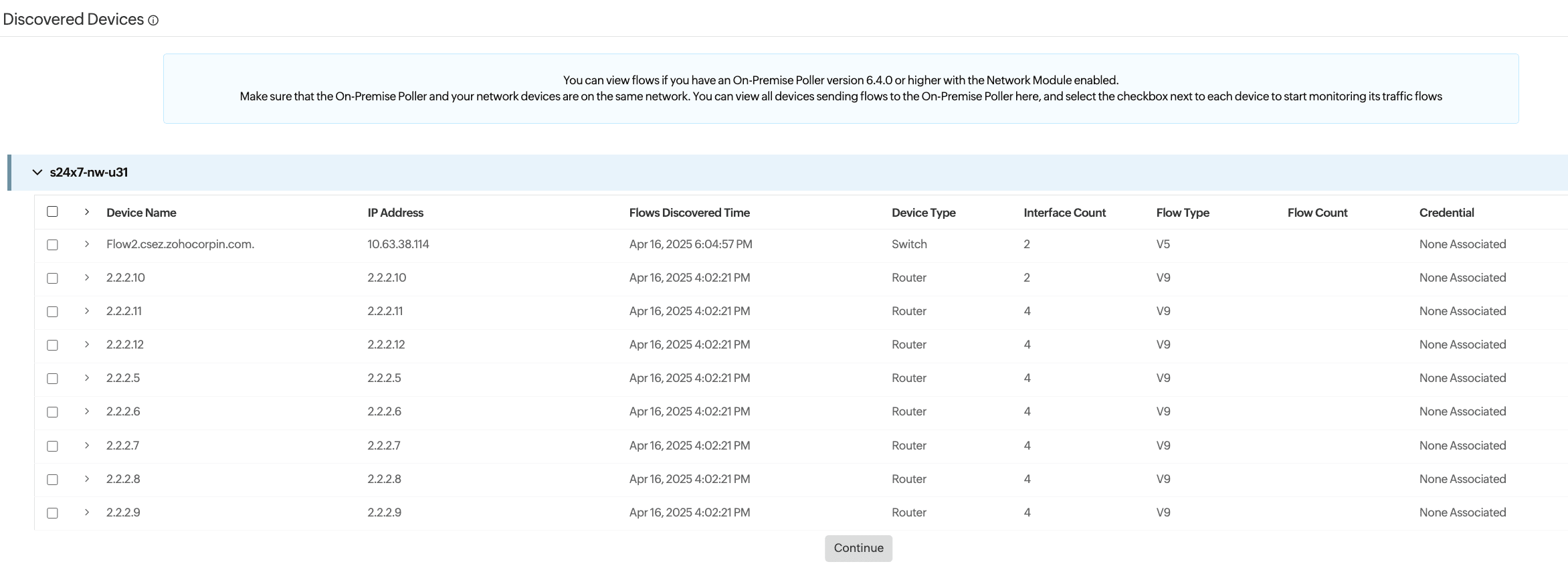
The Discovered Devices section lists all network devices that are sending flow data to the Site24x7 On-Premise Poller. This view helps you review and enable traffic monitoring for these devices with just a few clicks.
How it works
Site24x7 automatically discovers devices that are exporting flow data (NetFlow, sFlow, etc.) to your configured On-Premise Poller. These devices appear in this table with key details like:
- Device Name: The hostname or DNS of the discovered device
- IP Address: The IP address from which flow data was received
- Flows Discovered Time: Timestamp of when flows were first received
- Device Type: Identifies whether it is a router, switch, etc.
- Interface Count: Number of interfaces discovered on the device
- Flow Type: NetFlow version (for example, V5, V9)
- Flow Count: Total number of flow records received (not shown in the image, but implied by the column title)
- Credential: Indicates whether SNMP or other credentials have been associated with in-depth monitoring
Prerequisites
- The On-Premise Poller must be installed and active on the same network as the devices sending flow data.
- Devices must be properly configured to export flows to the poller’s IP address and port.
- Valid credentials must be available.
To view flows, ensure your On-Premise Poller is version 6.4.0 or above and has the Network Module enabled.
Steps to enable network traffic monitoring from Discovered Devices tab
- Log in to your Site24x7 account.
- Navigate to Network > NetFlow > Discovered Devices.
Select the devices that you wish to add for monitoring and click Continue to add the device as a monitor.
The initial steps—selecting an On-Premise Poller, configuring devices to export flows, and selecting a credential—are bypassed in this case, as the required details are already available.
Site24x7 will automatically start tracking device traffic when flows are received and add new interfaces automatically if it is enabled in Network > NetFlow > Settings page. Devices will only be displayed according to the On-Premise Poller if the option is disabled.