
Application Discovery and Dependency Mapping
The Application Discovery and Dependency Mapping (ADDM) feature in Site24x7 automatically detects discovered and available applications across your environment.
It visualizes how these application interact, offering you a complete view of service relationships and dependencies.
With ADDM, Site24x7 delivers an intelligent, visual representation of your complete application ecosystem. By correlating data from APM Insight agents, server agents, cloud sources, and network mapping, ADDM enables you to:
-
Discover hidden or unmonitored applications.
-
Visualize interdependencies between components.
-
Analyze connectivity patterns in real time.
Often, customers monitor only a subset of their services, unaware that additional components are present in their environment.
Through ADDM, you can visualize the complete topology of your applications, identify service dependencies, and gain actionable insights into the connectivity, status and availability—all within a unified flow map.
This feature is currently only available for Enterprise customers.
Prerequisites
To enable ADDM, ensure the following requirements are met:
-
Site24x7's Full-Stack Agent and APM Insight agent (for supported languages like Java, .NET, and Python) must be installed.
-
Smart Groups must be configured as ADDM and Smart Groups are interdependent. The Smart Group data is used to enrich ADDM visualizations.
-
Network Layer 2 Maps must be enabled through the Network module to collect the Layer 2 network topology information.
-
If you use Site24x7 to monitor your VMware infrastructure, then the entire topology will be integrated into the ADDM.
How it works
The ADDM flow map illustrates the relationships between applications and infrastructure components using three primary relationship types:
-
Runs On: Displays which application is running on which host or instance.
-
Connects to: Represents how services or applications communicate with one another.
-
Topology: Shows the complete hierarchical and dependency view of the environment.
Currently, the ADDM flow map provides application-wise dependency views, allowing you to identify how one service depends on another and where those dependencies exist.
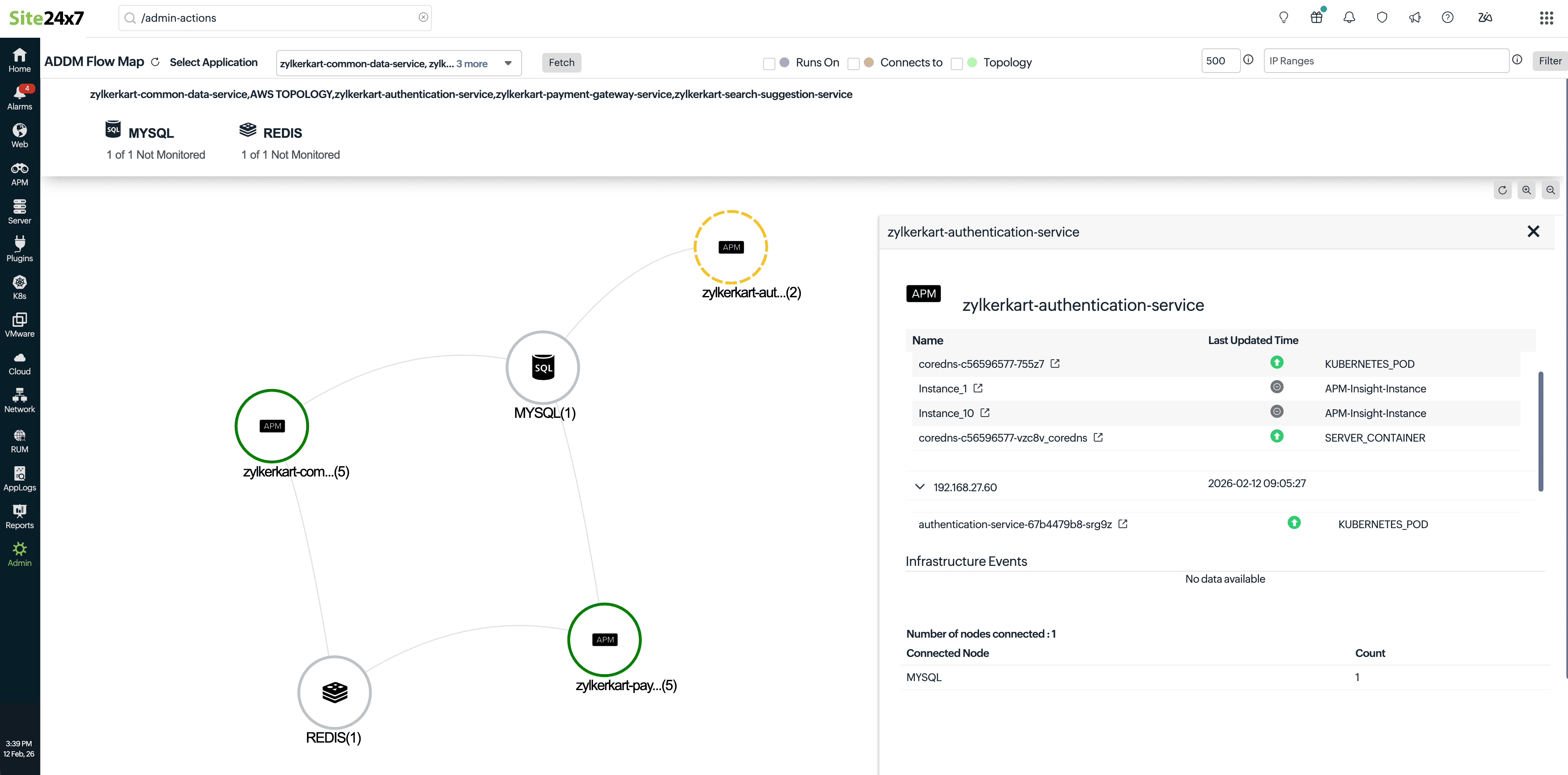
Within the flow map, each application monitored by Site24x7 is represented along with its current status (e.g., Down, Trouble, or Up). Associated infrastructure events and logs are consolidated into a single view, helping you quickly pinpoint service health and connectivity issues.
Key data sources for enabling ADDM
ADDM builds its dependency and topology insights from multiple data sources, which include:
-
Extended Berkeley Packet Filter (eBPF): The eBPF component is injected into the Site24x7 server agent to monitor TCP connections at the kernel level. It captures all inbound and outbound network connections, forming the foundational layer of dependency mapping.
-
APM Insight agents: APM Insight agents (e.g., Java, .NET, Python) act as another data source, contributing application-level dependency data through Application Dependency Maps (service maps). These service maps capture real-time transaction flows and component interactions within the application tier.
-
Network Layer 2 mapping: Using the On-Premise Poller, Site24x7 retrieves Layer 2 network topology details, which help in mapping the connectivity between servers and services.
-
Other modules and cloud sources: ADDM integrates with multiple infrastructure sources, including:
-
Cloud platforms: AWS, Azure, and GCP
-
Virtualization platforms: VMware and Nutanix platforms
-
Other Site24x7 infrastructure modules: Even across different environments, these data points are unified into a single consolidated dependency view.
-
Component clustering: ADDM intelligently groups related nodes in a single cluster view.
For example: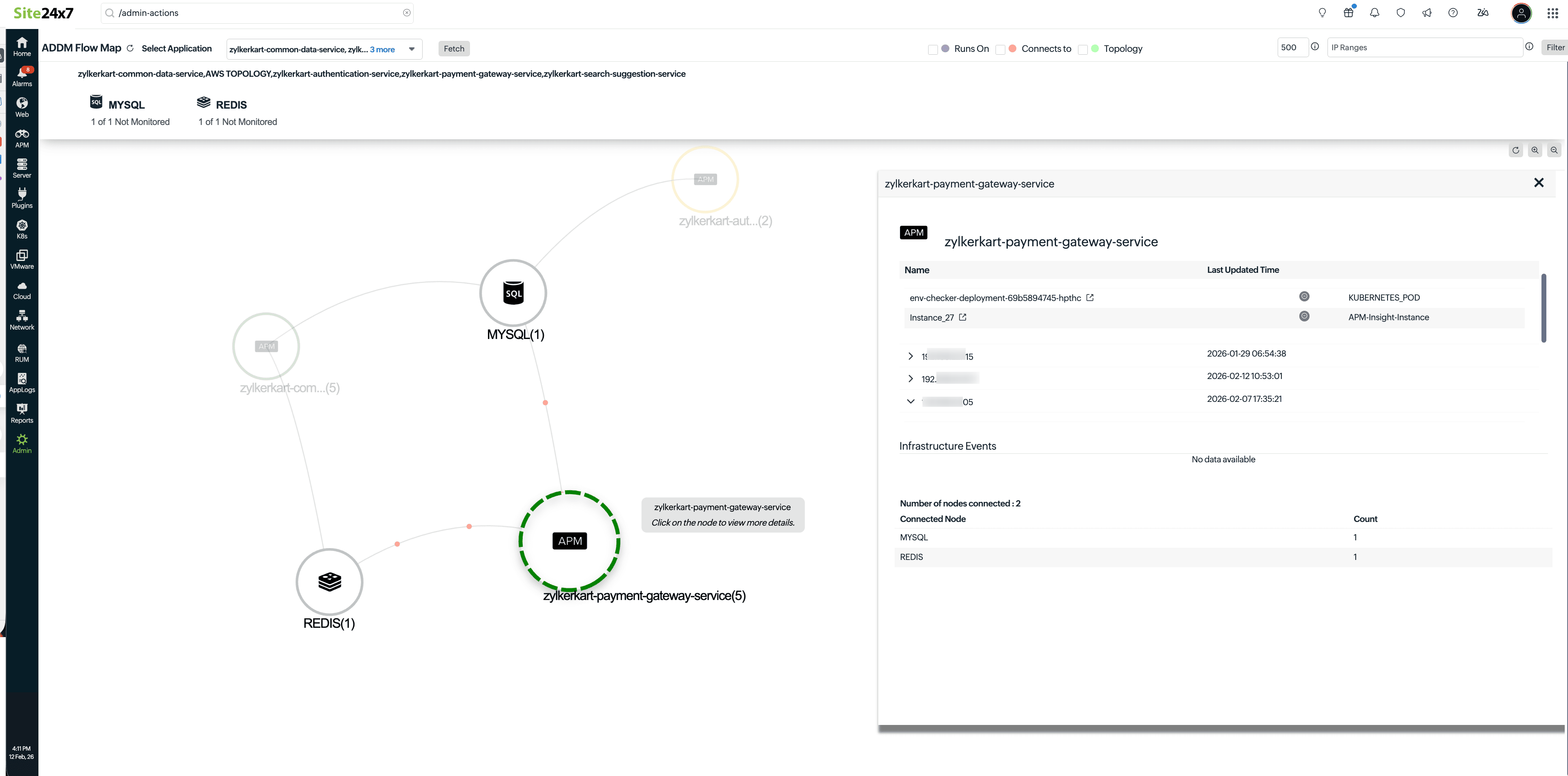
-
zylkerkart-payment-gateway-service(5) indicates that five nodes are connected to the zylkerkart-payment cluster.
-
Other supported components include MYSQL, REDIS, zylkerkart-aut, and zylkerkart-com.
These cluster representations allow you to visualize how individual servers or instances relate within the broader topology.
-
Traffic and endpoint mapping: From the flow map, you can easily trace the traffic flow between components, from an application to a cluster and vice versa.
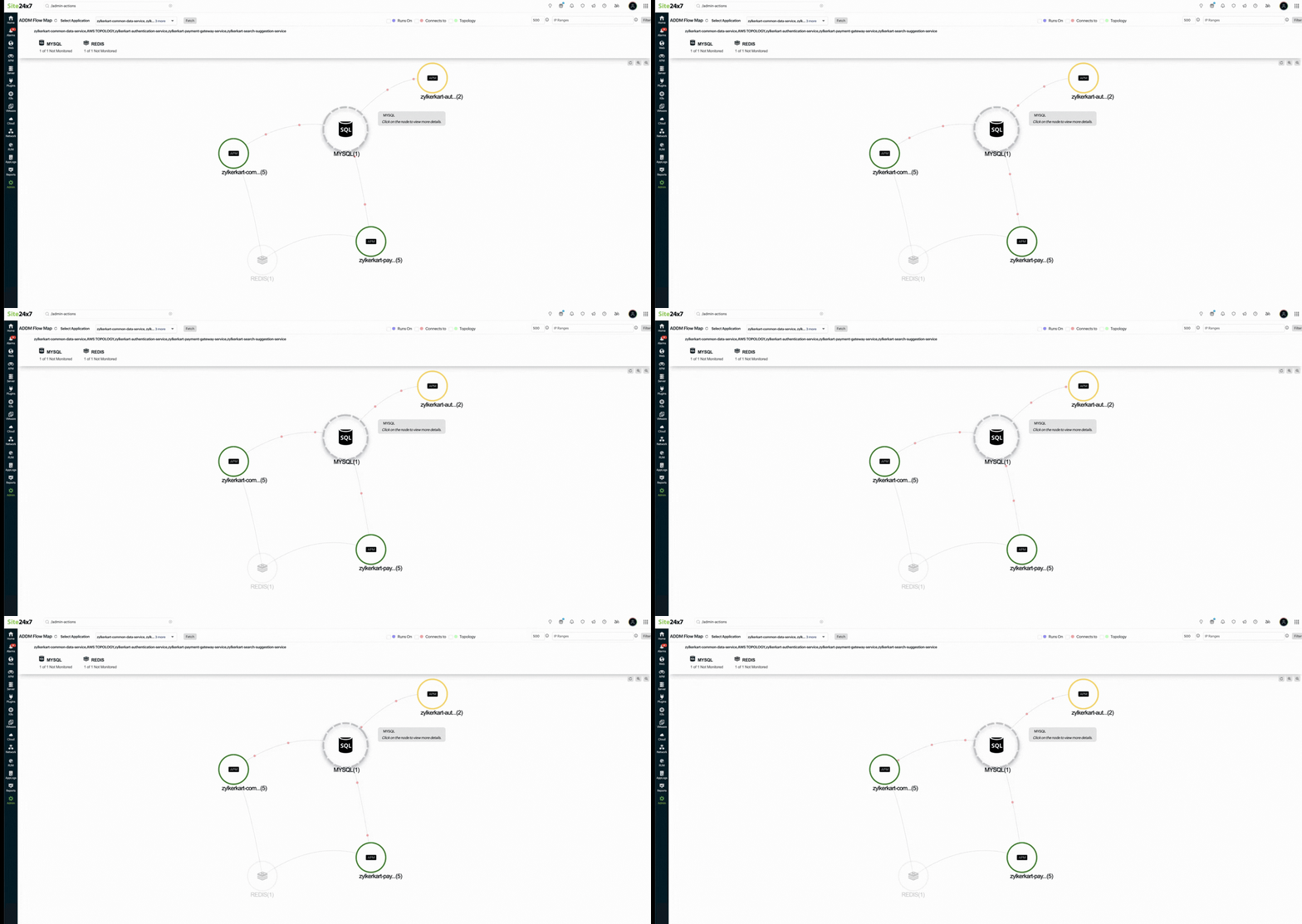
The topology map provides endpoint-level details showing which instance communicates with which node, while the higher-level ADDM map focuses on traffic and dependency relationships.
View ADDM in Smart Groups
You can view ADDM data directly within Smart Groups:
-
Navigate to Admin > Inventory > Smart Groups.
-
Select the desired Smart Group application.
-
Click Topology Map to view all the individual nodes and the traffic flow within the selected application, even in non-clustered environments.
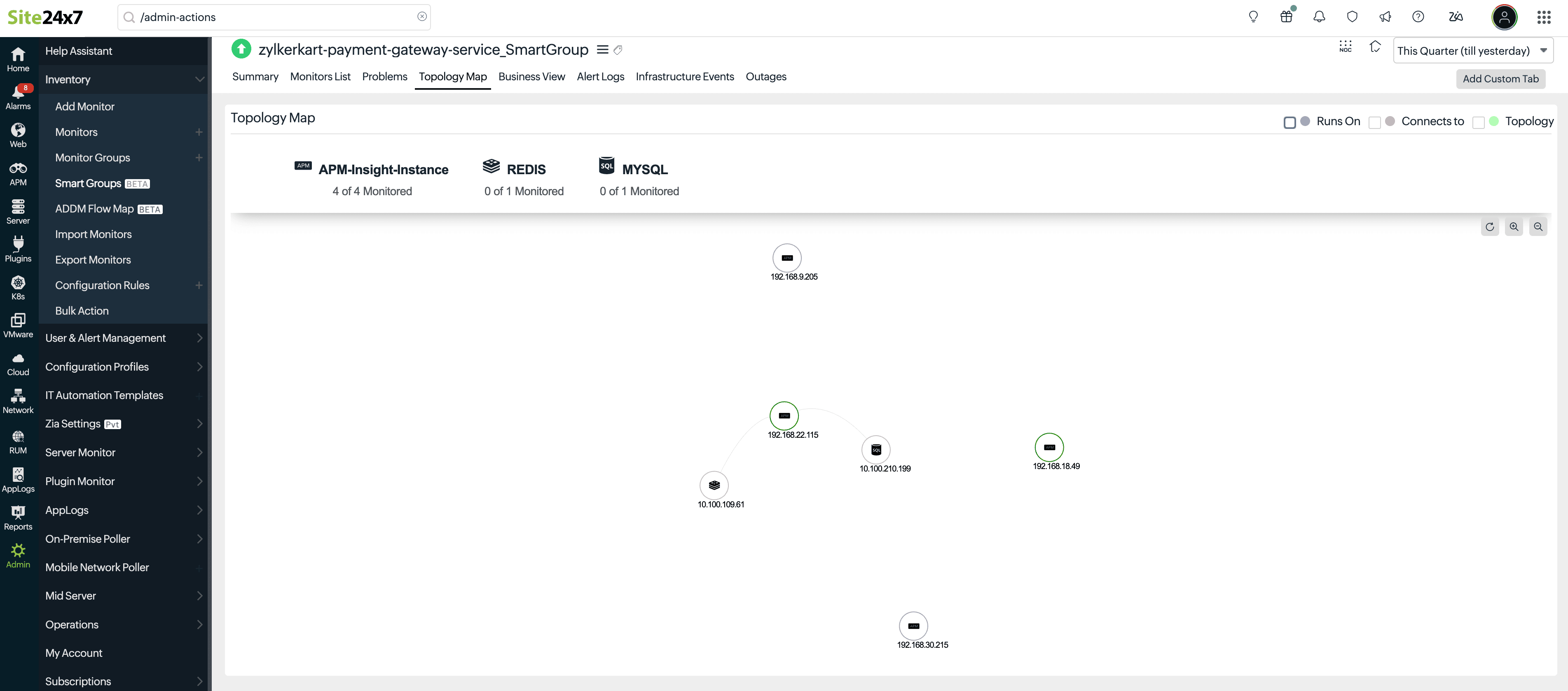
This integration provides a unified view with both node-level and dependency-level visibility.
Access the ADDM flow map
To view the overall ADDM flow map, follow the steps below:
-
Navigate to Admin > Inventory > ADDM Flow Map.
-
Select your desired applications from the drop-down menu.
-
Click Fetch.
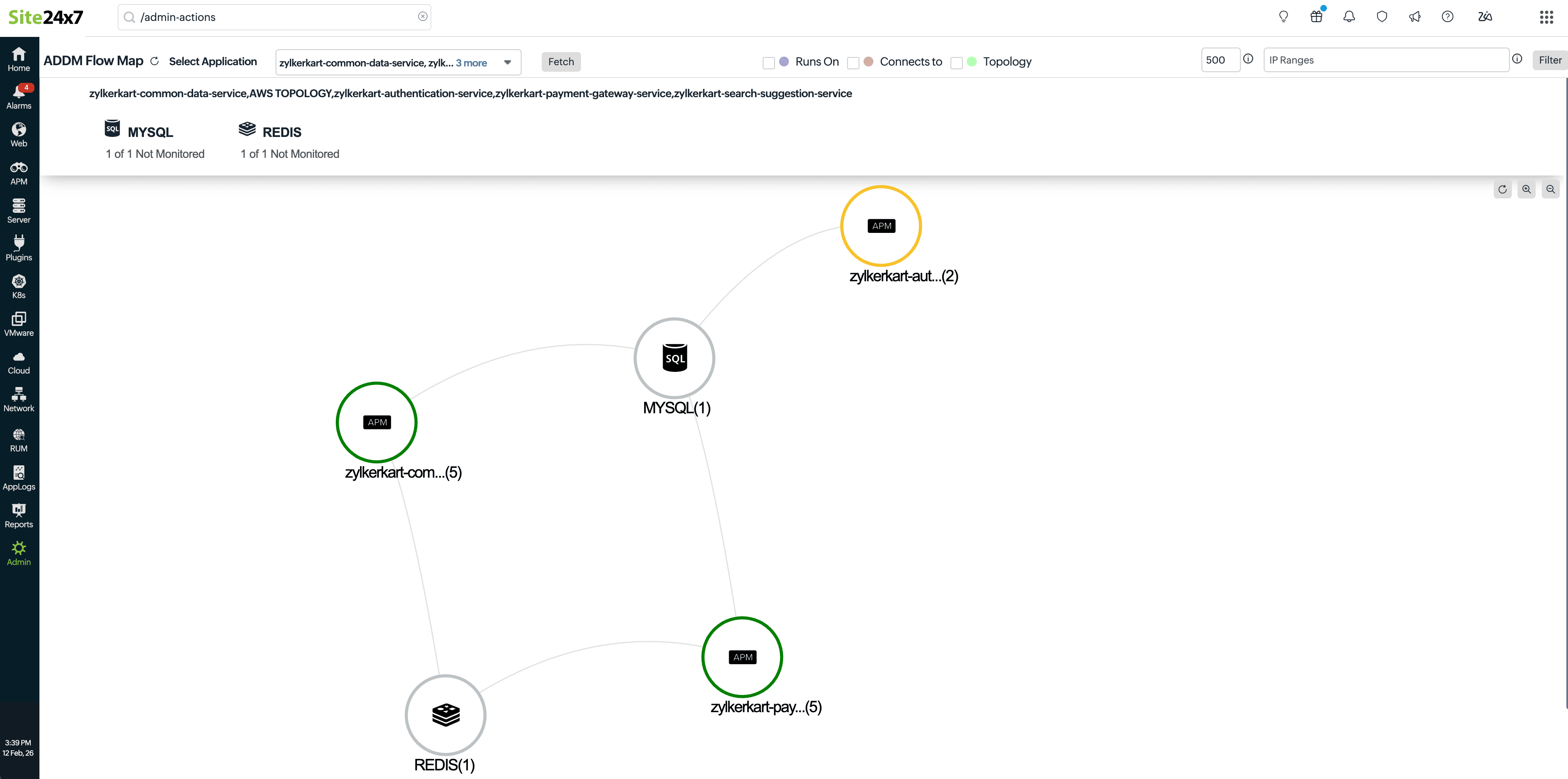
You can explore the topology map of all the selected applications and their dependencies, which will be visible when you hover over any application.