FTP Service Monitoring
Analyze the availability and response time of your FTP servers and receive instant notifications in the event of a downtime.
Add a FTP Service Monitor
- Click Admin > Inventory > Monitors > Add Monitor.
- Select FTP Service from Add Monitor page.
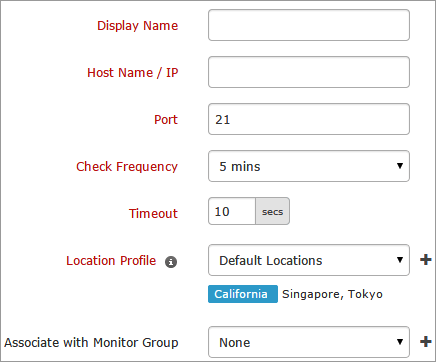
- Specify the following FTP server information to add the monitor:
- Display Name: Provide a display name to identify the FTP Service.
- Host Name: Specify the host name of the FTP Server.
- Port: Provide the port number through which the server can be accessed.
- Timeout: Specify the time in seconds needed to establish a connection with the target server. The value should be between 10 to 60 seconds. If the connection is not established within the specified time, a "Connection Error" message will be reported.
- Check Frequency: Change poll interval to check frequency. The frequency can be set from 1 minute to 1 day.
- Location Profile: Set a location profile from the drop down list where the server can be accessed from the selected location.
To know more, refer Location Profile.
- Associate with Monitor Group: Select a monitor group from the drop down list to logically group your monitors.
To learn how to create a group for your monitors, refer Monitor Groups.
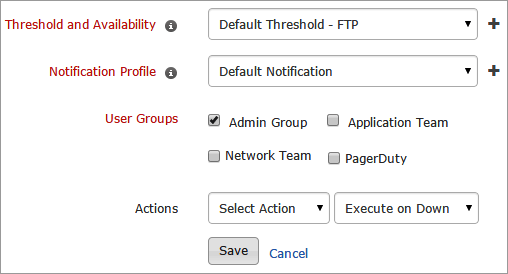
- Specify the following details for Configuration Profiles:
- Threshold and Availability: Select a threshold from the drop down list or choose the default threshold set available and receive notification when the resource cross the set threshold.
To create a customized threshold and availability profile, refer Threshold and Availability.
- Notification Profiles: Choose a notification profile from the drop down or selct the default profile available. Notification profile helps to configure when and who needs to be notified in case of downtime.
Refer Notification Profile to create a customized notification profile.
- User Groups: Select the user group that need to be alerted during a outage.
To add multiple users in a group, see User Groups.
- Actions: Select an action to be executed when the FTP service is down/trouble/up/any status change/any attribute change. The defined action gets executed when there is a state change and selected user groups are alerted.
To automate corrective actions on failure, refer Actions.
- Click Submit.


