Actions
Actions help you automate corrective actions on failure thus improving productivity of your staff.
Add a Action
- Login to Site24x7.
- Click Admin > Configuration Profiles > Actions.
- Click Add Action in Actions window.
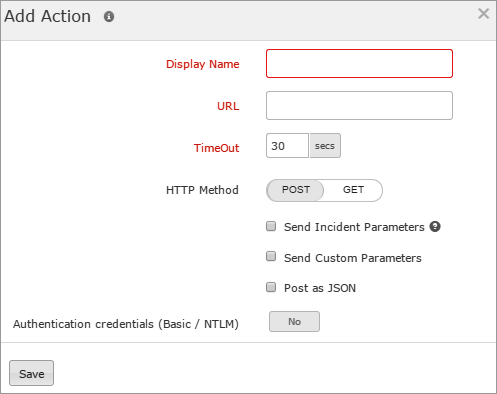
- Mention the following details to add an action:
- Action Name: Specify a name to identify the action specified.
For example: Server Restart
- URL: Specify the URL which triggers the action.
- TimeOut: Enter the time in seconds to determine how long the Site24x7 servers should wait before considering the websites as non-responsive. Enter a time in seconds that is not the usual response time of your website.
- Http Method: Send the parameters as GET or POST.
Post submission method also supports request sending in JSON format.
- Send Incident/Custom Parameters: Write specific code in the URL itself and pass the variables using Incident Parameters. And define own parameters using Custom Parameters.
- Authentication credentials (Basic/NTLM): Enable the toggle button to monitor the authenticated websites. Enter the Username and Password.
- Click Save.
- The actions created will be automatically listed in Action window along with the other actions created already.


