Monitor Groups
Monitor Groups help you organize resources (Monitors) by business application, geography, type or resource ownership. Its a handy concept for easy administration.
Add Monitor Groups
- Login to Site24x7.
- Click Admin > Inventory > Monitor Groups.
- Select Add Monitor Groups in Monitor Groups screen.
- Mention the following details to add monitor group:
- Display Name: Specify a name for the monitor group for identification purpose.
- Description: Provide a description for the group.
- Available Monitors: Select the monitors which you want to add to this monitor group.
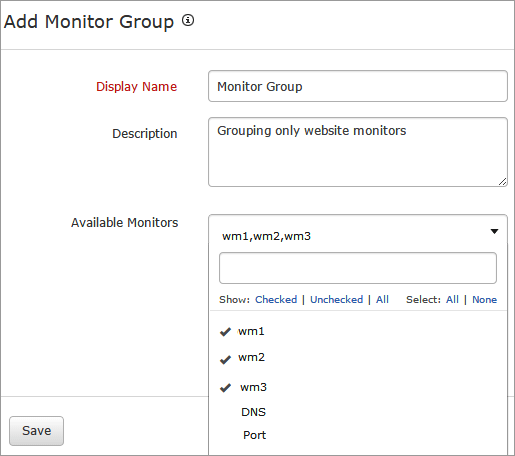
- Click Save.
- The monitor group created will be automatically listed in Monitor Groups screen along with the other groups already created.
Edit Monitor Group
- Click the group which you want to edit.
- Edit the parameters which needs to be changed in the Update Monitor Group window.
- Click Save.
Delete Monitor Group
- Click the profile in the Monitor Groups screen which needs to be deleted.
- This will navigate to the Edit Monitor Group window.
- Click Delete.


