Notification Profile
Notification Profiles help you tweak when alerts have to be sent out.
Add a Notification Profile
- Click Admin > Configuration Profiles > Notification Profile.
- Select Add Notification Profile in the Notification Profile screen.
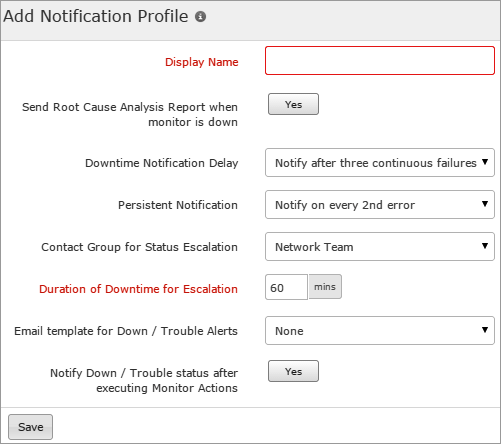
- Specify the following details to add a Notification Profile:
- Display Name: Specify a name for the notification profile.
- Send Root Cause Analysis Report when the monitor is down: Enable the toggle button to show what caused the monitor to go down and receive a complete root cause analysis report for the downtime.
- Downtime Notification Delay: Choose from the drop down about when you want to be alerted about the downtime status. Set the value to receive notification after the 'nth' failure according to the set value.
- Persistent Notification: Choose from the drop down list the error notification frequency and get alerted until the errors are rectified.
- Contact Group for Status Escalation: Select the contact group from the drop down list and set the duration of downtime to escalate when the value exceeds the set time value.
To form a new contact group, see User Group.
- Email Template for Down/Trouble Alerts: Choose the email template from the drop down list for alert report.
To create and customize your own email template, see Email Template.
- Notify Down/Trouble status after executing Monitor Actions: Use the toggle button to enable or disable the option.
- Click Save.
- The Notification profile created will be automatically listed in Notification Profile screen along with the other notification profiles already created.
A default Notification Profile is also listed in Notification Profile screen. As it is mandatory for each resource like Website, Web Page Analyzer, DNS, FTP etc to associate itself with a notification profile, you can also choose this default profile available instead of customizing one.
Edit a Notification Profile
- Click the profile which you want to edit.
- Edit the parameters which needs to be changed in Edit a Notification Profile window.
- Click Save.
Delete a Notification Profile
- Click the profile in the Notification Profile screen which needs to be deleted.
- This will navigate to Edit a Notification Profile window.
- Click Delete.


