SSL Certificate Monitoring
SSL certificate monitoring alerts you about the expiry of your domain's SSL certificate in advance. This way, you can be sure of providing a safe environment for your website visitors.
Add a SSL Certificate Monitor
- Click Admin > Inventory > Monitor > Add Monitors.
- Select SSL Certificate Monitor in Add Monitors screen.
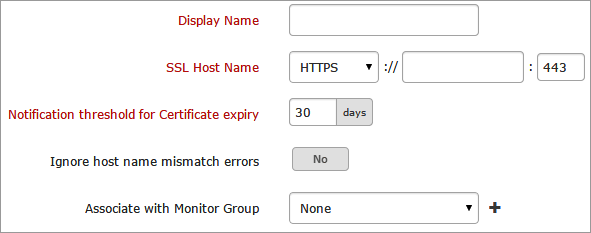
- Specify the following details to add this monitor:
- Display Name: Provide a name for the SSL certificate for identification purpose.
- SSL Host Name: Specify a name for the SSL Host. Choose the appropriate protocol from the drop down list and input the domain name and port number against the same.
- Notification threshold for Certificate expiry: Input the number of days to get notified in advance about SSL Certificate expiry.
- Ignore Hostname Error: Use the toggle button to enable or disable this option.
- Associate with Monitor Group: Select a monitor group from the drop down list to logically group your monitors.
To learn how to create a group for your monitors, refer Monitor Groups.
- Specify the following details for configuration profiles:
- User Groups: Select the user group that need to be alerted during a outage.
To add multiple users in a group, see User Groups.
- Actions: Select an action to be executed when the service is down/trouble/up/any status change/any attribute change. The defined action gets executed when there is a state change and selected user groups are alerted.
To automate corrective actions on failure, refer Actions.
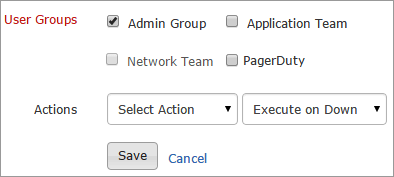
- Click Save.


