
The shocking June 12, 2025, Cloudflare outage that lasted 2.5 hours and took down nearly half the internet is a solid example of how a single storage backend failure can trigger a domino effect across hundreds of dependent services.
It sends a clear message to businesses: Get your monitoring right, or pay the price.
Unfortunately, many businesses have invested in database monitoring tools, but their chosen platforms are simply not good enough. They feature poor cross-platform integrability, deliver uncorrelated insights, and require manual instrumentation and remediation at every turn.
Quest’s Tim Fritz wrote in “10 database monitoring metrics to track for optimal performance”:
“Prescription without diagnosis is poor medicine... Going with your gut may apply to stealing second base or betting on the World Cup, but not so much to solving performance problems in enterprise IT.”
So how do you weed through the maze of database monitoring solutions available to find the right one? How do you locate one that offers all the must-have features and completely suits your use cases?
This guide will help you pick the database monitoring tool that’s ideal for your specific applications. You’ll also learn about the key challenges such a tool must solve and why Site24x7 is just the platform you’re looking for.
Database monitoring essentials: A quick refresher
Database monitoring (also database performance monitoring) involves continuously collecting and analyzing metrics and logs produced by a database and its underlying infrastructure. At its core are five essential database performance indicators: workload, resources, throughput, contention, and optimization.
Workload
Workload is a measure of the demand that users and applications place on a database. This is quantified by indicators like type or number of queries, batch jobs, concurrent user sessions, and transactions over time.
Resources
Workload consumes hardware and software resources, including CPU, memory, cache, disk I/O, and network bandwidth.
Throughput
Throughput indicates the volume of work a database completes successfully over time, e.g., queries per second. When throughput is lower than incoming queries, your database capacity may be insufficient and your queries may be poorly optimized.
Contention
Contention happens when multiple processes try to access the same resources, such as data, locks, or disk channels. An example is when there are two simultaneous fund withdrawals, with each attempting to acquire a lock on the target account. Contention spikes latency and lowers throughput.
Optimization
Optimization is the ongoing process of tuning databases for speed and efficiency, e.g., by deleting unused tables or improving indexing. You can measure optimization with metrics like query execution time or buffer cache efficiency.
What are the benefits of using the ideal database monitoring tool?

Database monitoring, if done right, helps businesses stay on top of database issues by tracking availability, performance, and security.
The ideal database monitoring platform will:
- Spot throughput bottlenecks or contention issues slowing applications to a crawl
- Understand what needs optimizing
- Ensure that resource usage is efficient and in line with SLOs
- Diagnose and resolve issues in real time
What are the top obstacles to effective database monitoring?
The efficacy of your database monitoring system depends on how you overcome some key hurdles.
Metrics and integration
Determining which data points matter—with the countless metrics available—can be overwhelming. Many DBAs focus solely on monitoring high-level metrics, missing out on critical database performance insights.
To obtain a true picture of database health and find the root cause of issues, low-level metrics such as response times, read/write latency, and connection timeouts are also critical.
Make sure your tooling can integrate with diverse technologies. Modern IT stacks are powered by a mix of relational databases and NoSQL databases, typically from different service providers. Not only do they run on various clouds or as in-memory databases, but they also operate on different operating systems and deployment models.
When IT leaders choose database monitoring tools with limited cross-platform support, teams are forced to monitor the different technology stacks in silos or leave some unmonitored.
Limited insights
Many issues contribute to limited monitoring insights:
- Lack of granularity: Even if you have the big picture, without fine-grained details to snapshot bottlenecks, a tool may detect increased memory consumption but not the exact unoptimized queries causing it.
- Inadequate context: When a solution doesn’t correlate database monitoring insights with broader context from infrastructure monitoring and application performance management (APM), a slow database may appear to be a query issue when a network latency spike is the real culprit.
- No full-spectrum database monitoring: Solutions can also omit critical aspects of database monitoring, such as performance tracking, causing teams to fly blind.
Pro tip: Avoid platforms that isolate insights or cannot zoom into individual queries, hosts, or applications.
Poor monitoring optimization, no automation
Poorly optimized monitoring agents consume excessive system resources like CPU, I/O, and memory. Rather than improving database performance, agents will instead drag efficiency, reduce throughput, and increase latency.
Many DBAs also perpetually play catch-up because their tools only reveal issues after application performance dips and end users are affected.
Keep thresholds fresh to prevent reactive monitoring.
Finally, automate, automate, automate. With manual tuning, DBAs can’t respond to live changes, rendering optimization efforts time-consuming and error-prone. The impact of this ranges from user experience deficits to lower business productivity and revenue.
Non-negotiable requirements of ideal database monitoring platforms
Let’s explore key capabilities to look out for in a database monitoring tool, mapped to example use cases showing the importance of these features.
Platform coverage
A solution should offer out-of the-box agent integrations for the different database types (relational, columnar, document), as well as for various technologies and underlying platforms.
Rather than forcing teams to build and maintain custom connectors for each technology, a solution should enable seamless compatibility with heterogeneous databases and unify fragmented findings.
Futureproofing is also key. Consider coverage of not just the platforms and technologies you’re currently using, but also other popular platforms to lock in future compatibility.
Use cases: Monitoring polyglot persistence architectures and migration
E-commerce, gaming, and e-learning applications may use a relational database like MySQL to manage transactions or user accounts. They may then rely on Redis for caching and a NoSQL database like MongoDB for search and recommendation engines.
If a tool checks the “built-in cross-platform compatibility” box, teams can easily use it to correlate disjointed insights from across their entire database estate. This enables a single-pane view of data, eliminating blind spots.
When it comes to migration, keep it simple. In the banking sector, many companies use legacy platforms (e.g., SQL Server), mandating that, at some point, they migrate their data and applications to more modern database solutions. Broad-based compatibility ensures they can effortlessly monitor both legacy and new database technologies.
Essential and custom metrics tracking
Pay attention to prebuilt and custom metrics tracking. While custom metrics are key, prebuilt metrics measure common KPIs like CPU usage, I/O, query latency, and memory utilization.
These provide a baseline of preconfigured metrics that DBAs can start their monitoring with.
Use case: Music, video, and game streaming
Businesses offering streaming services need this capability to effectively monitor general metrics (throughput, cache hit ratios, and concurrent connections). They also require custom metrics such as query execution lags for particular features like “playback,” “trending,” or “top players.”
OTel Native
Having to re-instrument your database every time you change vendors locks you in, even if the vendor is underdelivering. Because OpenTelemetry (OTel) is vendor-agnostic, tools that integrate with OTel-native metrics contribute to long-term interoperability and future-proofing.
Use case: Mapping metrics, traces, and logs
A tool that collects OTel-native metrics is indispensable in microservice applications where a single deadlock can affect multiple processes. Mapping OTel’s distributed traces to query-level metrics and logs can also help spot the exact line of inefficient code or JOIN causing the issue.
Query performance insights

Platforms that provide individual query-level insights make troubleshooting easier and faster. These tools not only explore total query times and overall throughput, but also drill down into particular timelines, errors, and throughput for specific workloads.
Use case: Troubleshooting
Low-level metrics like per-shard utilization in time-series workloads or index hit ratios in transactional workloads (OLTP) can help pinpoint load balancing and availability issues fast. In such scenarios, DBAs can then resolve the problems quickly.
Availability monitoring
Go for solutions that extend beyond performance tracking to predicting availability based on historical and real-time performance. By incorporating availability monitoring, these tools help you increase your overall uptime and resolve potential outages before they occur.
Use cases: Optimizing resource usage and forecasting usage needs
Regardless of how powerful your servers are, poor database optimization (inefficient queries, high R/W usage, locking and blocking issues) can max out capacity.
Predictive availability monitoring can help assure you that the extra server capacity is truly needed and that it isn't a poorly optimized database spiking usage—and costs.
Performance tracking
Ensure that your vendor allows you to track your database performance via server reports. These reports should ideally contain metrics like batch requests, SQL compilation, buffer cache hit ratio, and several other top N metrics.
Use case: Capacity planning
Performance monitoring guarantees a deep understanding of various memory and buffer manager details, such as lazy writes per second, SQL cache memory, and lock memory. These and other metrics will allow you to adequately prepare for peak periods.
Such metrics are crucial factors for e-commerce, retail, and stock trading applications, where peak periods happen seasonally and adequate planning is necessary to prevent a system from being overwhelmed—or an eventual outage.
Logs and intelligent anomaly detection
Log ingestion is a critical part of any monitoring platform. While metrics indicate there’s a problem, logs show you the specific query, error, app, or user causing the performance degradation or security event— in granular, timestamped detail. This eliminates guesswork with swift troubleshooting insights.
AI-driven anomaly detection will also uncover stealthy threat activity and performance outliers in dynamic workloads, correctly distinguishing security threats from performance issues.
Use cases: Detecting fraud and data exfiltration
Financial and healthcare service providers use intelligent database monitoring to detect unauthorized access, suspicious queries, and unusual data exfiltration patterns that could indicate data theft or fraud.
Threshold and baseline-based alerting
Choose tools that offer both baseline and threshold-based alerting. Baseline alerts snapshot anomalies in real time with historical and AI analytics, while threshold-based alerting allows you to configure alerts for specific metrics. This combination helps you detect issues early without drowning in noise (from the thousands of metrics generated per second).
Use case: Detecting anomalies and preventing outages
A monitoring tool with built-in threshold and baseline monitoring can tell you when a normally light workload unaccountably starts gobbling up CPU and threatening availability. It will also notify you when connections suddenly spike at 2 a.m., indicating an attempted brute-force attack.
Low-impact, automated instrumentation
Lightweight agents, automated instrumentation, and prebuilt unified dashboards ease onboarding, ensure long-term user friendliness, and minimize impact on database performance.
Use case: Fast time to value, non-technical teams
Auto-instrumentation is a must-have to be able to onboard a solution and instantly get a quick overview of your database performance.
Why end-to-end database visibility is a critical “cherry on top”
Integrating database monitoring within the broader application and infrastructure ecosystem reduces MTTR, minimizes false positives, and improves overall system reliability.
Improve user experience and confidence
If users are complaining about slow registration, streaming, or checkout processes, you want to instantly correlate slow processes at the application layer with database queries. This way, you can confidently say, “Everything is OK here; it must be their network.”
Spot complicated bottlenecks
Sometimes, it isn’t just one issue impacting performance, e.g., spiking error rates, throughput, or connection drops. Without correlation, you might miss, for example, how both packet loss and poor indexing are increasing error rates.
Effective database monitoring with Site24x7

We've examined the holy grail features of an effective DB monitoring tool. But does Site24x7 check those boxes? Yes, it does.
With Site24x7, you can obtain all your monitoring needs in one solution:
- Analyze top queries by CPU, I/O, and CLR to monitor/predict processor strain, memory utilization, and throughput issues
- Identify inefficient custom code, complex joins, missing indexes, and full table scans
- Monitor throughput, error statements, latency, cache metrics, and other KPIs to improve response times and overall database health
- Track CPU usage, memory utilization, and I/O operations, plus query performance for replicated instances
- Configure thresholds and receive alerts via preferred channels to ensure uninterrupted database availability
- Get notified about critical anomalies like abnormal performance drops, unexpected resource usage, or unusual access attempts
- Website and API uptime
- Automate corrective actions, and automatically run your database to ensure optimal performance across peak and non-peak periods
- Know exactly how much disk space, CPU, and memory you have left
- Monitor R/W utilization to know when your servers are under strain from excessive reads/writes and fix any contention
- Receive alerts when tablespaces are approaching full capacity and if upgrades are necessary.
Our cross-platform monitoring capabilities ensure comprehensive coverage, supporting relational, non-relational, on-premises, in-memory, and cloud-native databases.
Note: Site24x7 supports top database providers, including Oracle DB, MSSQL, MySQL, PostgreSQL, SAP HANA, MongoDB, Cassandra, and Redis.
Request for proposal template
Here’s a template for assessing potential vendors to identify the best tool for your requirements. Verify features marked available by each vendor, and pre-test the potential tool adequately before purchase. Make sure to also see how the tool responds under stress and if it misses any insights.
| Capabilities | Breakdown | Site24x7 | Vendor 2 | Vendor 3 |
|---|---|---|---|---|
| Platform coverage | Diverse database engine support |  |
||
| Multi-cloud support | |
|||
| Compatibility with multiple OSes and hosts | |
|||
| Consistency across dev, test, and prod environments | |
|||
| Cluster and distributed system support | |
|||
| Essential and custom metrics tracking | Prebuilt metrics for tracking CPU load, RAM usage, disk space, etc. | |
||
| Custom metrics monitoring, e.g., business logic metrics | |
|||
| High-level/low-level metrics | |
|||
| Query performance insights | Per-database query insights, e.g., throughput, wait time per query, errors per specific workloads, etc. | |
||
| Availability monitoring | Historical and real-time performance tracking for availability monitoring | |
||
| Predicting outages with timely alerts | |
|||
| Capacity planning | |
|||
| Performance | Cross-platform support | |
||
| tracking | Performance tracking, including latency monitoring | |
||
| Automated alerts for performance lags or failures | |
|||
| Flagging performance errors/inconsistencies | |
|||
| Failover testing | |
|||
| Logs and intelligent anomaly detection | Log ingestion | |
||
| Database activity monitoring, e.g., traffic, access, data privacy | |
|||
| Deep insights into inefficient queries | |
|||
| Correlating error or audit logs with real-time performance to spot outliers and anomalies | |
|||
| AI-powered anomaly detection engine | |
|||
| Threshold and baseline-based alerting | Static and adaptive thresholds | |
||
| Multi-level thresholds for the same metric, e.g., 60% memory usage, warning; 85%, critical | |
|||
| Correlated threshold alerting, e.g., when several interconnected metrics (CPU, I/O) exceed thresholds | |
|||
| Trend-aware baseline alerting (historical or seasonal trends) | |
|||
| Low-impact, automated instrumentation | Lightweight agent | |
||
| Simplified installation | |
|||
| Autodiscovery (of databases and server instances) | |
|||
| Autonomous issue remediation and database tuning with minimal manual intervention | |
|||
| End-to-end monitoring and correlation | APM | |
||
| Network observability | |
|||
| Digital experience monitoring, e.g., RUM, uptime, DNS, website monitoring, etc.) | |
|||
| Cloud monitoring | |
|||
| Container and Kubernetes monitoring | |
|||
| Futureproofing | Continuous improvement, with examples of recent improvements within the last year | |
||
| Extensibility and customization | |
Looking for proactive database monitoring? Explore Site24x7
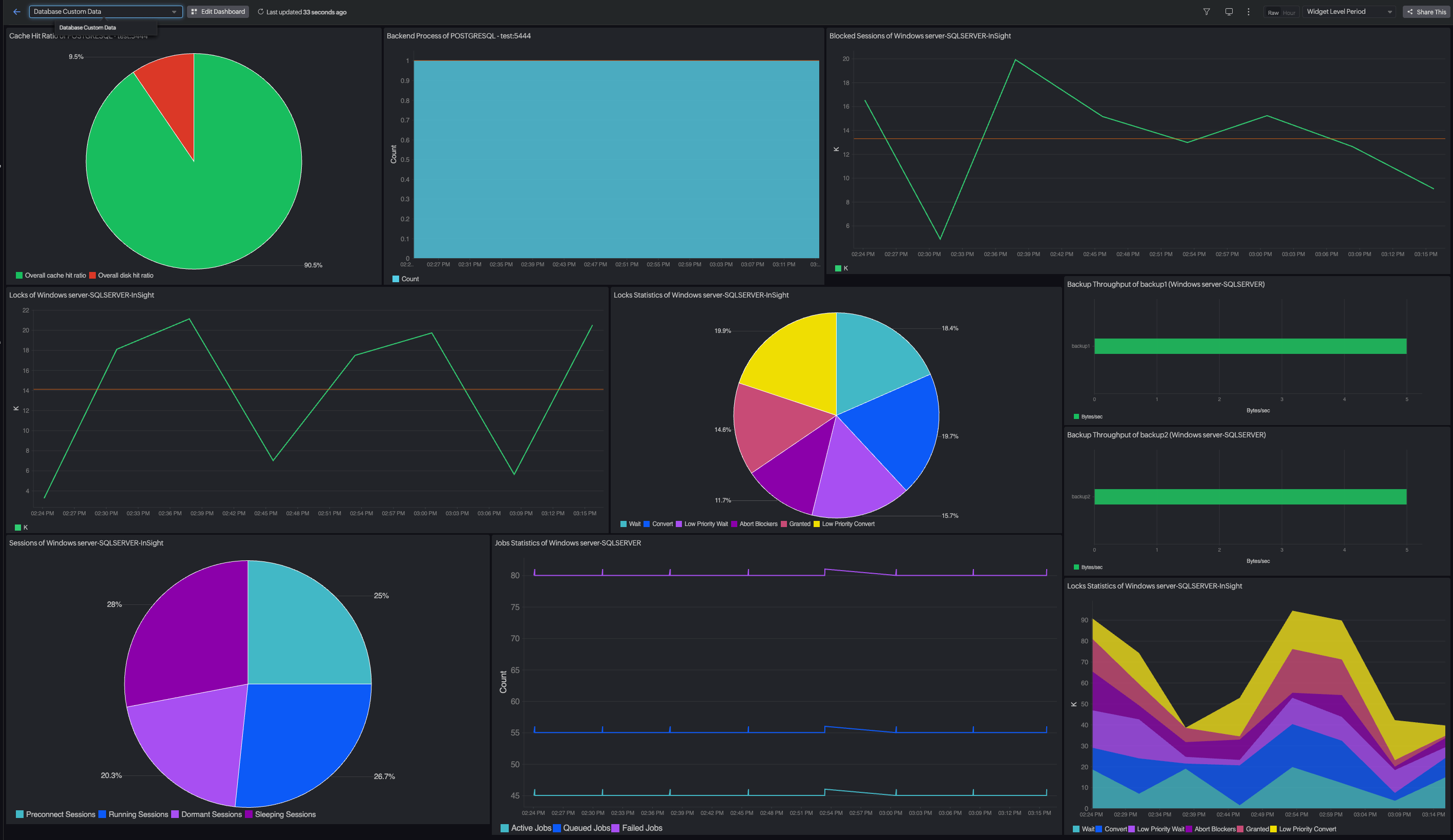
Site24x7 starts by unifying database performance and availability monitoring across your hybrid environments and heterogeneous databases.
The platform then takes things a step further, predicting outages and performance dips in advance to ensure you apply fixes or improve capacity ahead of time. This way, you own your uptime and can guarantee uninterrupted service delivery.