Identify and eliminate bottlenecks in your application for optimized performance.
Garbage collection (GC) is a core component of the Java Virtual Machine (JVM), automatically managing memory by reclaiming unused objects. However, treating GC as a "black box" can lead to performance bottlenecks, especially in high-throughput or low-latency applications. Choosing the right garbage collector and tuning it properly is essential to avoid unpredictable "Stop-the-World" (STW) pauses, reduce infrastructure costs, and optimize the overall responsiveness of your Java applications.
The garbage collector is an automated memory management process run by the JVM to recycle unused memory footprints. When you create an object in Java, it resides in the heap memory. If left unmanaged, these objects would eventually consume all available memory, leading to an OutOfMemoryError. To alleviate the pain of manual memory management (unlike C or C++), the JVM automates this process by periodically identifying and removing objects that are no longer reachable by the application.
Most modern JVMs use a generational garbage collection strategy based on the hypothesis that most objects "die young." The heap is typically divided into the Young Generation and the Old (Tenured) Generation. Live objects are tracked continuously, and the rest are considered eligible for the next cycle of GC. For example, if ten objects are created but only five are still referenced in the application flow, those five are live objects; the rest will be marked for garbage collection.
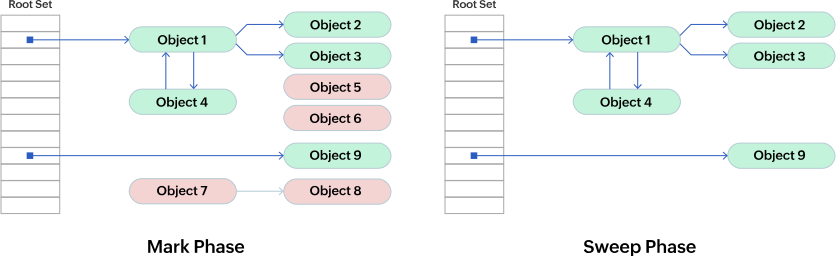
To determine which objects are no longer used, the JVM relies on the mark-and-sweep algorithm. It traverses the object graph starting from GC Roots (like active threads or local variables). Objects it can reach are marked as "live," while unreachable objects are swept away. Understanding the basics of Java GC is crucial for diagnosing latency spikes and memory leaks.
There are multiple factors to consider before choosing the appropriate garbage collector. The optimal choice often involves a trade-off between reducing "Stop-the-World" pauses (latency) and maximizing application processing speed (throughput).
The three most important factors are:
One of the earliest, single-threaded garbage collectors. It uses a single thread for both minor and major GC. This is still a good choice for applications with small data sets (under 100 MB) or microservices running on a single CPU core.
Important flags:
Also known as the throughput collector, the Parallel GC uses multiple threads to perform garbage collection. It is ideal for batch processing, reporting, or background jobs where maximizing overall throughput is more important than minimizing individual GC pauses.
Important flags:
Note: CMS was deprecated in Java 9 and completely removed in Java 14. If you are migrating to newer Java versions, you should transition to G1 GC or ZGC.
CMS runs concurrently with the application threads to minimize pause times. While it offers lower latency than Parallel GC, it requires more CPU resources and memory overhead. It does not compact the heap, which can lead to memory fragmentation.
The Garbage-First (G1) collector is the default in Java 9 and later. It divides the heap into equal-sized regions and focuses on collecting the regions with the most garbage first. G1 provides a great balance between high throughput and predictable, low-latency pauses. It compacts the heap on the fly, preventing fragmentation issues seen in CMS.
Important flags:
For applications requiring ultra-low latency (sub-millisecond pauses) and very large heaps (up to terabytes), modern Java versions offer ZGC and Shenandoah.
-XX:+UseZGC.-XX:+UseShenandoahGC.When running Java applications in Docker or Kubernetes, the JVM must respect Cgroup memory and CPU limits. If the JVM consumes more memory than the container limit, the OS will trigger an OOM Killer.
Instead of hardcoding memory sizes using -Xmx, modern cloud-native deployments often rely on -XX:MaxRAMPercentage to let the JVM automatically scale its heap based on the container's available memory. For small microservices with strict CPU throttling (e.g., fractional CPUs in Kubernetes), the Serial GC might perform better than G1 by avoiding thread context switching overhead. For heavily loaded containers, G1 GC remains the best default.
If you are modernizing a legacy Java 8 application running ParallelGC or CMS, upgrading directly to Java 17 or 21 brings significant performance improvements. Since CMS is removed, G1 GC will become the default. During migration, you should generally remove legacy tuning flags (like -XX:NewRatio or CMS-specific arguments) and let G1's ergonomics self-tune based on your defined MaxGCPauseMillis. If your application handles real-time trading or highly interactive web sessions, consider testing ZGC on Java 21 for near-zero latency.
| Collector | Key Advantage | Best Use Cases |
|---|---|---|
| Serial GC | Very low memory and CPU footprint | Single-threaded applications, small microservices, tight container constraints. |
| Parallel GC | Maximum Throughput | Batch processing, offline data crunching. |
| G1 GC (Default) | Predictable pause times, low fragmentation | General purpose web applications, large heaps. |
| ZGC / Shenandoah | Sub-millisecond latency (near-zero pauses) | Real-time systems, financial trading, very large memory heaps. |
Yes, Site24x7 APM Insight provides deep visibility into Java Virtual Machine (JVM) metrics, including garbage collection count, pause times, heap memory usage, and thread activity.
Site24x7 tracks the 'Stop-the-World' pause times caused by GC. You can set custom thresholds to receive alerts when GC takes too long, allowing you to optimize your collector choice or heap size.
Yes, regardless of whether you use Serial, Parallel, CMS, G1 GC, or ZGC, Site24x7 provides the necessary metrics to evaluate their efficiency and impact on application throughput.