






ISP Monitoring

Track the performance and reliability of your internet service providers with Site24x7's ISP monitoring tool. Map every hop along the network path from source to destination, measure round-trip latency, jitter, and packet loss at each node, and pinpoint exactly where slowdowns or outages occur. Run traceroutes from 130+ global monitoring locations, detect BGP route changes as they happen, and generate shareable performance reports that give you the evidence to hold ISPs accountable, compare providers across regions, and make informed vendor decisions.

Plans, Pricing and Sign Up 30-Day Free Trial, sign up in 30 seconds
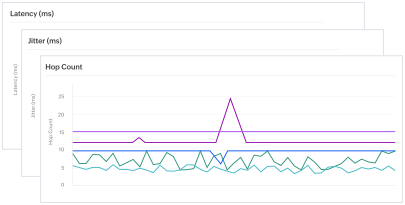
Illustration of traceroute visualization and latency metrics for ISP monitoring

What does Site24x7's ISP monitoring tool track?

Site24x7 continuously monitors how ISPs and transit providers handle your traffic. Every data point—from hop-level latency to route changes—is collected, visualized, and alertable so you can act before users complain.

Dashboard illustration representing ISP latency monitoring across network hops

Identify high-latency paths across your ISP network

Run traceroutes from 130+ monitoring locations worldwide and compare latency across every network path. Site24x7 highlights exactly which hop or interface introduces the most delay, so you can isolate ISP-related bottlenecks from infrastructure issues. A global latency heat map gives you an at-a-glance view of connection quality across all your monitored regions.

Verify ISP SLA compliance and manage vendor performance

Collect continuous measurements of availability, round-trip latency, hop count, AS number, and jitter for every network path. Compare these metrics side by side against each ISP's committed SLA thresholds—turning raw monitoring data into a vendor scorecard that quantifies which providers deliver and which consistently fall short. Site24x7 also detects uninformed route changes and transit provider switches, giving you immediate visibility into network path alterations that could affect performance. When it's time to renegotiate contracts or evaluate alternative providers, historical SLA compliance data gives your network and procurement teams the leverage they need.

Dashboard illustration representing ISP SLA performance verification
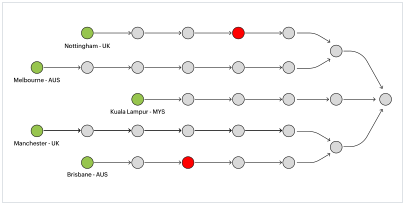
Network diagram illustration representing hop-to-hop ISP traceroute analysis

Analyze hop-to-hop data transfer in detail

See exactly how your data moves through each network node in both the outbound and return directions of every round-trip measurement. Site24x7's hop-to-hop view reveals latency, connectivity provider changes, IP prefix details, AS number, and AS name at every point along the route. When checked from different vantage points, you can spot asymmetric routing, identify broken links, and determine whether a specific ISP or transit provider is the source of degradation. Search for specific nodes, highlight individual paths, and filter by link delay threshold to focus on the hops that matter most.

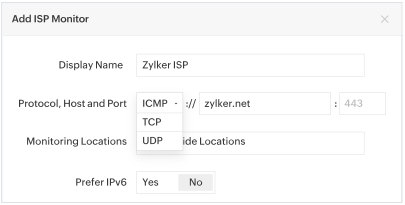
Monitor ISP connectivity across ICMP, TCP, and UDP protocols

Test domain reachability using all three major transport protocols. Internet Control Message Protocol (ICMP) gives you basic connectivity and round-trip time data, Transmission Control Protocol (TCP) validates application-layer reachability on specific ports, and User Datagram Protocol (UDP) helps you assess performance for latency-sensitive services like VoIP and video streaming. Select the protocol, specify the host and port, and start monitoring in seconds.

Dashboard illustration representing ISP monitoring across ICMP, TCP, and UDP protocols
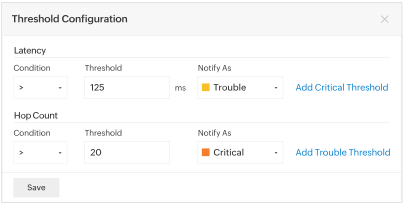
Dashboard illustration representing ISP threshold configuration and alerts

Set granular thresholds and alerts at each hop

Define threshold limits for every metric you track—latency, jitter, AS number on the traceroute, and the AS number of the last hop. If an untrusted ISP or transit provider begins handling your traffic at any point along the route, you receive an instant alert so you can take corrective action. Thresholds can be configured globally or customized per monitoring location to match regional SLA requirements.

Get proactive alerts for ISP outages and degradation

Site24x7 notifies you the moment ISP performance crosses your defined thresholds. Alerts are delivered through email, SMS, voice calls, or integrations with tools like Slack, Microsoft Teams, PagerDuty, and ServiceNow. With root cause analysis built into every alert, your team spends less time diagnosing and more time resolving. When escalation is necessary, share timestamped traceroute data and performance reports directly with your ISP's support team—providing the concrete, third-party evidence that transforms a vague complaint into an actionable ticket and accelerates resolution.

Gain broad visibility into ISP health across regions

Individual traceroutes show you one path at one moment. Site24x7's multi-location ISP monitoring aggregates traceroute data from 130+ locations continuously, revealing patterns that point-in-time checks miss—regional outages forming across an ISP's backbone, transit congestion building during peak hours, or a provider's performance gradually degrading in a specific geography. This macro-level visibility helps you anticipate problems before they reach your users and correlate ISP health trends with application performance data from your APM stack.

Frequently asked questions about ISP monitoring

What is ISP monitoring?

ISP monitoring is the practice of continuously tracking the performance, availability, and reliability of your internet service providers. It involves measuring key network metrics—such as latency, jitter, packet loss, and hop count—along the data path from your infrastructure to your end users. The goal is to ensure that ISPs are delivering the connectivity they promised in their service level agreements and to quickly identify when an ISP is the root cause of performance issues.

Why do I need an ISP monitoring tool?

Without an ISP monitoring tool, distinguishing between problems in your own infrastructure and issues caused by your ISP or transit providers is difficult. An ISP monitoring tool provides hop-by-hop visibility into the network path, measures real-time performance metrics from multiple locations, and generates alerts when SLA thresholds are breached. This data helps you prove ISP accountability, troubleshoot outages faster, and make informed decisions about switching or adding providers.

What metrics should I track for ISP performance?

The core metrics for ISP monitoring include latency (round-trip time for data to travel between two points), jitter (variation in latency over time), packet loss (percentage of data packets that fail to reach their destination), hop count (number of network nodes data passes through), and availability (uptime percentage). Tracking autonomous system (AS) numbers and route changes is also valuable for detecting unauthorized path modifications by ISPs.

How does Site24x7 monitor ISP performance from multiple locations?

Site24x7 runs traceroutes from over 130 monitoring locations across the globe. Each location independently traces the network path to your target host, measuring latency, jitter, and packet loss at every hop. This multi-location approach reveals whether performance issues are region-specific or widespread, and helps you identify exactly which ISP or transit provider is responsible for degradation in a particular geography.

Can ISP monitoring help with SLA verification?

Yes. ISP monitoring provides the continuous, objective data needed to verify whether your ISP is meeting its SLA commitments. Site24x7 tracks availability, latency, and other performance metrics 24/7, stores historical data for trend analysis, and generates reports you can share with ISP account teams when negotiating or filing SLA breach claims. Threshold-based alerts notify you in real time when agreed-upon performance levels are not being met.

How does ISP monitoring detect BGP route changes?

ISP monitoring detects route changes by continuously tracking the autonomous system (AS) path along your traceroutes. When an ISP or transit provider modifies its BGP routing—causing your traffic to flow through a different network operator or take a longer path—the AS numbers in the traceroute change. Site24x7 alerts you when a new or untrusted AS appears in the route or when the AS at the last hop changes unexpectedly, giving you immediate visibility into routing decisions that could affect latency and availability.

Can I compare performance across multiple ISPs?

Yes. Site24x7 allows you to set up ISP Latency monitors for each of your internet service providers and compare their performance side by side. You can evaluate latency, availability, hop count, and jitter across providers and regions, giving you the data to identify which ISPs consistently meet their SLA commitments and which are underperforming. This multi-ISP visibility supports vendor management decisions like contract renegotiation, traffic rebalancing, or provider migration.

Start monitoring your ISP performance today

Start 30-day free trial Try now, sign up in 30 seconds
Looking for assistance? We’re here to help!

Want to learn more?

  • Personalized product demo
  • Proof of concept for set up
  • 30-day, unlimited, free trial
Request a Demo

Interested in our services?

  • 24/5 customer support
  • Flexible and competitive pricing
  • Better ROI
Get quote