Scheduled Maintenance
Schedule a maintenance window to collaborate effectively within the IT team. This prevent alerts from being sent.
Schedule a Maintenance
- Click Admin > Operations > Scheduled Maintenance.
- Click Scheduled Maintenance in Scheduled Maintenance screen.
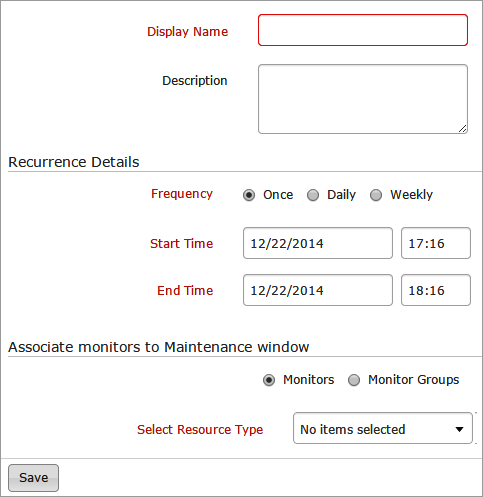
- Specify the following details to Schedule a Maintenance:
- Display Name: Give a name for the schedule.
- Description: Provide an appropriate description for your schedule like weekly maintenance, periodic updates.
- Recurrence detail frequency: Select the radio button to schedule when the maintenance will take place.
- Start and End Time: Set the corresponding start time and end time.
- Associate Monitors to Maintenance window: Associate required monitors or monitor groups from the dropdown list to the maintenance window.
- Click Save.
- The details of the schedule will be automatically added in the scheduled maintenance screen where users can view it as day view, week view or month view.