Click Admin > Configuration Profiles > Threshold and Availability.
Click Add Threshold and Availability in Threshold and Availability screen.
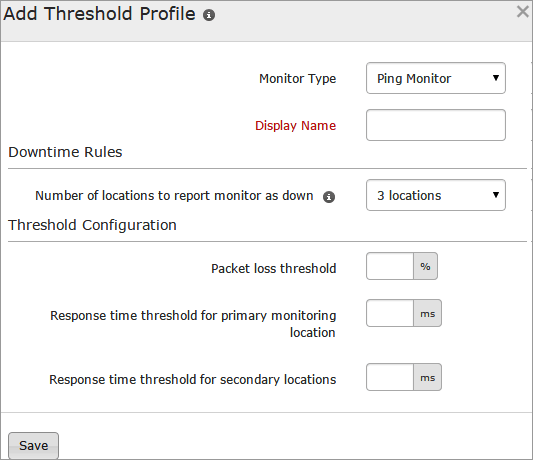
Specify the following details for adding threshold and availability for Ping Monitor:
Monitor Type: Select Ping Monitor from the drop down list.
Display Name: Provide a label for identification purpose.
Number of locations to report monitor as down: Choose from the drop down to receive alert notification when the ping is found unavailable from specified number of locations.
Specify the following details for Threshold Configuration:
Packet loss crosses: This option checks the amount of packet lost during ping. Specify a value in percentage to get notified when the packet loss crosses the set value.
Response time from primary location crosses: Enter a value in milliseconds to get notified when the response time from primary location crosses the specified value.
Response time from secondary location crosses: Enter a value in milliseconds to get notified when the response time from secondary location crosses the specified value.
Click Save.
The threshold and availability profile created for Ping monitor will be automatically listed in Threshold and Availability screen along with the others already created.
A default threshold and availability profile for Ping Monitor will be automatically listed in Threshold and Availability screen when the users for the first time click Admin > Inventory > Monitors > Add Monitor > Ping Monitor.
Edit Threshold and Availability for Ping Monitor
Click the profile which you want to edit.
Edit the parameters which needs to be changed in Add Threshold and Availability window.
Click Save.
Delete Threshold and Availability for Ping Monitor
Click the profile in the Threshold and Availability screen which needs to be deleted.
This will navigate to Add Threshold and Availability window.
Click Delete.
Was this document helpful?
Sorry to hear that. Let us know how we can improve this document.
Thanks for taking the time to share your feedback. We’ll use your feedback to improve our online help resources.