Network Monitoring
Monitor critical network devices such as Routers, Switches and Firewalls using SNMP and assist network teams visualize, monitor, optimize and manage the network devices and interface performance.
Supported Devices:
- Routers
- Switches
- Firewalls
Adding a Network Monitor
- Click Admin > Inventory> Monitors> Add Monitor.
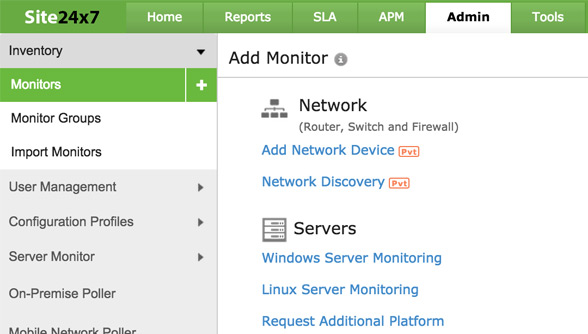
- Select Add Network Device or Network Discovery under Network Category in the Add Monitor screen.
- In the Network Discovery screen, select Add Device to add a specific network device using its IP or select Add Network for adding multiple devices using an IP range.
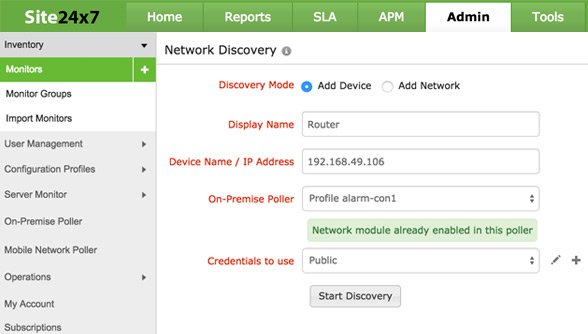
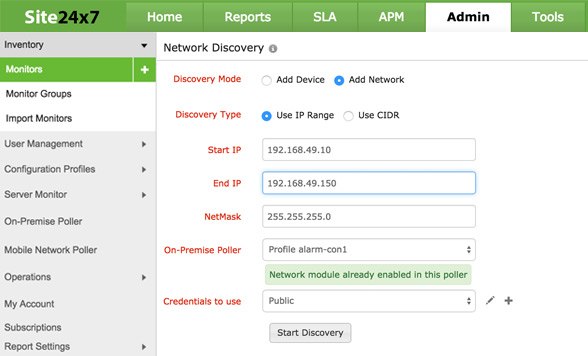
- Select an existing On-Premise Poller from the drop-down list. The status of the selected On-Premise poller is highlighted. If On-Premise Poller is not already installed, refer here.
- Once selected, the existing On-Premise Poller would be updated with a network module.
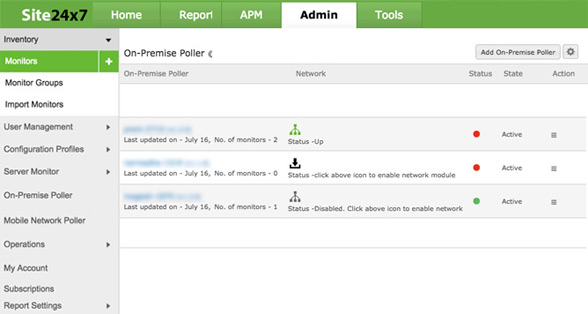
- Once added, the network devices are identified for monitoring.
System Requirements
| # of devices/interfaces |
Processor |
RAM |
Free Hard Disk |
Supported Operating System |
| Up to 50 devices or 300 interfaces |
1.7 GHz |
1 GB |
40 GB |
Any Windows/Linux OS |
| Up to 300 devices or 2000 interfaces |
3.4 GHz |
2 GB |
| Up to 1000 devices or 5000 interfaces |
2*3.4 GHz |
4 GB |
80 GB |
| More than 1000 devices or 5000 interfaces |
4*3.4 GHz |
8 GB |
Linux users:
In order to add a network monitor using On-Premise Poller, users must install the poller agent as a root user.


