
Compliance reports in Digital Risk Analyzer
Compliance is the process of evaluating whether your organization's digital assets adhere to the security and best practice requirements defined by recognized regulatory standards and cybersecurity frameworks. Meeting these requirements helps reduce security risks, strengthen your security posture, simplify audits, and demonstrate adherence to industry expectations.
Digital Risk Analyzer helps you measure your domains against supported compliance frameworks by mapping the security assertions performed during domain scans to the corresponding controls within each framework. Based on the outcome of these mapped assertions, you can get the compliance percentage and a detailed compliance report, helping you quickly identify gaps, prioritize remediation, and continuously monitor your compliance posture across all monitored domains.
Benefits
The Compliance page helps you:
- Measure your domains against supported compliance frameworks using mapped security assertions.
- Identify areas that require remediation based on framework-specific findings.
- Compare compliance percentage across all monitored domains from a single view.
- Drill down into detailed compliance reports for individual domains.
- Download framework-specific compliance reports for documentation and internal reviews.
Use cases
Here are a few real-time use cases for compliance reports:
- Before an internal security review, compare compliance percentage across supported frameworks to understand your organization's overall compliance posture.
- After receiving audit findings, use the compliance report to pinpoint the security controls that contribute to a lower compliance percentage and prioritize corrective actions.
- Following a security hardening or infrastructure upgrade, review updated compliance percentage to validate that the implemented changes have strengthened your security posture.
Supported compliance frameworks
Here is the list of compliance frameworks supported in Digital Risk Analyzer:
- NIS2: Helps assess security controls aligned with the European Union's (EU's) cybersecurity requirements for essential and important entities.
- CIS Controls v8: Evaluates domains against the supported security assertions mapped to the Center for Internet Security's (CIS') prioritized security controls.
- NIST Cybersecurity Framework (CSF) 2.0: Measures your domain's security posture using Digital Risk Analyzer assertions mapped to the NIST CSF functions and categories.
- Digital Operational Resilience Act (DORA): Provides compliance insights for supported security assertions relevant to the EU's digital operational resilience requirements for financial entities.
Compliance percentage and reports are generated based on the Digital Risk Analyzer security assertions that are supported and mapped to the selected compliance framework.
How to access your compliance report
Follow the steps below to access your compliance report:
- Log in to your Digital Risk Analyzer account.
- Click the domain for which you want to see the compliance report.
- From the left navigation menu, click Compliance > select the desired Compliance framework.
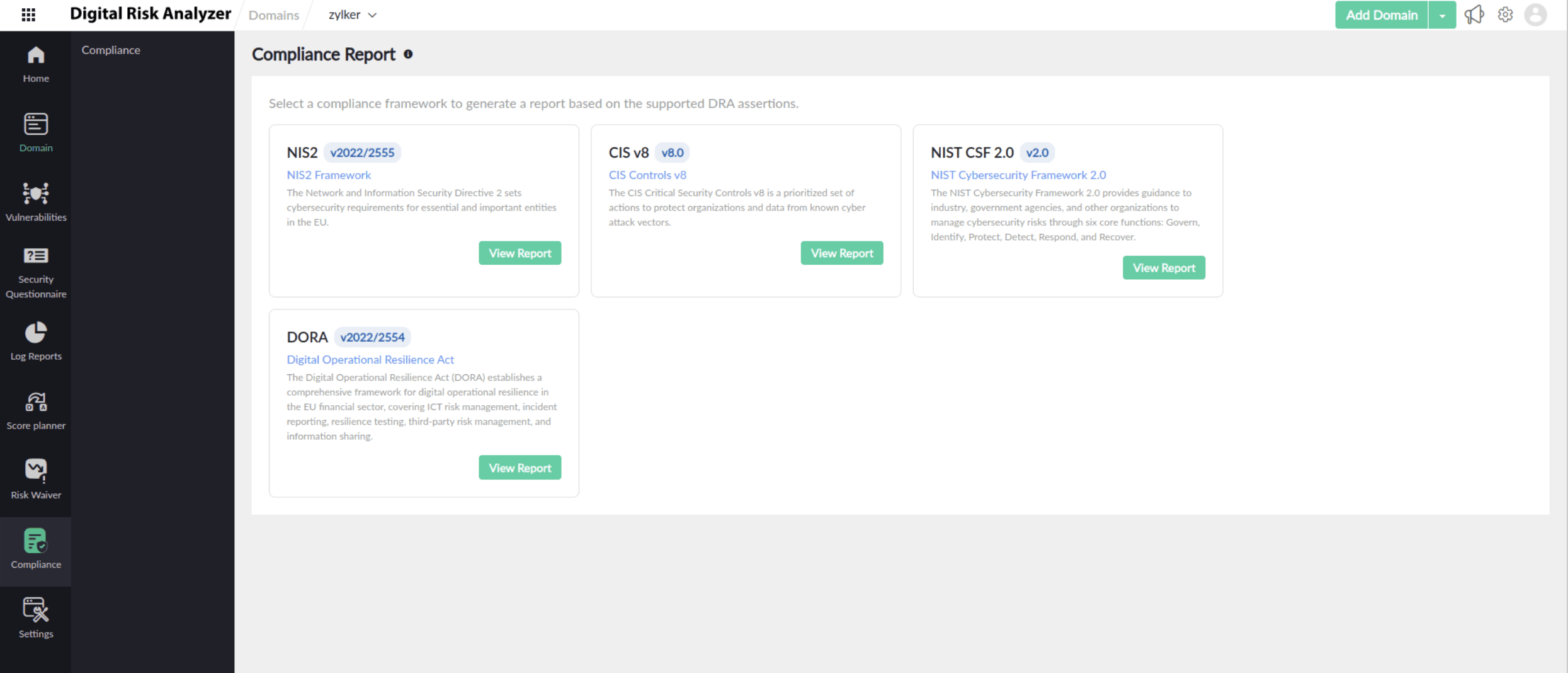
This page lists all the security categories grouped below the selected compliance framework, the associated assertions that were performed, the compliance status, and the compliance percentage.
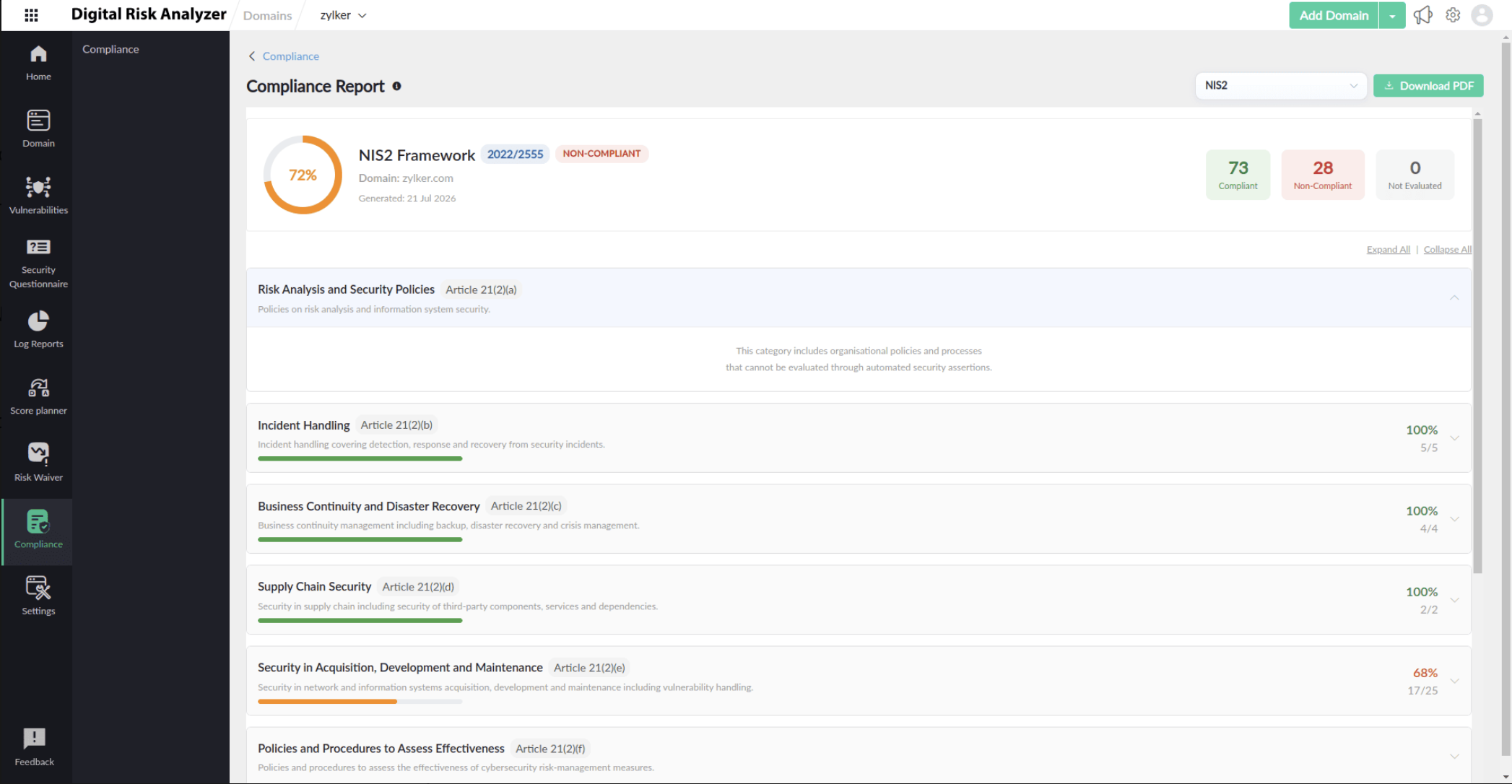
- While viewing a compliance report, use the drop-down menu in the upper-right corner to switch between supported compliance frameworks.
The report includes:
The overall compliance percentage for the selected framework.
- Compliance status summary: Within the compliance report, evaluated assertions are categorized based on their assessment outcome. Depending on the result, an assertion may be flagged as:
- Compliant: Evaluated assertions that satisfy the mapped framework requirements.
- Low/Medium/High: Identifies the level of security risk detected for the evaluated assertion.
- Non-evaluated: Assertions that were not evaluated.
- Framework sections organized according to the selected compliance standard.
- Individual assertion results that contribute to the compliance percentage.
- The severity or compliance status for each evaluated assertion.
Each framework section can be expanded to review the mapped security assertions and their evaluation results.
How to download a compliance report
To export the currently displayed compliance report:
- Open the required compliance report.
- Select the appropriate framework.
- Click the Download PDF option in the top-right corner.
The exported report contains the compliance assessment for the selected domain and framework, making it suitable for documentation, internal reviews, and stakeholder sharing.
How to view compliance percentage across domains
To view the overall compliance percentage of all domains for all compliance frameworks:
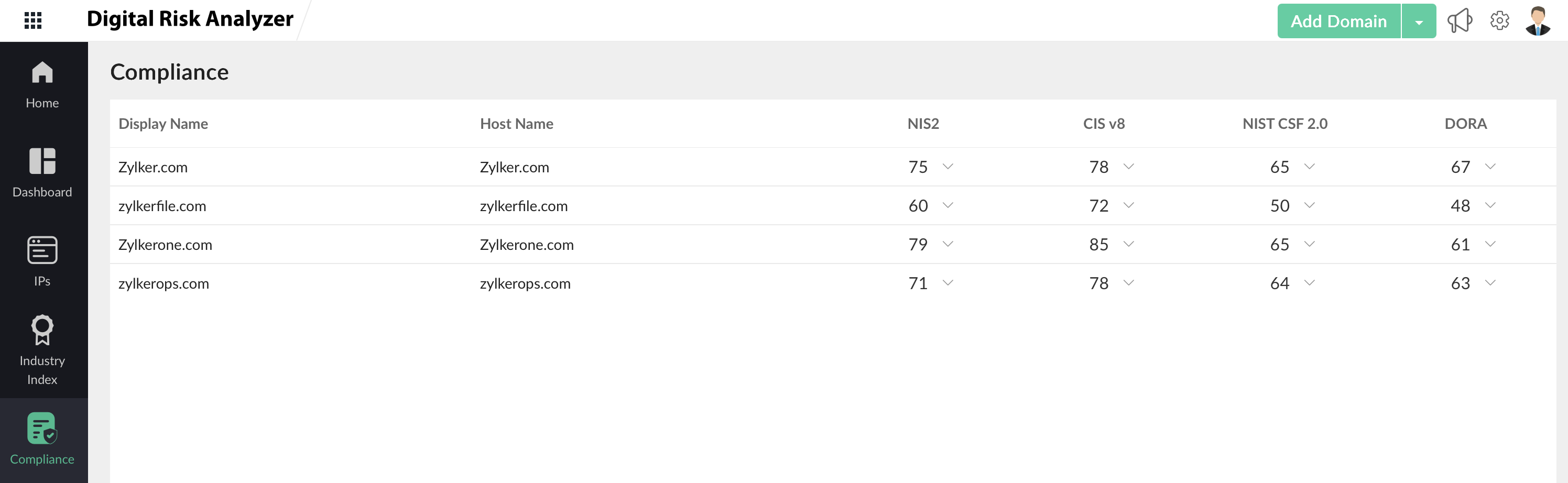
- Navigate to Home > Compliance in the left navigation menu. The Compliance page provides a consolidated view of:
- Display name: The configured name of the monitored domain.
- Host name: The associated hostname or domain.
- Framework percentage: The compliance percentage for each supported framework.
- The number of compliant, non-compliant, and not evaluated mapped assertions.
- Click the accordion icon
 and select View to get a detailed view of the compliance report, or click Download to download the report as a PDF.
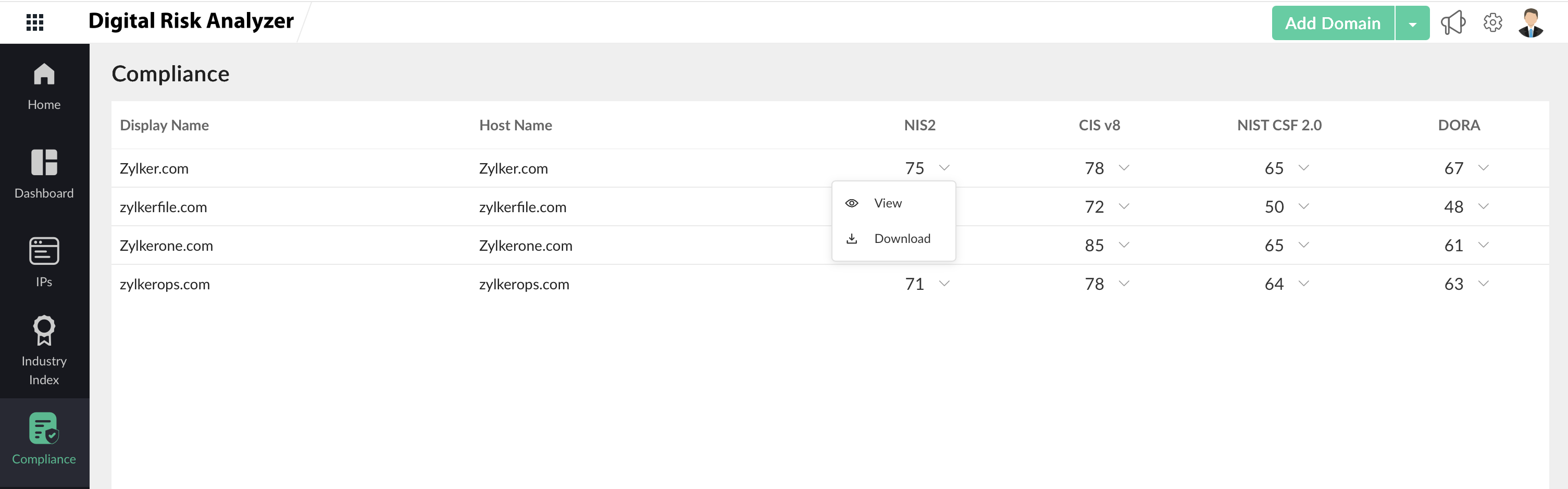
This enables you to quickly compare compliance posture across all monitored domains.