
Website monitoring is one of the most essential practices for developers seeking to maintain and enhance the availability, performance, and user experience of their web applications. Developers use website monitoring to obtain in-depth, actionable insights at the code level as well as at the deployment level, helping them debug faster, optimize performance, and do even more.
Why developers need website monitoring
Website monitoring offers thorough insight into how code modifications impact a website's speed and availability. It provides the thorough diagnostic information required to identify and fix issues with intricate front-end and back-end systems promptly. Additionally, it provides testable, automation-ready metrics that help you integrate quality assurance into agile CI/CD processes, guaranteeing dependable deployments and ongoing development. Developers and larger operational and business teams can smoothly integrate through shared collaboration tools, which also empower developers with independent alerting systems and encourage accountability.
Performance insights specific to development
Developers benefit from granular, actionable performance metrics at both the front-end and back-end layers. These include detailed data such as:
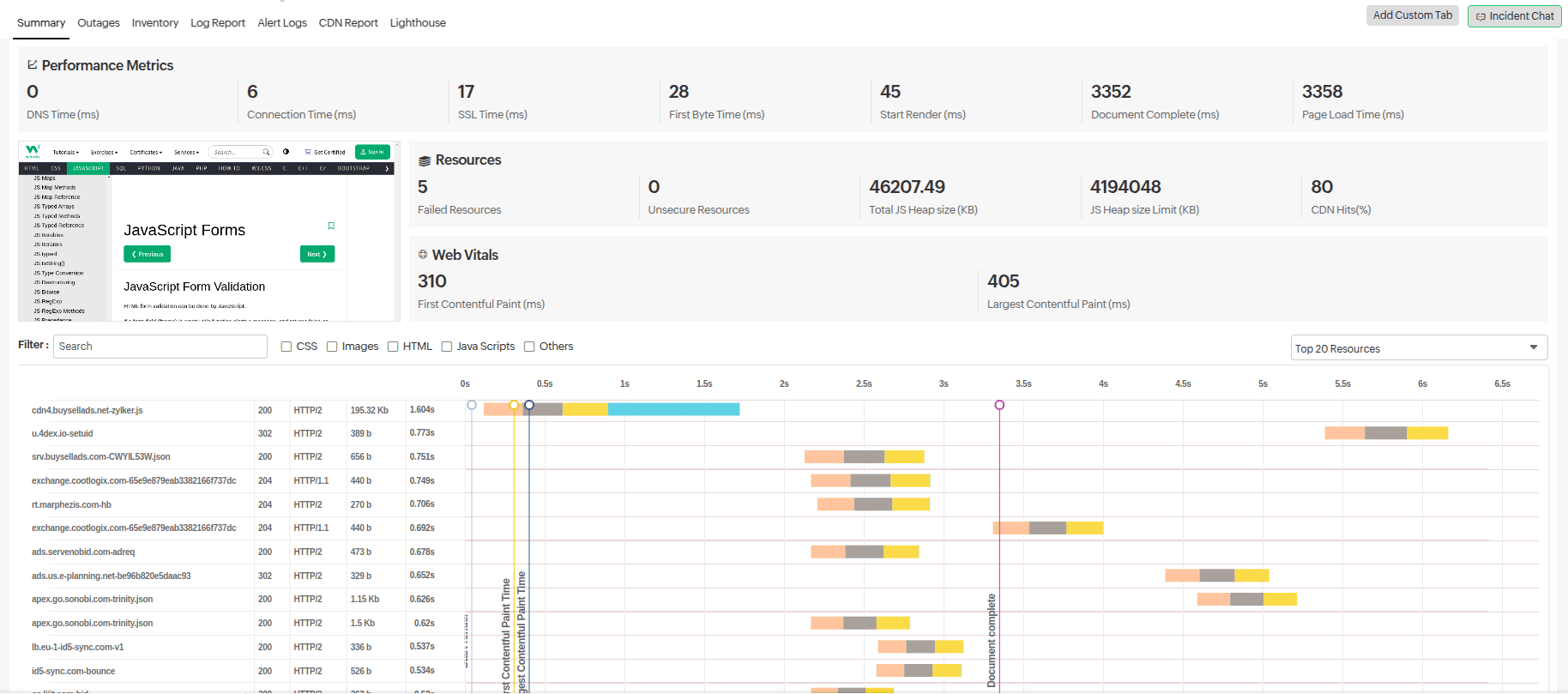
- Page loading metrics: Metrics like the FCP, LCP, and TTI help you identify issues with the user experience.
- The time to first byte (TTFB): This measures server responsiveness, highlighting back-end performance bottlenecks.
- Resource timing: Network request breakdowns show slow-loading scripts, images, or third-party services causing latency.
- API latency and uptime: Back-end API responses impact the front-end speed and functionality, which can be avoided with monitoring.
Such data allows developers to pinpoint optimization targets precisely—whether trimming JavaScript, optimizing database queries, or improving caching strategies—to deliver faster loading times and smoother interactions tailored to real user conditions.
Root cause analysis
In the event of issues, website monitoring provides:
- Detailed error logs: Capturing stack traces, error messages, HTTP status codes, and affected user sessions gives developers the context to isolate the source of a problem rapidly.
- Error rates and trends: Alerts on abnormal spikes enable the prioritization of critical failures over intermittent glitches.
- Component-level tracing: Distinguishing whether errors arise from front-end code, back-end microservices, or third-party dependencies accelerates debugging.
- Correlation with deployments: Tying issues to recent code pushes helps you determine if failures stem from new bugs or changes in the entire environment.
This precision in the diagnosis stage enables faster resolutions, helps reduce the MTTR, and has a positive impact on end users.
Proactive quality assurance and testing support
Monitoring facilitates:
- Benchmarking performance thresholds: Setting KPI-related alerts (e.g., a max page loading time of two seconds) ensures that any regression triggers immediate attention.
- Synthetic monitoring scripts: Automated, scripted tests simulate high-value user journeys such as logins, checkouts, or form submissions, validating end-to-end functionality in staging and production before and after releases.
- Regression testing: Continuous monitoring in CI/CD pipelines enables you to catch performance degradations and functional failures early so you can prevent faulty code from reaching the production stage.
This proactive approach helps developers enforce quality gates, safeguard against performance decay, and uphold user experience standards continuously.
Continuous improvement and agile development
Website monitoring supports agile workflows through:
- Feature evolution tracking: Monitoring how new releases affect the site speed and error rates over time informs data-driven backlog prioritization.
- User experience metrics: Real user monitoring provides developers with aggregated performance data from actual user environments and devices, revealing usability issues caused by network conditions or device constraints.
- Rapid feedback loops: Integrated and continuous monitoring helps you find and fix problems quickly, enabling better functioning without any hiccups.
Collaboration advantages
Modern monitoring solutions promote team collaboration through:
- Shared dashboards: Unified views of performance, errors, and uptime metrics foster transparency between development, quality assurance, and operations teams.
- Role-based alerts: Developers receive precise notifications about issues directly related to their code components, reducing noise from infrastructure or network alerts.
- Incident context sharing: Linking error reports with logs, deployment versions, and session replays enables cross-functional teams to diagnose and remediate issues collectively.
Website monitoring use cases for developers
1. Post-deployment performance tracking
After deploying new code or updates, developers need to immediately verify that the website's KPIs remain within acceptable limits. Monitoring the page loading times, TTFB, and resource loading timings helps developers detect regressions before users notice any degradations.
Take the case of an e-commerce team that deploys a new product recommendation widget. The team monitors the TTFB and page loading time right after deployment using a website monitoring tool like Site24x7. If the page loading time exceeds a set threshold (e.g., three seconds), alerts are triggered, prompting a quick rollback or patching to avoid losing customers due to slow pages.
2. Synthetic monitoring to track the performance of workflows
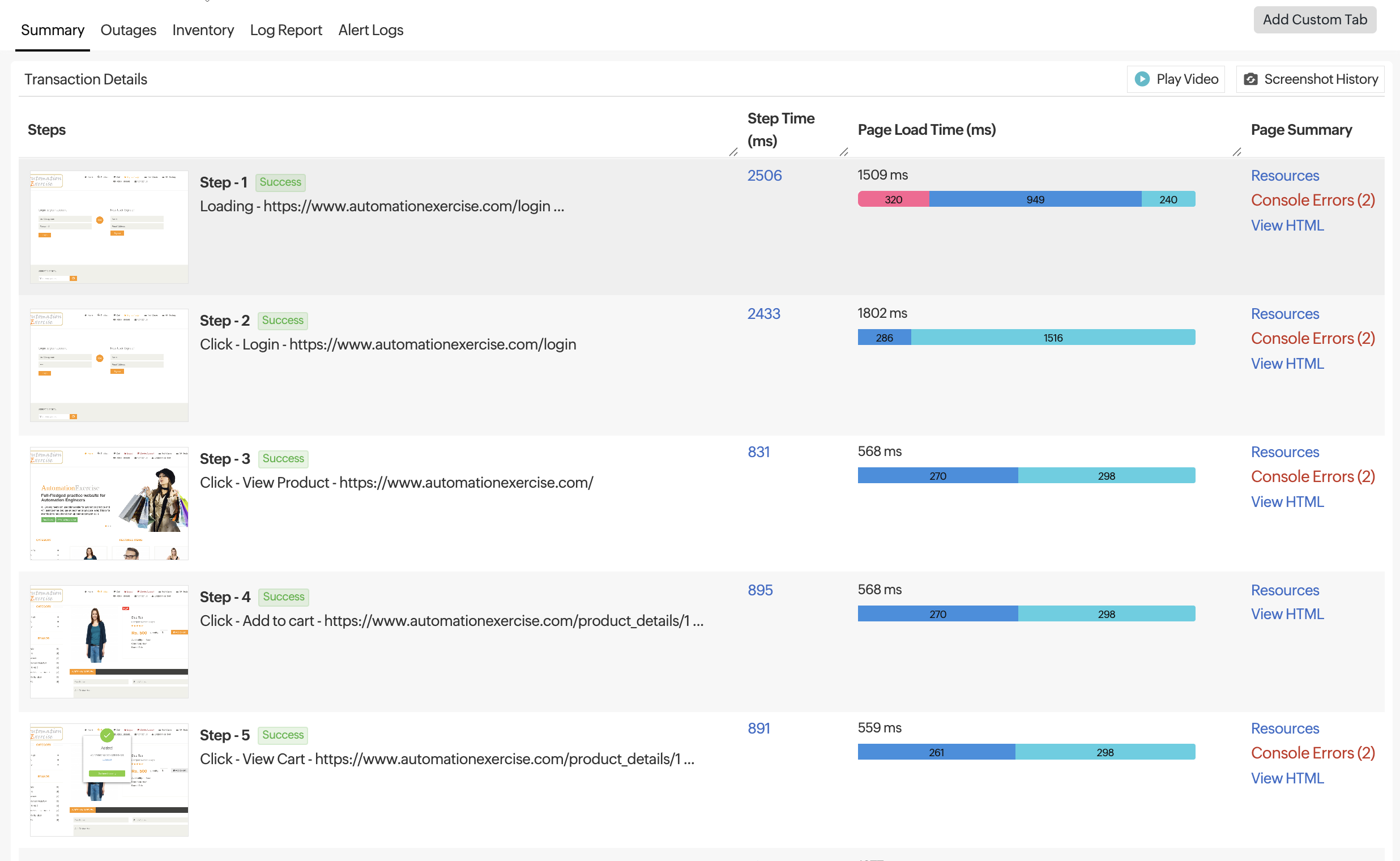
The practice of using scripted synthetic tests or synthetic monitoring to simulate complex user workflows like logins, checkouts, or form submissions from different browsers and geographic locations is popular among developers. This approach aids in catching failures or slowdowns that could disrupt the real user experience.
For example, for a SaaS application, developers create synthetic tests that automatically run every five minutes to simulate logging in to the dashboard and submitting a support ticket. If the tests detect errors or latency spikes, the development team is notified immediately, preventing escalations from real customers.
3. API endpoint monitoring
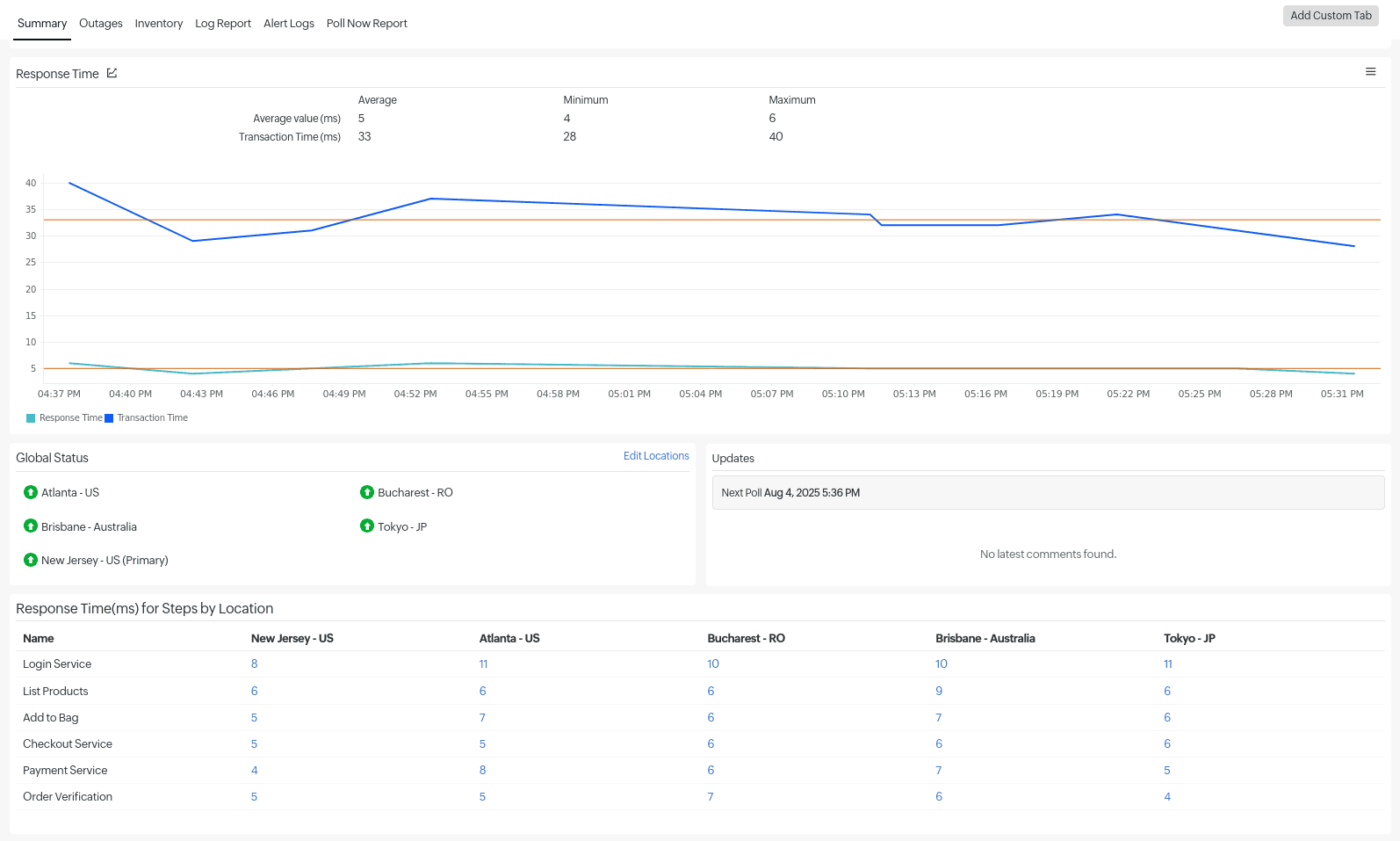
Since modern web apps often rely heavily on back-end APIs, continuous checks of API uptime and latency with API monitoring are critical. Monitoring HTTP status codes, response times, and payload correctness helps you ensure that dependent front-end features behave smoothly.
Imagine that a FinTech company's app fetches user transaction data via an API. Developers monitor the API’s 200 OK response rate and average latency. An alert is triggered if the API responds with 500 errors or latency goes above two seconds, prompting developers to investigate possible back-end issues or third-party service outages.
4. Automated integration into CI/CD pipelines
Integrating website monitoring tests into CI/CD pipelines enables the automated detection of performance regressions or functionality failures before the code reaches production. This early feedback loop reduces deployment risks.
For example, before merging new front-end code, a build pipeline runs automated synthetic tests to simulate key user flows and measures the page responsiveness. If tests identify slowdowns beyond the baseline or functional errors, the pipeline fails the build, prompting developers to fix the issues before release.
Incorporating website monitoring into the developer toolkit
By incorporating a website monitoring tool into their toolkit, developers can deliver stable, high-performing web applications that can ensure better user experiences and business outcomes. Moreover, monitoring tools also enable developers to perform easy analysis of data through a unified platform approach and better collaboration among different teams in the organization. Monitoring platforms like Site24x7 offer robust monitoring solutions that combine real-time performance analytics, synthetic user journey tests, API monitoring, and CI/CD integration, empowering developer teams to maintain excellence at every stage of the development life cycle proactively.